Thanks Jonathan!
Instead of Postgres, I have MariaDB running as a synology package, so not in docker. It works with other containers ok.
I do this so synology backups also the databases without having to pull all kind of stunts.
So I followed your example from “2. install n8n”
I changed the DB settings obviously 
It works WITHOUT setting the volumes…
When I add a volume, it breaks. This does not work:
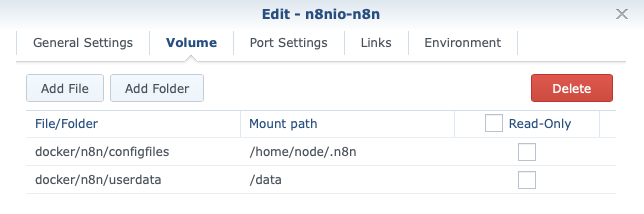
It results in this error:
Initializing n8n process
UserSettings got generated and saved to: /home/node/.n8n/config
› Error: There was an error: EACCES: permission denied, open
› ‘/home/node/.n8n/config’
When I change it from /home/node/.n8n to /home/node ,so it reflects your settings, I get this error:
Initializing n8n process
(node:6) [EACCES] Error: EACCES: permission denied, open ‘/home/node/.local/share/n8n/package.json’
(Usenode --trace-warnings ...to show where the warning was created)
UserSettings got generated and saved to: /home/node/.n8n/config
› Error: There was an error: EACCES: permission denied, mkdir
› ‘/home/node/.n8n’
[Error: EACCES: permission denied, mkdir ‘/home/node/.cache/n8n’] {
errno: -13,
code: ‘EACCES’,
syscall: ‘mkdir’,
path: ‘/home/node/.cache/n8n’
}
[Error: EACCES: permission denied, mkdir ‘/home/node/.cache/n8n’] {
errno: -13,
code: ‘EACCES’,
syscall: ‘mkdir’,
path: ‘/home/node/.cache/n8n’
}
So yes, it’s absolutely a permission problem… The container seems to ignore the PUID/PGID environment variables. Running from terminal with -u or --user also gives a weird error:
Error: Unexpected arguments: -u, myDocker
