@Nick_ud Thank you for your feedback! The table issue has already been fixed and will be resolved in the next version of the node. Additionally, I plan to add a feature for automatic page breaks.
Great, thanks for answering!
Can you please also add support for the <br> tags inside tables so the text in the table cell can have line breaks? Thanks!
Thank you for the suggestion! Could you please send me a sample Markdown text with <br>
tags inside a table, so I can check and test it directly?
Hey @gik986 !
Here is the markdown with the table:
# Foo Integration - E2E Test Scenarios

| Number | Testing Scenario                                                                                                                                                                                                                                                                                                                                                                                                                                                                                                                            | Priority | Comment from AQA |
| ------ |---------------------------------------------------------------------------------------------------------------------------------------------------------------------------------------------------------------------------------------------------------------------------------------------------------------------------------------------------------------------------------------------------------------------------------------------------------------------------------------------------------------------------------------------| -------- | ---------------- |
| 1      | 1. Create a new form with a variety of fields (text, email, dropdown, number, phone)<br> 2. Open the form in Form Builder<br> 3. Navigate to Marketing > Foo Integration 4. Enable integration toggle<br> 5. Verify that the configuration table is rendered with the following: Default connection name = "New Foo Integration", Request URL field, Request Body mapping table, Conditional Logic toggle, Secure checkbox for each row, Add/Remove row buttons<br> 6. Save the form and confirm that settings persist after page reload. | High     | —                |
Hi @Andri_Koval
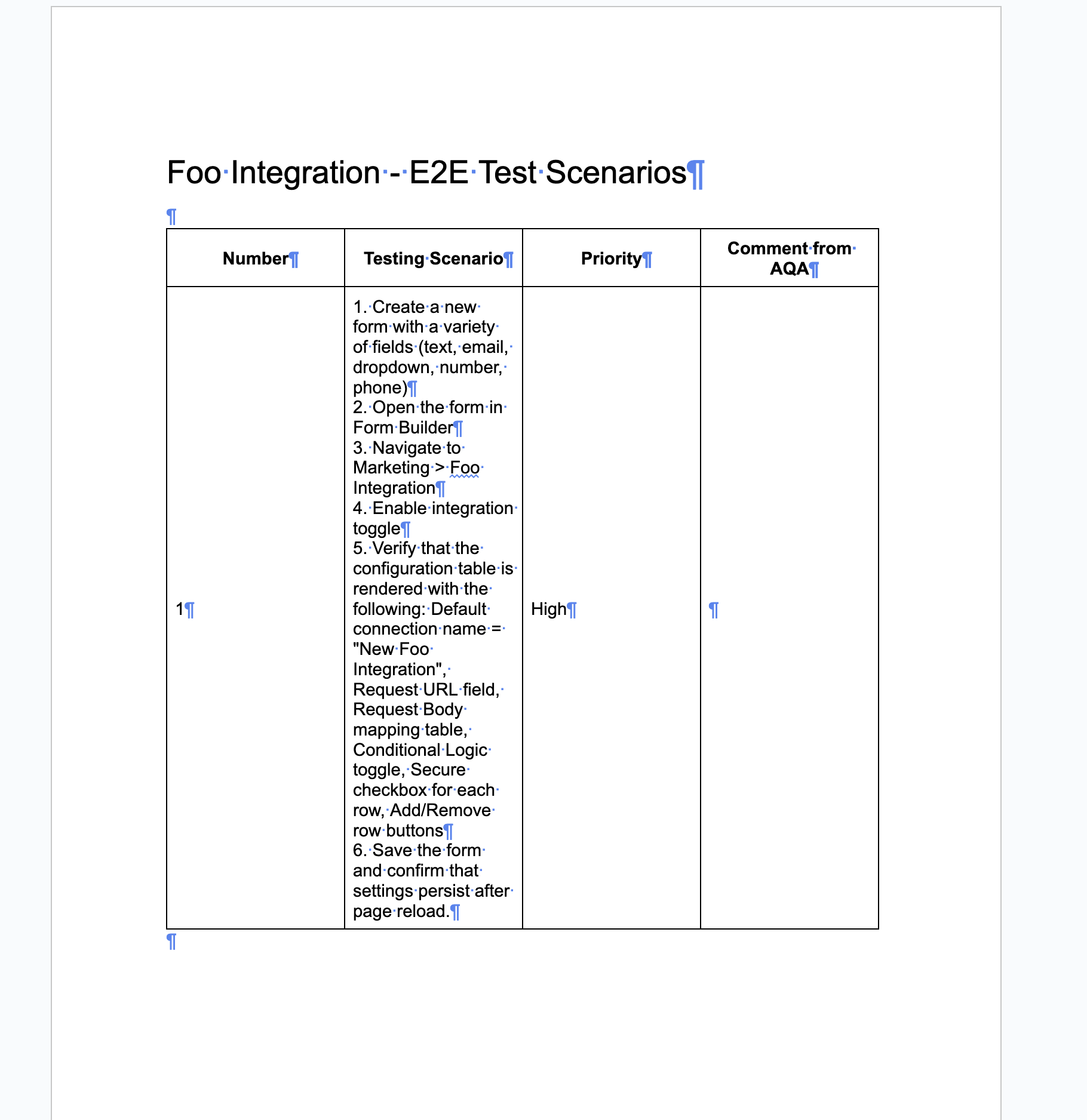
Thank you for the example! “<br>” tags for line breaks inside table cells are currently supported. The only change I made to your sample is adding <br> before “4.” and removing the space after the tag (”<br>4.” instead of “<br> 4.”).
In the new node version (already published as version 0.5.0), vertical alignment for table cell content is also added. I’m attaching a screenshot of the generated document for reference.
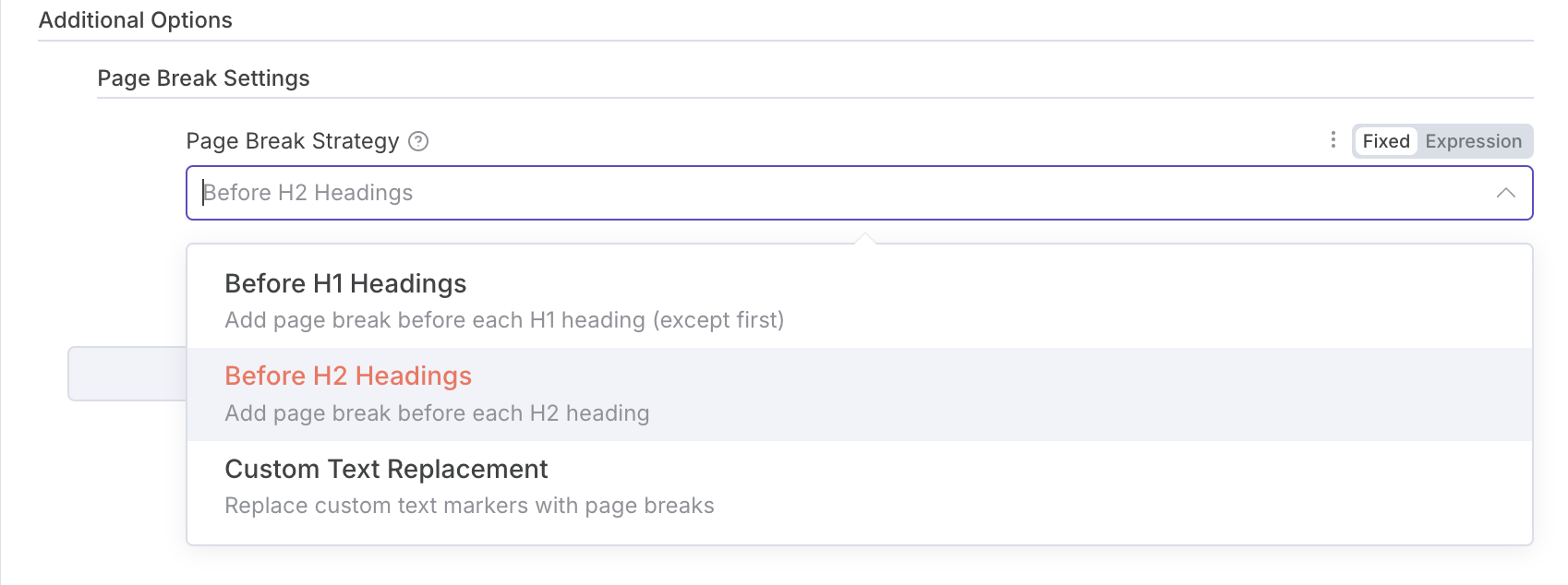
Hi Nick, the latest version of the node is now published and includes an additional option for page breaks. You can now choose to automatically insert a page break before H1, H2 headings, or even use a custom text marker for page breaks. Please let me know if this matches what you expected as functionality!
 n8n-nodes-md-to-docs v0.5.0 - New Page Break & Table Enhancements!
Hey n8n community! 
Just released a major update to the Markdown to Google Docs community node with some great new features:
 What’s New:
 Page Break Control - Finally! Automatic page breaks with 3 strategies:
- H2 Strategy: Page break before each H2 heading (default)
- H1 Strategy: Before each H1 (except first)
- Custom: Replace text markers like
<!-- pagebreak -->
 Table Improvements - All table cells now have vertical centering while keeping header formatting (bold + centered). Much cleaner looking tables!
 Fixed:
- Empty table cell handling
- Better page break positioning
- Improved table cell styling
The new page break settings are in Additional Options → Page Break Settings.
Perfect for creating professional documents, reports, and multi-page content from your workflows! 
Has anyone been using this node? I would love to hear your feedback! 
3 Likes
@gik986 Thanks for checking the tables rendering and for the update!
That’s a really great node!
I was solving similar problem recently and came up with an idea of converting .md to .html via built-in n8n node and then uploading do Goodle Docs. After that it was possible to convert HTML to Google Docs.
But this nodes solves exactly the same issue + provides several cool features like template variables. 
2 Likes
i tried markdown to docs format kindly video send me
1 Like
OMG - I’m new to n8n. Just started creating my first workflow. I found your community node and sadly, it’s still not on the cloud version. I truly need a node that will reformat my data in google docs after the Ai agent spits it out. Any suggestions on what to use until this is available in the cloud version? Thanks- Kay
Wow! Talk about a community contribution! This should be an included node. I spent hours, days, WEEKS! wasting time trying to get text from previous nodes to look anything but terrible in Google Docs. NOTHING WORKED!
Thank you thank you thank you!
Any progress at getting this part of the n8n cloud options?