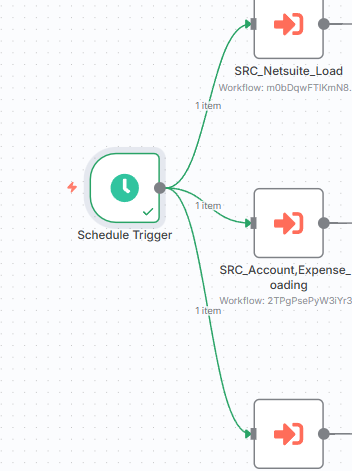
just wanted to follow back up to confirm, the 2 test workflows that were supposed to run every 7 hours, only ran the day they were created, there were no executions yesterday or today.
I know this used to work, can’t remember which version of n8n it worked on, or exactly which version it stopped working on.
my only hope is the developers see this and take a look.
@hallbc,
thanx for posting the original thread, it proved that I and you are not crazy. and maybe have a workaround.
Thanks for the suggestion. The only problem is it’s then using 3 active workflows of my subscription, which is not ideal when I’m running other workflows.
If I set it to every 12 hours 12 minutes it’s never triggered
I’ve tried differents timings and it’s like random. Sometime work, sometime not. I tried a workaround with 11000 second (about 12 hours) but then it ran a loop, etc… When i set triger like each day at 3:00 am , it seems ok
I am having the same issue in n8n cloud. If I set it to trigger every 5 minutes it works, 5 hours nothing happens. It was working previously then all of a sudden stopped. I have deactivated and reactivated the workflow but still nothing. Everything runs fine when triggered manually. Any ideas?
Facing this issue. Had an 6 hour trigger that working, stopped. Disabled and re-enabled. Tested anew workflow on every 2 min, worked fine. Another one I have that is at Scheduled times works, so I had to change the original to have a set of pre-defined times.
Any ideas core reason multi-hour delays don’t work?
i figured out a fix for mine. i have multiple schedule triggers connected to the same start node, on daily schedules at different times. hope this helps folks!
This is a constant issue for me and with a lot of automations I am getting sick and tired of having to check if all automations are running each day as set up.
With so many people having problems with this N8N should be having a look at this.
For record we have been stopping and waiting 30 seconds to minutes before reinstating workspaces to active and sometimes this works and mostly doesn’t.
We have also tried on numerous occasions to restart the application. Sometimes works for some workspaces and not others.
We ensure the app is updated - sometimes partly works and mostly doesn’t.
It would seem crazy that our next step is to use pen and paper to record cron times and ensure there is no overlap when the software should do this! No idea if this will work.
Strangely enough, I finally got things to work. A few upfront notes: I’m on n8n cloud, and I switched from minutes/hour scheduling to Cron so I could custom-set the times.
I can’t verify this technically, but this is what seems to have solved the issue for me. Every time the schedule trigger failed before, I would set the trigger, close out my workflow, and just hope it would fire at the interval set. It never worked when I did things that way.
Then I tried something different. I set the trigger for a time when I knew I’d be online, kept the workflow window open, and watched to see if it would fire the first time. When I did this, the workflow executed as expected. After that, even once I closed the window, it kept running at the interval I had set.
So, my takeaway is this: on n8n cloud, the first trigger seems to require the window to be open. If that initial run executes successfully, the future triggers will continue as scheduled based off that first trigger. But if the first one doesn’t get the chance to run while the window is open, none of the later ones fire either.
For anyone else running into this, give it a try—having the workflow open for that very first trigger might be the key.
Having the same issue here, seems to have been working fine for a while and just recently it stopped. I just want the workflow to trigger every 2days at 6pm. Thanks
I have the same problem here. I am using community version docker 1.118.1 and my Schedule Trigger node does not trigger when I set it every 6 hours. I did what was suggested here, I changed it to minutes, 360 minutes, and it triggered every hour on the spot. It seems to me (so far) that the node likes only single digits as parameters and only less than an hour.
Update: Cron expression within the Schedule Trigger node is working fine [0 0 */6 * * *], this solved my problem. I don’t really mind for specific times or anything, just the time interval.
 and maybe have a workaround.