Dynamic Switch Node - Efficient Multi-Output Routing for n8n
Hi everyone,
I’m excited to share a new community node that solves the multi-output routing problem in n8n: Dynamic Switch.
The Problem
Many of you know the frustration of working with n8n’s built-in Switch node, which is limited to just 4 outputs. While there have been attempts to work around this (like Switch9000), those solutions often come with significant drawbacks - particularly the inefficiency of visiting all receiver nodes before filtering, rather than routing directly to the correct branch.
The Solution
Dynamic Switch provides true multi-output routing with up to 50 dynamic outputs, and it routes items efficiently - just like the native Switch node, items go directly where they need to go.
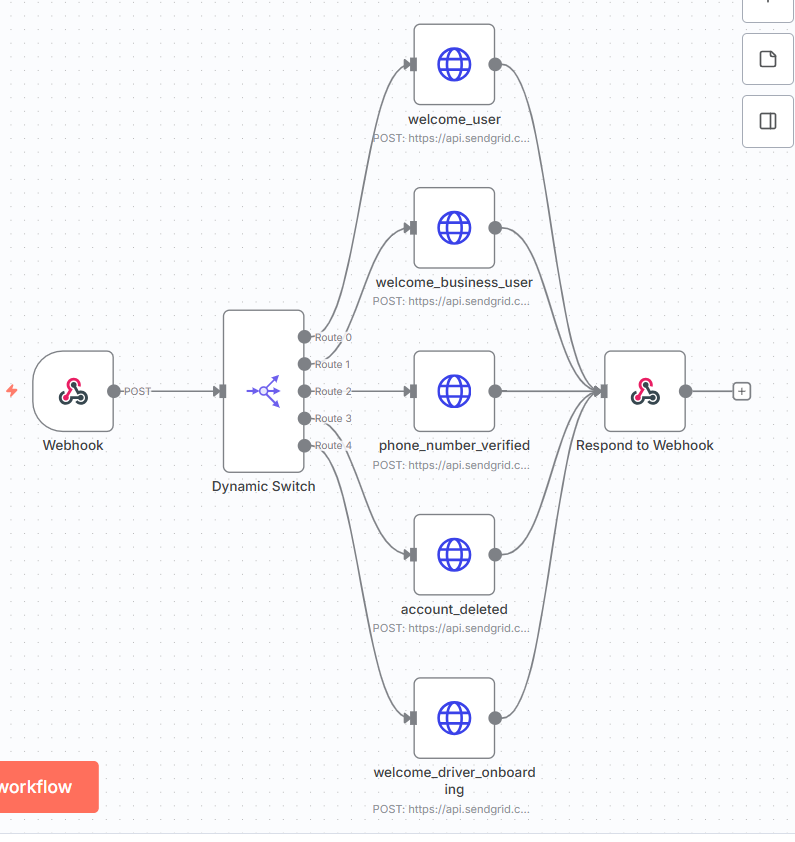
Key Features
Flexible Routing Modes:
- Expression Mode: Use JavaScript expressions for complete control over routing logic
- Rules Mode: Visual rule builder with type-safe comparisons
Powerful Rule Engine:
- 4 Data Types: String, Number, DateTime, Boolean - each with type-appropriate operators
- 14+ Comparison Operations: Contains, regex matching, numeric comparisons, date/time logic, and more
- Case-Insensitive Option: For string comparisons when needed
Multiple Routing Strategies:
- First Match: Route to the first matching output (efficient, default)
- All Matches: Route to all matching outputs (for broadcasting scenarios)
Dynamic Configuration:
- Add 1-50 outputs based on your needs
- Custom labels for each output route
- Zero-based indexing with clear labeling
- Fallback handling for non-matching items
Developer-Friendly:
- Clean, readable code (580 lines, well-documented)
- Type-safe implementation using n8n’s INodeType interface
- Proper error handling with continueOnFail support
- Built with modern TypeScript
Installation:
Via n8n’s Community Nodes
Settings > Community Nodes > Install > n8n-nodes-dynamic-switch
Or via npm in your n8n installation
npm install n8n-nodes-dynamic-switch
Links:
- npm: https://www.npmjs.com/package/n8n-nodes-dynamic-switch
- Documentation: See README for detailed examples and configuration options
-–
Give it a try and let me know what you think! Questions, feedback, and feature requests are always welcome.
Happy automating!