Literature reviews have a mechanical phase that slows everything down. You need citations for a topic. So you open Google Scholar, search, check citation counts to find authoritative papers, copy references into your doc, format them in APA, realize you also need BibTeX for the submission system, reformat again. Repeat for every topic you’re covering.
For a paper with 8-10 distinct search queries, that’s easily 2-3 hours of mechanical work before writing anything.
Built a workflow that turns a spreadsheet into a citation engine. Type a query, set Status to Pending, wait 20 seconds — top 10 papers by citation count come back with APA and BibTeX ready to paste.
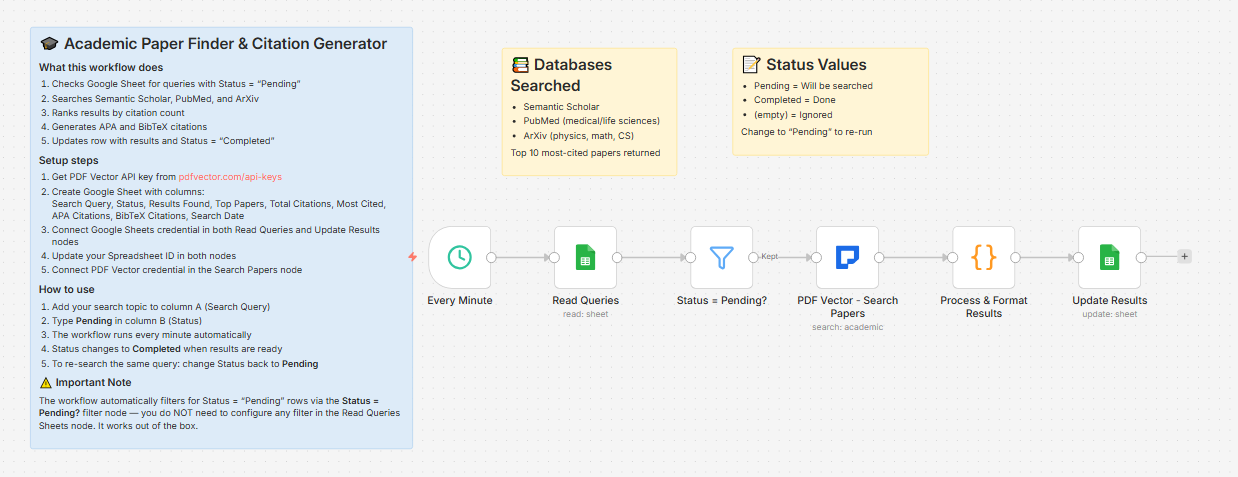
What it does
Runs every minute → reads all rows with Status = “Pending” → searches Semantic Scholar, PubMed, and ArXiv simultaneously → ranks results by citation count → writes top 10 papers + full citations back to the sheet → status flips to “Completed”
Queue as many queries as you want. All pending rows get processed each cycle.
How to use it
-
Open your Google Sheet
-
Column A: your search query — “transformer attention mechanism”, “CRISPR off-target effects”, whatever
-
Column B: type Pending
-
Wait about 20 seconds
-
Results appear in the same row — top papers list, citation counts, APA citations, BibTeX
To re-run a query with fresh results: change Status back to Pending.
What comes back per query
-
Results Found — total papers across all three databases
-
Top Papers — numbered list of top 10 most-cited papers with year and citation count
-
Total Citations — combined count across top 10
-
Most Cited — the single highest-cited paper with its count
-
APA Citations — ready-to-paste formatted references for all 10
-
BibTeX Citations — ready-to-paste .bib entries for all 10
-
Search Date
Example output for “large language model hallucination”:
Top Papers:

1. Survey of Hallucination in Natural Language Generation (2023) - 1,847 citations

2. TruthfulQA: Measuring How Models Mimic Human Falsehoods (2022) - 1,203 citations

3. Language Models Know What They Know (2022) - 891 citations

...

APA:

Ji, S., Lee, N., et al. (2023). Survey of hallucination in natural language generation. ACM Computing Surveys. https://doi.org/10.1145/3571730

BibTeX:

@article{ji2023survey,

title={Survey of hallucination in natural language generation},

author={Ji, S., Lee, N., et al.},

year={2023},

journal={ACM Computing Surveys},

doi={10.1145/3571730}

}
Databases searched
-
Semantic Scholar — broad coverage across all disciplines
-
PubMed — medical and life sciences
-
ArXiv — physics, math, CS, AI preprints
Setup
You’ll need:
-
Google Sheets (free — this workflow is entirely spreadsheet-driven, no Gmail or Slack needed)
-
n8n instance (self-hosted — uses PDF Vector community node)
-
PDF Vector account (free tier: 100 credits/month)
About 10 minutes to configure — the simplest setup in this series.
Download
Workflow JSON:
Full workflow collection:
Setup Guide
Step 1: Get your PDF Vector API key
Sign up at pdfvector.com — free plan works for testing.
Step 2: Create your Sheet
Headers in Row 1:
Search Query | Status | Results Found | Top Papers | Total Citations | Most Cited | APA Citations | BibTeX Citations | Search Date
Step 3: Import and configure
Download JSON → n8n → Import from File.
Read Queries: Connect Sheets, paste Sheet ID — pre-filtered to Status = Pending
PDF Vector - Search Papers: Add credential, paste API key
Update Results: Same Sheets credential and Sheet ID — matches on Search Query column to update the correct row
Step 4: Test it
Add a query to column A, type Pending in column B, wait about 20 seconds. The row updates with results.
Notes on databases
-
Semantic Scholar: strong for STEM, CS, economics, biology
-
PubMed: highly reliable for medical and life sciences
-
ArXiv: excellent for preprints in physics, math, CS, AI — citation counts tend to be lower than final published versions
BibTeX keys are auto-generated as [firstauthor][year][firstword] — standardize for large bibliographies.
Cost
2 credits per academic search. A literature review with 10 queries uses about 20 credits — well within the free tier.
Customizing it
Filter by year: The workflow already supports yearFrom and yearTo in the Search Papers node — add columns to your Sheet and map them to filter only recent work
Search one database: Edit the providers array in the Search Papers node — use ["semantic-scholar"] for general research or ["pubmed"] for clinical topics
Export to Notion: After Update Results, add a Notion node to create a page per query with the citation list
Questions? Drop a comment.