Access blocked: authorization error when setting up Google Oauth

Describe the problem/error/question

I’m having an issue similar to the one describe in this topic which has been closed automatically, I am trying to use the gmail trigger and I’m having problems setting up my Google Oauth, I have followed the video tutorial and it’s seemingly correctly set up

  • my n8n instance is accessible remotely (n8n.domain.dev.br)
  • domain.dev.br is set as one of the allowed domains
  • the callback URI is set correctly
  • the app is configured for internal usage in the Google Cloud Console
  • the only scope requested is https://www.googleapis.com/auth/gmail.readonly

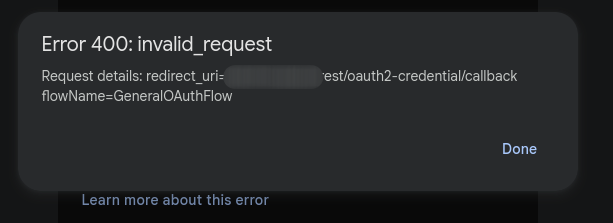
What is the error message (if any)?

Information on your n8n setup

  • n8n version: 1.106.3
  • Database (default: SQLite): default
  • n8n EXECUTIONS_PROCESS setting (default: own, main): default
  • Running n8n via (Docker, npm, n8n cloud, desktop app): docker
  • Operating system: Ubuntu Server 22.04 aarch64

Hey @fmleo hope all is good. Welcome to the community.

@jamiemadden_n8n fyi

@fmleo when you changed Publishing status from Testing to Production, were there any warnings in yellow? Something about verification maybe?

Yes when switching to External from Internal and trying to change it to Production, though the warnings asked me to submit many things, such as a demo video which I don’t believe are relevant considering I am the only one that’s going to be using the app. Changing it back to Internal yields the same results as the unverified External (with or without my emails as test users)

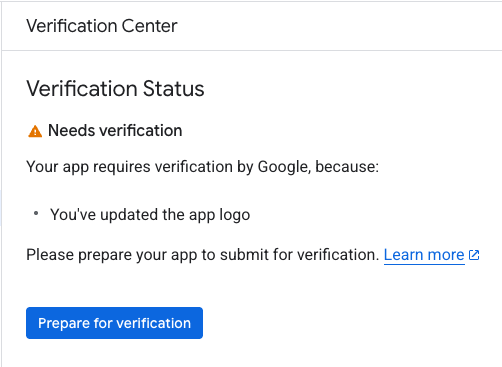
I believe when verification screen comes up, it specifies what is the cause for verification to be required. One such cause, for instance, would be if you included a logo for the app under Branding. Like this:

What do you have for yours?

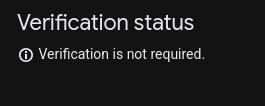
what I changed before was just adding https://mydomain.com to both the application home page and privacy policy, after that it stopped giving me warnings

I see, so I assume now there aren’t any verification warnings anymore.

What about the scope. You mentioned that you only requested https://www.googleapis.com/auth/gmail.readonly scope. Where did you do that?

that was on the Data Access tab, I manually added that specific scope

Would it make any difference if you removed that?

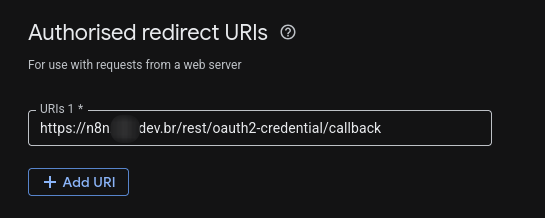
Also, does your redirect_url looks like this?

https://n8n.domain.dev.br/rest/oauth2-credential/callback

Nope, I’ve removed it but the outcome is the same

Access blocked: authorisation error
You can’t sign in to this app because it doesn’t comply with Google’s OAuth 2.0 policy for keeping apps secure.

and the same error 400 as before

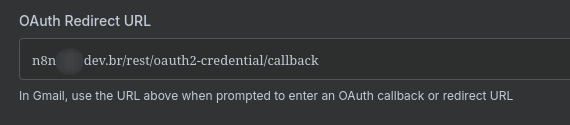
What about the redirect_url, does it look anything like this?

https://n8n.domain.dev.br/rest/oauth2-credential/callback

oh weird, I swear I had replied to that

The second image is odd

why there aren’t any schema specified?

Could you show your docker env variables? All those having links need to have a schema too.

1 Like

that was totally the issue :sweat_smile:
I forgot the https:// at the beginning of the docker environment variables, changing that made it work as expected, thank you very much for the comprehension

1 Like

This topic was automatically closed 7 days after the last reply. New replies are no longer allowed.