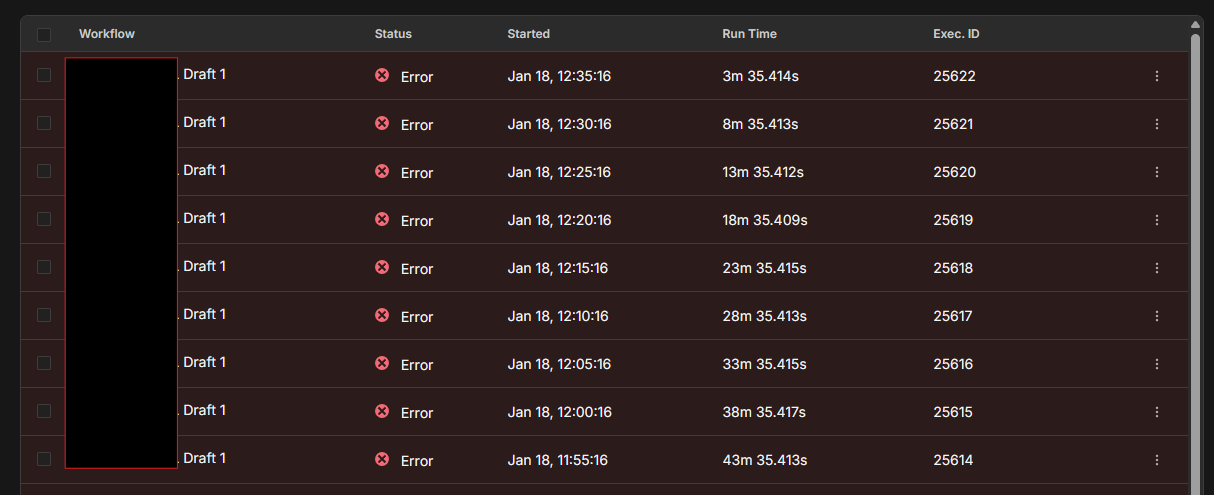
After Updating Execution Log turns all past executions into errors (though were success earlier)

Describe the problem/error/question

After Updating my queue mode n8n self hosted instance, I have this issue every single time. All my past executions start showing error in execution logs. although they were successfully completed before update.

  • Running n8n via docker

  • Operating system: ubuntu

  • n8nVersion: 2.3.6

  • platform: docker (self-hosted)

  • nodeJsVersion: 22.21.1

  • nodeEnv: production

  • database: sqlite

  • executionMode: scaling (single-main)

  • concurrency: -1

storage

  • success: all
  • error: all
  • progress: false
  • manual: true
  • binaryMode: database

pruning

  • enabled: true
  • maxAge: 1080 hours
  • maxCount: 10000 executions

Welcome to the community mate @ankushanand

Since you’re running Docker on Ubuntu with SQLite, here’s how to recover:

1. Check for Docker Volume Backups:

Find your n8n volume docker volume ls | grep n8n

Check if you have volume snapshots docker run --rm -v YOUR_N8N_VOLUME:/data alpine ls -la /data

2. Access SQLite Database Directly:

Copy database out of container

docker cp YOUR_CONTAINER_NAME:/home/node/.n8n/database.sqlite ./database.sqlite

Query for workflow history (older versions might have your code)

sqlite3 database.sqlite “SELECT id, name, updatedAt FROM workflow_entity ORDER BY updatedAt DESC;”

# Check execution data (might contain code from successful runs)

sqlite3 database.sqlite “SELECT workflowData FROM execution_entity WHERE finished = 1 LIMIT 10;”

3. If You Have Database Backup:

Stop n8n

docker-compose down

Restore old database

docker cp ./database.sqlite.backup YOUR_CONTAINER_NAME:/home/node/.n8n/database.sqlite

Start with OLD n8n version temporarily

Export all workflows

Then upgrade properly

Fix for Execution Log Errors

This is likely a schema mismatch. Your execution data format changed between versions:

Quick Fix:

Clear execution history (if acceptable - you have pruning enabled anyway)

docker exec YOUR_CONTAINER_NAME rm -rf /home/node/.n8n/executions/*

Or just ignore old executions - they’re display errors only

The old executions aren’t actually re-running - it’s just the new version can’t properly parse the old execution data format.

Quick Question: Do you have any backups of your Docker volume or database from before the upgrade? That’s your best path to recovering the lost code.

Let me know what you find!
version: '3.8'

services:
  redis:
    image: redis:7-alpine
    container_name: n8n_redis
    restart: always
    volumes:
      - redis_data:/data
    command: redis-server --appendonly yes
    deploy:
      resources:
        limits:
          memory: 512M
          cpus: '0.5'
        reservations:
          memory: 256M
          cpus: '0.25'
    networks:
      - n8n_network
    healthcheck:
      test: ["CMD", "redis-cli", "ping"]
      interval: 10s
      timeout: 5s
      retries: 3

  n8n:
    image: n8nio/n8n:latest
    container_name: n8n
    restart: always
    ports:
      - "5678:5678"
    environment:
      - N8N_HOST=domain.com
      - N8N_PORT=5678
      - N8N_PROTOCOL=https
      - WEBHOOK_URL=https://domain.com/
      - GENERIC_TIMEZONE=Asia/Calcutta
      - N8N_LOG_LEVEL=info
      - EXECUTIONS_DATA_SAVE_ON_ERROR=all
      - EXECUTIONS_DATA_SAVE_ON_SUCCESS=all
      - EXECUTIONS_DATA_MAX_AGE=1080
      - EXECUTIONS_DATA_PRUNE=true
      - EXECUTIONS_DATA_SAVE_MANUAL_EXECUTIONS=true
      - N8N_LOG_OUTPUT=console,file
      - N8N_LOG_FILE_LOCATION=/home/node/.n8n/logs/
      - N8N_METRICS=true
      - QUEUE_BULL_REDIS_HOST=redis
      - QUEUE_BULL_REDIS_PORT=6379
      - EXECUTIONS_MODE=queue
      - N8N_SKIP_WEBHOOK_DEREGISTRATION_SHUTDOWN=true
    volumes:
      - n8n_data:/home/node/.n8n
    depends_on:
      redis:
        condition: service_healthy
    deploy:
      resources:
        limits:
          memory: 3G
          cpus: '2.0'
        reservations:
          memory: 2G
          cpus: '1.0'
    networks:
      - n8n_network

  n8n-worker-1:
    image: n8nio/n8n:latest
    container_name: n8n_worker_1
    restart: always
    command: worker
    environment:
      - GENERIC_TIMEZONE=Asia/Calcutta
      - N8N_LOG_LEVEL=info
      - N8N_LOG_OUTPUT=console,file
      - N8N_LOG_FILE_LOCATION=/home/node/.n8n/logs/
      - QUEUE_BULL_REDIS_HOST=redis
      - QUEUE_BULL_REDIS_PORT=6379
      - EXECUTIONS_MODE=queue
    volumes:
      - n8n_data:/home/node/.n8n
    depends_on:
      redis:
        condition: service_healthy
      n8n:
        condition: service_started
    deploy:
      resources:
        limits:
          memory: 2.5G
          cpus: '1.5'
        reservations:
          memory: 1.5G
          cpus: '0.75'
    networks:
      - n8n_network

  n8n-worker-2:
    image: n8nio/n8n:latest
    container_name: n8n_worker_2
    restart: always
    command: worker
    environment:
      - GENERIC_TIMEZONE=Asia/Calcutta
      - N8N_LOG_LEVEL=info
      - N8N_LOG_OUTPUT=console,file
      - N8N_LOG_FILE_LOCATION=/home/node/.n8n/logs/
      - QUEUE_BULL_REDIS_HOST=redis
      - QUEUE_BULL_REDIS_PORT=6379
      - EXECUTIONS_MODE=queue
    volumes:
      - n8n_data:/home/node/.n8n
    depends_on:
      redis:
        condition: service_healthy
      n8n:
        condition: service_started
    deploy:
      resources:
        limits:
          memory: 2.5G
          cpus: '1.5'
        reservations:
          memory: 1.5G
          cpus: '0.75'
    networks:
      - n8n_network

volumes:
  n8n_data:
    driver: local
  redis_data:
    driver: local

networks:
  n8n_network:
    driver: bridge

I am actually using docker compose (through portainer). i happen to see this issue for a while and I kept ignoring it. I dont’ think have backups of anything. If this could be fixed in future automatically. that could be good