Hello everyone
I’m working on a workflow in n8n where I use an AI Agent connected to Google Gemini, Simple Memory, and two Google Sheets tools — one for fetching rows and another for appending/updating them.
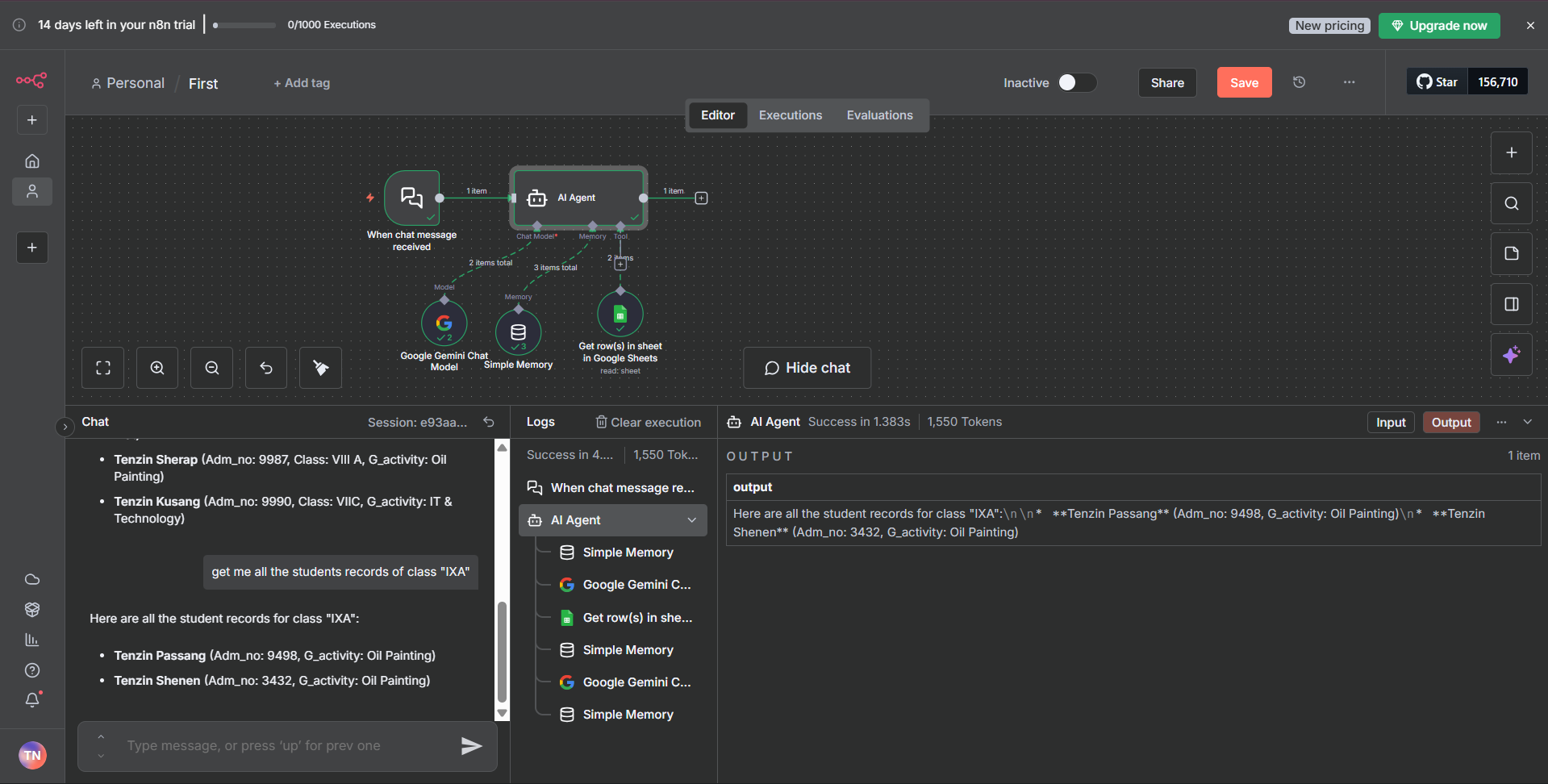
Here’s the workflow structure (screenshot attached):
When chat message received → AI Agent
AI Agent uses:
Google Gemini Chat Model (for LLM)
Simple Memory
Get row(s) in Google Sheets (to fetch records)
Append or update row in Google Sheets (to modify/add records)
The issue I’m facing is with the “Get row(s) in Google Sheets” node.
It correctly outputs 2 items (as shown in the execution output panel).
However, when the data passes through the AI Agent, the AI only receives and processes the first item and it ignores the second one.
Here’s what happens:
“Get row(s)” output → 2 records found
“AI Agent” output → Only 1 record is returned
I want the AI Agent to see and respond with all the fetched rows, not just the first one.
Is there a way to make the ai agent process all the items from the “Get row(s) from Google Sheet” node instead of just the first one?
Any suggestions or examples would be super helpful
My solution is using the AI Agent v2.2 while waiting for the n8n v1.119.0. I copy and paste from my previous workflows. But if this is your first, try copy and pasting this to your workflow
I have the latest versions working with the website and not Docker. Still, I have the same problem that only the first row of the data is being considered. The Google Sheet node outputs all the data correctly, but the AI agent does not consider them all.
As you can see from the screenshot, it’s working. I tested it both with filters and without filters on the Google Sheets Tool node, and both methods worked. I just had to be careful about what I set in the Filters field on the Google Sheets Tool node.
@Tenzin_Nyima_10B15 Not sure if the quantity plays a part. My Google Sheets is more than 5000 rows. I have since moved away from Google Sheets to Supabase to avoid this issue.