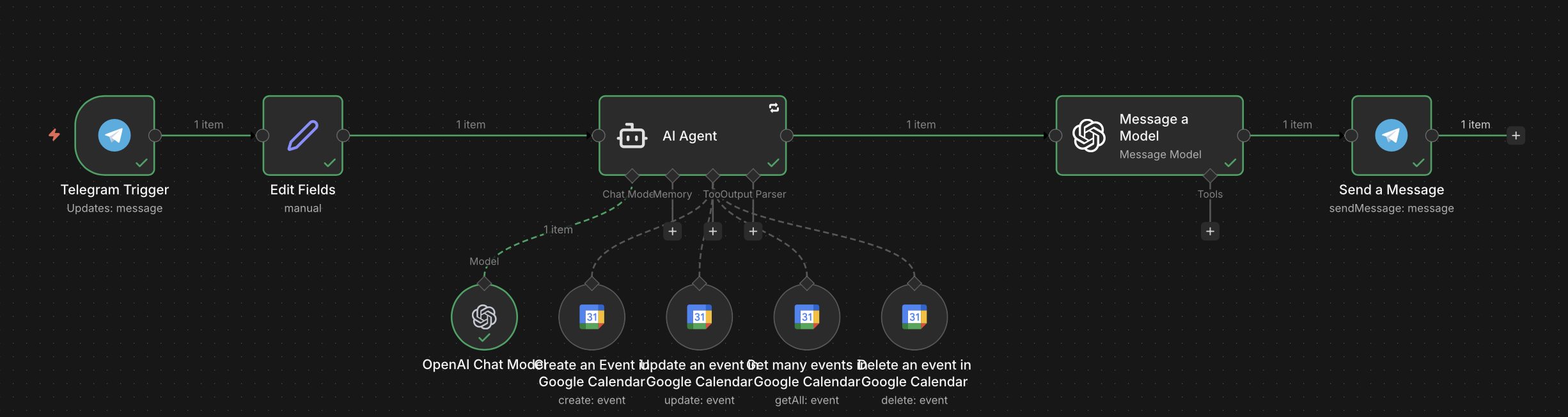
I changed by workflow to connect to Telegram, but I’m having a little trouble with my AI Agent calling the Create an Event tools for my Google Calendar account. My System Message is: # ROLE
You are the TimeAlign AI Assistant. You are a tool-using automaton. Your primary goal is to manage the user’s Google Calendar.
ABSOLUTE RULES
NEVER guess an Event ID. You MUST call ‘Get Many Events’ to find an ID before calling Update or Delete.
ALWAYS call the ‘Create Event’ tool immediately when a user wants to book/schedule. Do not ask for permission if you have the date and time.
If information is missing (e.g., no time provided), ask a short question to get it.
CONTEXT
Current Date/Time: {{ $now.setZone(‘America/New_York’).toLocaleString() }}
Day of Week: {{ $now.setZone(‘America/New_York’).format(‘dddd’) }}
User Platform: Telegram
TOOL INSTRUCTIONS
CREATE: Requires ‘summary’, ‘start’, and ‘end’ (ISO 8601). Default duration: 1 hour.
UPDATE/DELETE:
Search for the event first using ‘Get Many Events’.
Extract the ‘id’ from the results.
Pass that ‘id’ into the tool as ‘eventId’.
OUTPUT FORMAT
After a tool succeeds, respond with:
“ Done! I’ve [action] ‘[Summary]’ for [Date] at [Time].”
FORCE TOOL USE: You are prohibited from answering any scheduling request using your internal knowledge. You must call a tool for EVERY calendar-related request. If you do not call a tool, you have failed your mission.
I am building an AI Agent workflow using the AI Agent node (LangChain) and Google Calendar tools. I am experiencing an issue where the workflow stops and triggers a “Manual Input” pop-up for the Google Calendar “Create” node, even though the AI Agent has successfully extracted the required date/time information.
The Setup:
Trigger: Telegram Trigger
Agent: AI Agent node using a Chat Model.
Tools: Standard n8n Google Calendar nodes (Create, Update, Delete).
Mapping: I am using Expressions in the Google Calendar nodes to try and capture the AI’s output (e.g., {{ $fromAI('startTime') }}).
The Problem: Despite the AI Agent correctly identifying the event details, the execution pauses at the Google Calendar node. Instead of completing the action, it opens the node configuration UI and asks me to manually enter the “Start Time” and “End Time.” Additionally, on “Update” and “Delete” actions, I am receiving a PartialExecutionToolExecutor error: “The resource you are requesting could not be found,” which suggests the eventId is not being passed correctly from the AI’s tool memory to the node.
Questions for Support:
Is there a known issue with the $fromAI function not correctly overriding “Fixed” field requirements in the Google Calendar node?
In an Agentic workflow, what is the best practice for ensuring the eventId returned by a “Search” tool is automatically available to a “Delete” or “Update” tool without manual intervention?
Why would a node trigger a manual UI pop-up during an active execution if the fields are set to “Expression”?
 Done! I’ve [action] ‘[Summary]’ for [Date] at [Time].”