Continuing the discussion from When Scheduled Workflow runs it is stuck in Queued:
Describe the problem/error/question
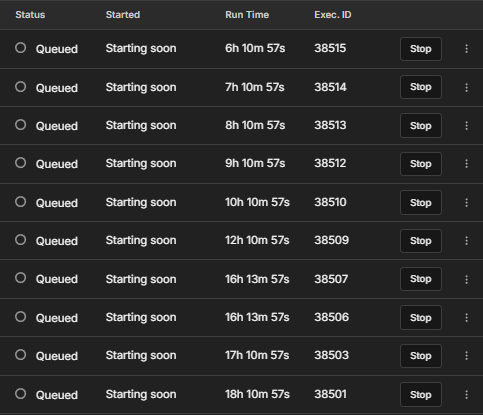
Everytime there is a pending updates in N8N, the workflow scheduled to run is automatically in Queued state and this can reach up to more than 20 hours of stand by. Which is a hassle in our production. Let me know if you face the same issue or if you have any solutions for this. Thanks
Please share your workflow
Information on your n8n setup
instance information
Debug info
core
- n8nVersion: 2.4.6
- platform: docker (cloud)
- nodeJsVersion: 22.21.1
- nodeEnv: production
- database: sqlite
- executionMode: regular
- concurrency: 50
- license: enterprise (sandbox)
- consumerId: 00000000-0000-0000-0000-000000000000
storage
- success: all
- error: all
- progress: false
- manual: true
- binaryMode: filesystem
pruning
- enabled: true
- maxAge: 720 hours
- maxCount: 25000 executions
client
- userAgent: mozilla/5.0 (windows nt 10.0; win64; x64) applewebkit/537.36 (khtml, like gecko) chrome/144.0.0.0 safari/537.36
- isTouchDevice: false
Generated at: 2026-01-30T08:12:55.840Z
I’ve seen this happen when the worker process gets stuck or cant pick up new jobs,usually restarting the n8n worker (or the whole instance) clears the queue.Also worth checking execution mode and concurrency limits, especially if you’re using queue mode with Redis. once the workers are healthy again, queued executions normally start running
Hey @zecklowe Add to your Docker environment:
environment:
  - N8N_VERSION_NOTIFICATIONS_ENABLED=false
  - EXECUTIONS_PROCESS=main
  - DB_TYPE=postgresdb  # Migrate when possible
Then restart n8n and monitor your queue.
Let me know if ythis helps!
Hello @robbie.jos.jis @Brighto, thanks for the responses and solutions but i’m on cloud platform. The solution do not apply to my situation.
1 Like
Hi @zecklowe
Concrete steps you can take on Cloud:
-
Restart the workspace from the Cloud UI (you need to be a workspace admin). This has resolved “stuck in queued” states for other Cloud users. [Webhook queued; Is there an outage]
-
Check for and apply Cloud updates if you see an update banner; a similar scheduled-queue problem was resolved after updating. [Scheduled queued fixed]
1 Like