I have a list of scheduled post to post on Twitter with day and time. That list is stored on google sheet.
Is there any trick to set nodes that can post those post at the scheduled time instead of by fixed time in the trigger note?
It looks like your topic is missing some important information. Could you provide the following if applicable.
- n8n version:
- Database (default: SQLite):
- n8n EXECUTIONS_PROCESS setting (default: own, main):
- Running n8n via (Docker, npm, n8n cloud, desktop app):
- Operating system:
Use a schedule trigger with an interval of the time you want. This sets a trigger workflow that reads your scheduled time and activates the posting trigger.
The easiest is y using a different trigger or a schedule trigger
1 Like
@mivtool I made a way for you to do it.
It takes two separate workflows, one to check the spreadsheet on a schedule then another to schedule the individual tweets. The workflows are in this post, you can actually just copy the code from them and paste it in your editor.
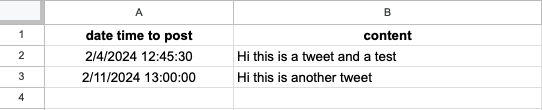
I made a spreadsheet like this.
If you name the rows the same thing and only need time and content then you won’t need to adjust any fields
1st workflow
This is the workflow that checks your spreadsheet. For every row that has a dateTime after the execution time but before one hour after the execution time, it will execute the 2nd workflow.
What you’ll need to change
- All of the credentials
- The spreadsheet and columns
- The workflow ID in the last node (can find the 2nd workflow ID in the url)
- If you add more fields, you’ll need to define them in the
Define fields for tweetnode
2nd Workflow
This will take the fields from the first workflow and schedule the actual tweet
What you’ll need to change
- Credentials for the twitter node
Potential Issues
Ensure your timezone is set right. If something is happening unexpected that is a good first thing to check with scheduling stuff
If you add any fields, you’ll need to manually add them to the 2nd workflow.
Add this code replacing newFieldName with the actual name: {{ $json.newFieldName }}
Let me know if you have any questions or have any issues 
Liam
2 Likes
Thanks @liam
I worked well, just modified some interval time for less checking 
But, how about posting image beside the content.
If that post has an image with it, and storing in google drive - and it is shown as a link in the sheet.
I use the google to download the file but it seems there is no way of twitter node that can post image.
Moreover, I have to open the folder of image to public. Is there any way that we can close that folder privately then use the google API instead of make it public.
To download a private file from google drive with a link simply use this node
Although i just looked on the twitter node and it displays this warning, so it doesn’t seem possible to post media

1 Like
Yes, I use that note to download the image. But cannot post it to the X.
Thanks for you help. Seems that have to manually post posts with images.
You can still post media to Twitter, but you need to use an API v1 call to post the media, then a v2 call to post the actual message using the ID from the v1 to attach the media.
This tutorial by @Jeremy_DE_CAMPOS explains the process. It’s in French, but the subtitle auto-translate works great.
1 Like
This topic was automatically closed 7 days after the last reply. New replies are no longer allowed.