Industry reports and whitepapers pile up fast. A 40-page market analysis lands in your Drive. A competitor publishes a technical whitepaper. Your team subscribes to three research feeds. Everyone saves documents they intend to read. Almost nobody reads them.
The documents that do get read take 45-60 minutes each to properly digest — extract the key stats, note the main findings, pull out the recommendations, figure out who on the team needs to see it.
Built a workflow that does that processing in about 20 seconds and posts a full structured summary to Slack automatically.
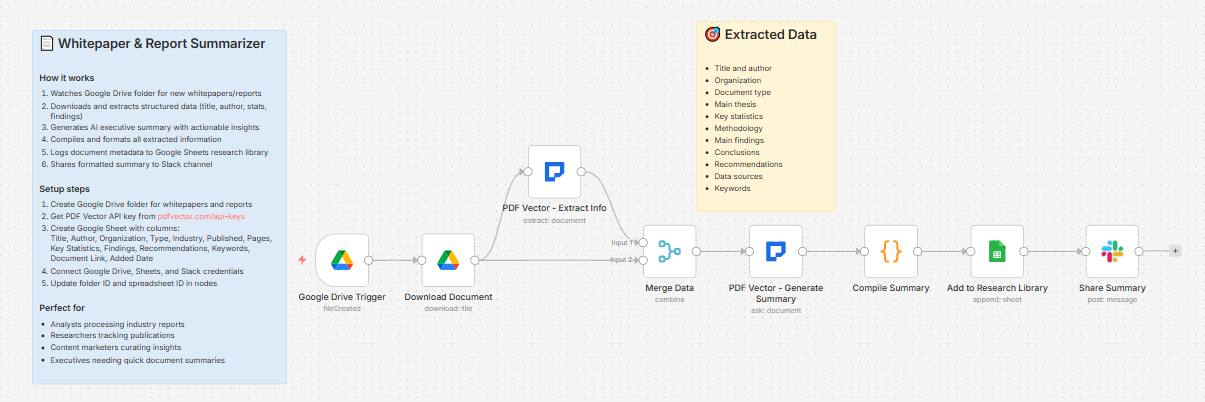
What it does
Document dropped in Google Drive → two AI passes (structured extraction + executive summary) → compiles everything → logs to research library → posts full briefing to Slack
Takes about 18-22 seconds per document.
Document types supported
-
Whitepaper
-
Research Report
-
Industry Report
-
Case Study
-
Technical Document
-
Annual Report
-
Market Analysis
Two AI passes — structured data + executive summary
Same two-pass pattern as the competitor analysis workflow — runs PDF Vector twice on the same document.
Pass 1 — Structured extraction:
Pulls discrete data points into a JSON schema:
-
Title, author, organization, publication date
-
Document type, industry, page count
-
Main thesis
-
Key statistics with sources
-
Methodology
-
Main findings (as array)
-
Conclusions (as array)
-
Recommendations (as array)
-
Data sources cited
-
Keywords
Pass 2 — Executive summary:
Uses PDF Vector’s Ask operation to generate:
-
3-4 sentence executive summary
-
Single most important takeaway for business leaders
-
Three actionable next steps based on findings
-
Who should read this document and why
What lands in Slack
📄 New Whitepaper Summarized

Title: The State of AI Adoption in Enterprise 2025

Author: Sarah Chen | Type: Industry Report

Industry: Technology

---

📋 Executive Summary:

Enterprise AI adoption accelerated significantly in 2024, with 67% of Fortune 500 companies now running at least one production AI system. The report identifies talent gaps and integration complexity as the primary barriers to scaling. Companies that invested in dedicated AI operations teams saw 3x faster deployment cycles than those relying on existing IT staff. The most important takeaway: competitive advantage is shifting from access to AI tools to operational maturity in deploying them.

---

📊 Key Statistics (8):

📊 67% of Fortune 500 companies have production AI systems

📊 Average time-to-production for AI projects: 14 months

📊 42% of AI projects fail to reach production stage

📊 Companies with AI ops teams deploy 3x faster

...

---

🔍 Key Findings (6):

1. Talent shortage is the #1 barrier cited by 78% of respondents

2. Integration with legacy systems costs 40% of AI project budgets

3. ROI positive within 18 months for 61% of successful deployments

...

---

✅ Recommendations (4):

✓ Build internal AI ops capability before scaling initiatives

✓ Prioritize use cases with clear data pipelines already in place

✓ Allocate minimum 30% of AI budget to integration work

✓ Start with narrow, high-value workflows before broad deployment

📄 Read Full Document
What lands in Google Sheets
Each row: Title, Author, Organization, Type, Industry, Published, Pages, Key Statistics (count), Findings (count), Recommendations (count), Keywords, Document Link, Added Date
Your full research library, searchable and filterable. Sort by Industry to find all reports in a specific sector. Filter by Type to pull only case studies or only market analyses.
Setup
You’ll need:
-
Google Drive (folder for whitepapers and reports)
-
Google Sheets (free)
-
n8n instance (self-hosted — uses PDF Vector community node)
-
PDF Vector account (free tier: 100 credits/month — each document uses ~6-8 credits for two passes)
-
Slack (for summary sharing)
About 15 minutes to configure.
Download
Workflow JSON:
Full workflow collection:
Setup Guide
Step 1: Get your PDF Vector API key
Sign up at pdfvector.com — free plan works for testing. Go to API Keys and generate a key.
Step 2: Create your Google Drive folder
Create a folder called “Whitepapers & Reports.” Copy the folder ID from the URL.
Step 3: Create your Google Sheet
Headers in Row 1:
Title | Author | Organization | Type | Industry | Published | Pages | Key Statistics | Findings | Recommendations | Keywords | Document Link | Added Date
Step 4: Import the workflow
Download JSON from GitHub → n8n → Import from File.
Step 5: Configure the nodes
Google Drive Trigger:
-
Connect Google Drive account (OAuth2)
-
Paste your folder ID
-
Event: File Created
Download Document:
- Same Google Drive credential
PDF Vector - Extract Info:
-
Add new credential (Bearer Token)
-
Paste your API key
-
Structured extraction with full schema
PDF Vector - Generate Summary:
-
Same PDF Vector credential
-
Uses Ask operation — generates the narrative executive summary
Compile Summary:
- No config needed — merges both passes automatically
Add to Research Library:
-
Connect Google Sheets
-
Paste your Sheet ID
Share Summary:
-
Connect Slack
-
Select your research or team-updates channel
Step 6: Test it
Drop any industry report or whitepaper PDF into your Drive folder. Check Slack and your Sheet after about 30 seconds.
Accuracy
Tested on industry reports, SaaS company whitepapers, consulting firm research, and academic papers converted to PDF.
-
Title, author, organization, date: ~97%
-
Key statistics: ~93% — numbers with clear context extract reliably; stats buried in charts less so
-
Main findings: ~91% — best on documents with explicit “Key Findings” or “Conclusions” sections
-
Recommendations: ~89% — depends on how explicitly the document frames its recommendations
-
Executive summary quality: strong on well-structured reports; more variable on loosely written whitepapers
Cost
Each document uses 6-8 PDF Vector credits for two passes. Free tier of 100 credits handles roughly 12-15 documents per month.
Basic plan ($25/month) gives 3,000 credits — enough for a team processing regular research batches.
Customizing it
Route by industry or document type:
Add a Switch node after Compile Summary to post to different Slack channels based on documentType or industry. Market analyses go to #sales-intel, technical docs go to #engineering, etc.
Build a weekly digest:
Add a scheduled workflow that reads your Sheets library every Monday and posts a summary of all documents added in the past 7 days — title, one-line thesis, and link.
Connect to Notion:
Replace or supplement the Sheets node with a Notion node to create a database entry per document — useful if your team’s knowledge base lives in Notion.
Tag documents for follow-up:
Add a column “Needs Action” to your Sheet and populate it based on whether the recommendations array is non-empty. Filter this column to find reports that contain specific calls to action.
Limitations
-
Requires self-hosted n8n (PDF Vector is a community node)
-
Uses ~6-8 credits per document due to two AI passes
-
Stat extraction from charts and images is limited — works best on text-based statistics
-
Very long documents (100+ pages) may hit token limits on the Ask operation
-
No deduplication — same document re-uploaded creates a new row
Questions? Drop a comment.