Hi everyone,
I’m running into a strange issue with Bright Data integration in n8n and I’m trying to rule out whether this is an n8n networking/config issue or purely Bright Data API side.
Setup:
-
n8n self-hosted (v2.1.5) on Ubuntu VPS
-
Using HTTP Request node to call Bright Data Webscrpaper Snapshot API
-
Endpoint used:
GET https://api.brightdata.com/datasets/v3/snapshot/<SNAPSHOT_ID>?format=json
Headers:
Authorization: Bearer <TOKEN>
Accept: application/json
Problem:
-
Scrape triggers successfully
-
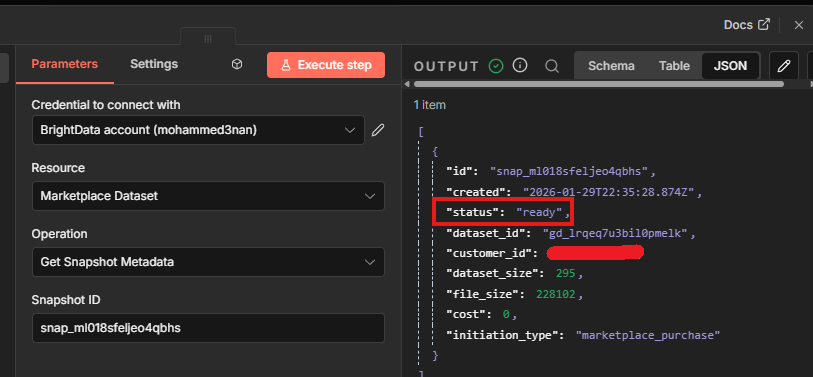
Snapshot shows READY in Bright Data UI
-
Data exists and size is small (~500 KB)
-
BUT fetching snapshot via API always returns:
502 Bad Gateway (nginx)
What I tested:
-
Same request in:
-
n8n HTTP Request node
-
curl directly on VPS
-
curl with HTTP/1.1 forced
-
-
All return 502
-
UI in Bright Data works fine
-
Restarted VPS
-
Happens for:
-
new snapshots
-
old snapshots
-
different dataset IDs
-
curl test:
curl -i --http1.1 \
-H “Authorization: Bearer ” \
-H “Accept: application/json” \
“https://api.brightdata.com/datasets/v3/snapshot/<SNAPSHOT_ID>?format=json”
Result:
HTTP/2 502 Bad Gateway
server: nginx
Question:
Has anyone seen this before with Bright Data?
Is there any n8n-specific networking, TLS, or proxy setting that could cause this?
Or is this clearly an upstream API issue that n8n cannot fix?
If anyone has successfully integrated Bright Data dataset snapshots with n8n recently, I’d love to know:
-
Which node you used (HTTP vs something else)
-
Any timeout / HTTP version settings
-
Any retries / wait logic
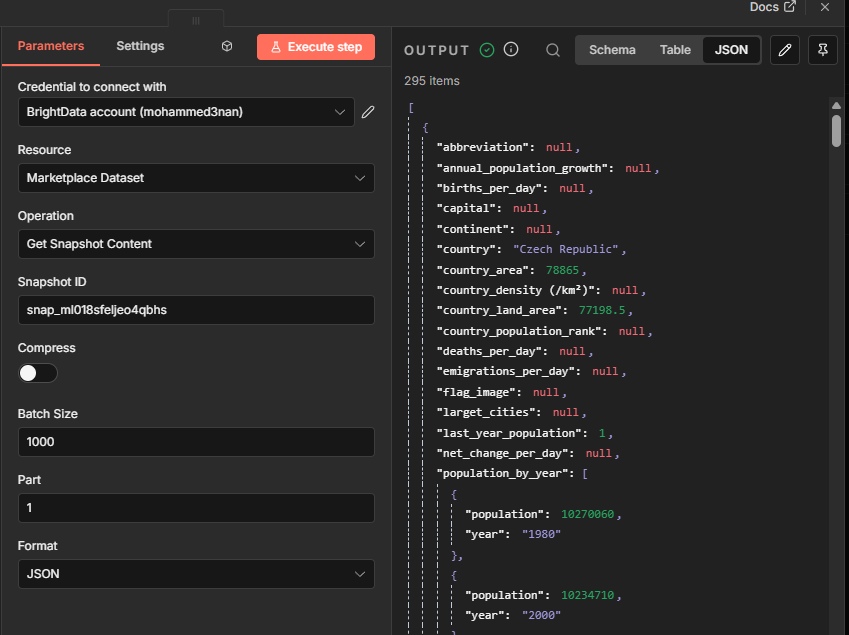
Also this node was working fine till now in but suddenly it is not downloading or reading any snapshot data even if the snapshot is ready or any previously created snapshot also.
Thanks in advance — this is blocking my automation pipeline.