Most people have no idea which of their products are still under warranty. The document got filed somewhere after unboxing, never looked at again, and by the time something breaks you’re either scrambling to find the receipt or just assuming coverage lapsed months ago.
For businesses tracking warranties across equipment, appliances, or inventory — the problem is worse. A $3,000 piece of equipment breaks. Someone spends an hour digging through emails and filing cabinets to find the warranty card. Turns out it expired 6 days ago.
Built a workflow that reads warranty documents the moment they land in Drive, calculates the expiry date automatically, and fires a Slack alert when anything is expiring within 30 days.
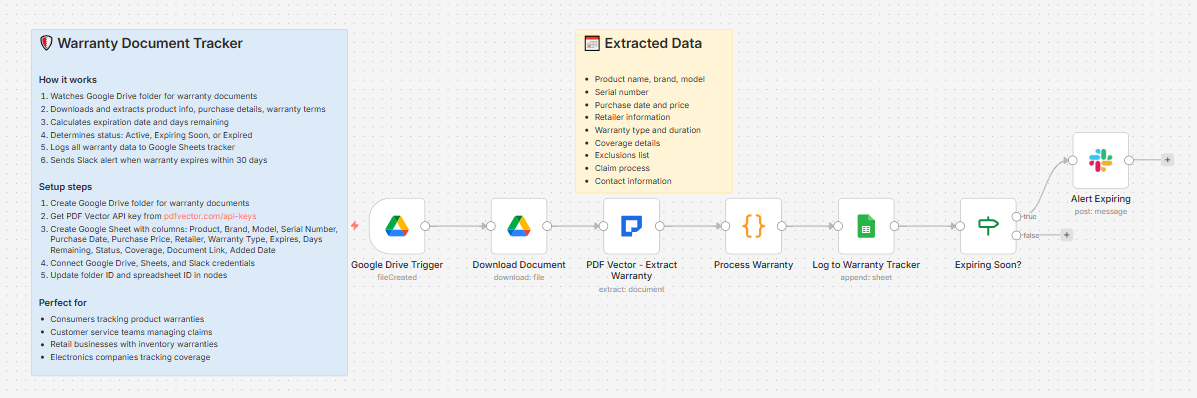
What it does
Warranty document dropped in Google Drive folder → extracts all product and warranty data → calculates days remaining → determines status → logs to tracker → fires Slack alert if expiring within 30 days
Takes about 10 seconds per document.
What gets extracted
Product:
- Name, brand, model, serial number, category
Purchase:
- Date, retailer, price, receipt number
Warranty terms:
-
Type — Limited / Full / Extended / Lifetime / Manufacturer
-
Duration in months
-
Start date and end date
Coverage:
-
What’s covered (as a list)
-
What’s excluded (as a list)
-
Claim process description
-
Contact info — phone, email, website, address
Expiry calculation
If the document doesn’t include an explicit end date, the workflow calculates it automatically from purchase date + warranty duration in months.
Status assigned based on days remaining:
-
Expired → past end date
-
Expiring Soon → 30 days or less remaining → triggers Slack alert
-
Active — Expires in 3 months → 31-90 days remaining
-
Active → more than 90 days remaining
What lands in Slack (expiring soon only)
⚠️ Warranty Expiring Soon!

Product: MacBook Pro 16"

Brand: Apple

Model: MBP16-M3-2024

📅 Expires: 2025-04-12

⏰ Days Remaining: 24

Coverage: Hardware defects, battery replacement,

display issues, logic board failures

Consider filing any claims before warranty expires!
Only documents with 30 days or less remaining trigger the alert. Everything else is logged silently.
What lands in Google Sheets
Each row: Product, Brand, Model, Serial Number, Purchase Date, Purchase Price, Retailer, Warranty Type, Expires, Days Remaining, Status, Coverage, Document Link, Added Date
Sort by Days Remaining to see what needs attention first. Filter by Status = “Expiring Soon” to get your immediate action list.
Setup
You’ll need:
-
Google Drive (folder for warranty documents)
-
Google Sheets (free)
-
n8n instance (self-hosted — uses PDF Vector community node)
-
PDF Vector account (free tier: 100 credits/month)
-
Slack (for expiry alerts — optional, remove the last two nodes if not needed)
About 10 minutes to configure. Simplest workflow in this series — no email, no complex routing.
Download
Workflow JSON:
Full workflow collection:
Setup Guide
Step 1: Get your PDF Vector API key
Sign up at pdfvector.com — free plan works for testing. Go to API Keys and generate a key.
Step 2: Create your Google Drive folder
Create a folder called “Warranty Documents.” Copy the folder ID from the URL.
Step 3: Create your Google Sheet
Headers in Row 1:
Product | Brand | Model | Serial Number | Purchase Date | Purchase Price | Retailer | Warranty Type | Expires | Days Remaining | Status | Coverage | Document Link | Added Date
Step 4: Import the workflow
Download JSON from GitHub → n8n → Import from File.
Step 5: Configure the nodes
Google Drive Trigger:
-
Connect Google Drive account (OAuth2)
-
Paste your folder ID
-
Event: File Created
Download Document:
- Same Google Drive credential
PDF Vector - Extract Warranty:
-
Add new credential (Bearer Token)
-
Paste your API key
Process Warranty:
- No config needed — expiry calculation and status assignment run automatically
Log to Warranty Tracker:
-
Connect Google Sheets
-
Paste your Sheet ID
Alert Expiring (Slack):
-
Connect Slack
-
Select your alerts channel
-
Only fires when status = “Expiring Soon”
Step 6: Test it
Drop any warranty PDF, product registration card, or appliance manual into your Drive folder. Check your Sheet after about 15 seconds.
Accuracy
Tested on appliance warranties, electronics manufacturer warranties, and extended warranty certificates.
-
Product name, brand, model: ~97% on digital warranty documents
-
Serial number: ~93% — reliable when printed clearly on the document
-
Purchase date and retailer: ~92% when included in the warranty card
-
Warranty duration: ~95% — “2 years from purchase date” extracts reliably
-
End date calculation: exact when purchase date and duration are both present
-
Coverage list: ~88% — depends on how structured the coverage section is
Many warranty cards don’t include purchase date — in those cases the workflow logs the duration but can’t calculate expiry. Best results come from scanning full purchase receipts alongside the warranty card.
Cost
Each document uses 3-4 PDF Vector credits. Free tier covers roughly 25-30 documents per month.
Customizing it
Change the alert threshold:
In the IF node condition, status equals "Expiring Soon" triggers at 30 days. To change this, modify the 30-day threshold in the Process Warranty Code node.
Add a 90-day advance alert:
Duplicate the IF node and Slack node, change the condition to daysRemaining <= 90, and route to a separate “heads up” channel for less urgent items.
Weekly digest instead of per-document alerts:
Remove the Slack nodes from this workflow. Add a separate scheduled workflow that reads your Sheet every Monday morning and posts all warranties expiring in the next 30 days.
For businesses tracking equipment:
Add a Location or Department column to your Sheet and populate it from the filename prefix (e.g., “IT-”, “KITCHEN-”, “OFFICE2-”). Helps multi-location businesses know which site owns what.
Limitations
-
Requires self-hosted n8n (PDF Vector is a community node)
-
Alert only fires when a new document is added — doesn’t retroactively check existing warranties daily
-
Expiry can’t be calculated if the warranty document doesn’t include purchase date or warranty duration
-
No deduplication — the same document re-uploaded creates a new row
Questions? Drop a comment.