Hey n8n community, if you run an n8n agency or build automations for clients, here’s an n8n video automation you can hand over: a free n8n workflow template that turns every row of a CSV into a short vertical infographic video for TikTok, Instagram Reels or YouTube Shorts.

How the n8n workflow works
It runs one row at a time:
- n8n reads the CSV. You can swap in the n8n Google Sheets node if your list lives in a sheet.
- The AI writes the content: a hook, a key number, a feature, three steps, a closing line and eight voiceover lines. Claude Opus 5.5 is the model I’ve had the most success with, but any chat model n8n supports can do this step.
- A Code step checks the answer before anything costs money, and stops the row if a field is missing or too long.
- The Shotstack node makes a studio photo with Nano Banana 2 and a music track with ElevenLabs Music. That’s Nano Banana and ElevenLabs in n8n without a Google or ElevenLabs account, because Shotstack runs the models. If the row links to the client’s own product photo, Nano Banana 2 Edit puts that exact product in the shot instead.
- One render adds the ElevenLabs voiceover and animates everything, plus a 5-second Seedance shot if the row asks for one.
- n8n saves the MP4 to a folder and adds a line to a results CSV.
How to set it up
It takes about ten minutes. You need your own n8n, version 2, running on your computer, in Docker or on a server.
- Install the Shotstack community node, version 0.2.1 or later: Settings → Community nodes → Install →
@shotstack/n8n-nodes-shotstack. The nodes panel still installs 0.1.1, which has no photo or music step. If you already have 0.1.1, click Update there. - Open a new workflow, click ⋯ → Import from File and pick the attached
infographic-videos-from-csv.json. - Add your Shotstack API key to the four Shotstack steps. You can start a free trial here (my company’s link): Shotstack - The Cloud Video Editing API
- Add an API key for your AI model to the Claude step. I used Claude, but you can swap in OpenAI, Gemini, Mistral or any other chat model n8n supports.
- Save your list as
videos.csvin n8n’s files folder and make an emptyvideosfolder next to it. In Docker, mount a folder from your computer there, for example-v ./n8n-files:/home/node/.n8n-files. On an npm install the folder is.n8n-filesin your home folder, so change/home/node/.n8n-filesto yours in Read the CSV, Save the results and Save the video. - Hit Execute workflow. Each video takes 4 to 8 minutes and lands in your videos folder as soon as it’s done, so I’d try one row first before running the whole list.
What goes in the CSV
Five columns, one row per video:
| Column | What to put in it | Example |
|---|---|---|
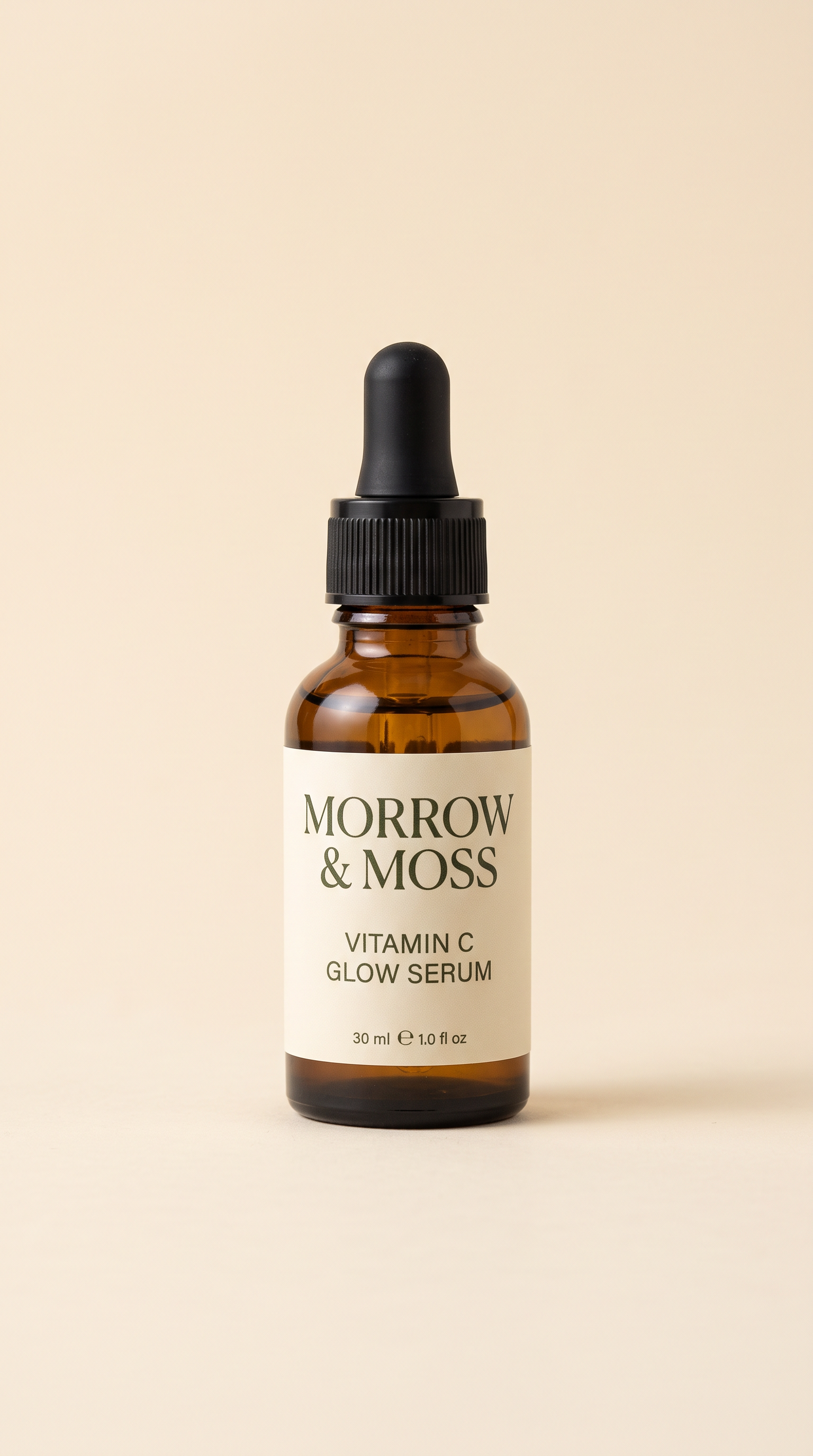
| What it is | The product or service, and what the photo should show | Morrow & Moss Vitamin C Glow Serum: a 30 ml amber glass dropper bottle with a black dropper cap and a minimal cream paper label. The label has dark moss-green text that reads MORROW & MOSS on the first line and VITAMIN C GLOW SERUM on the second, with 30 ml small at the bottom. |
| What to say | The facts: how it works, why it works, any numbers and a closing line | How it works: press three drops into clean skin every morning, before moisturiser and sunscreen. It sinks in within seconds and leaves no sticky finish. Why it works: 15% vitamin C helps skin look brighter and more even, and hyaluronic acid keeps it hydrated. It’s fragrance-free and gentle enough for every day. Close with: Your glow starts tomorrow morning. |
| Brand colours | Three hex colours, or leave it empty and the AI picks | #2F4A3A, #F3EBDD, #E8892B |
| Animated AI shot | Yes or No | No |
| Product photo | Optional link to the client’s real product photo | https://cdn.shotstack.io/au/v1/generations/ydk93ie0yi/cb2f80f6-6c5c-599e-8754-73b1a6a466e8.png |
What it costs and how long it takes
Roughly $1 to $1.25 a video all in, or about $3 with the animated AI shot, and 4 to 8 minutes each.
| Column 1 | Column 2 |
|---|---|
| Per video | About 5 Shotstack credits, which is 95¢ to $1 depending on the plan. The animated AI shot adds about 9.5 credits |
| What credits pay for | Both the AI generation (the photo, music and voiceover) and the render, so a credit isn’t the same as a minute of video |
| Per month | Pay as you go starts at $10. Starter ($39 a month) covers about 40 of these videos, Pro ($99) about 100 and Scale ($199) about 200 |
| AI model | About 5 cents a video with Claude Opus 5.5, less with a smaller model |
| Free trial | 10 credits, valid for 30 days, which covers your first video |
Ideas for n8n agencies and product catalogs
- A client sends a spreadsheet of their services, and you hand back a folder with a video for each one.
- A product catalog in the n8n Google Sheets node, with a photo link per product, gives you videos that show the real products.
- A Schedule trigger picks up new rows in the sheet every week and saves the videos to Google Drive.
Good to know
- It runs on self-hosted n8n for now, because it reads and saves files on disk. A Cloud version that uses the n8n Google Sheets node is coming soon.
- I tested it with Claude on a self-hosted n8n, version 2.42.
- When a row fails, the rest still get made, and the results file says which step broke.
- Each row has its own brand colours, so one run can cover several clients.
- If your n8n has N8N_UNVERIFIED_PACKAGES_ENABLED set to false, it won’t install 0.2.1 until n8n verifies it.
- Read the words before you post a video anywhere.
Links
- Shotstack free trial: Shotstack - The Cloud Video Editing API
- Shotstack plans and prices: Shotstack - Pricing
- The Shotstack n8n node on npm: https://www.npmjs.com/package/@shotstack/n8n-nodes-shotstack
- Its code on GitHub: GitHub - shotstack/shotstack-n8n · GitHub
The four videos in full
Here they are with sound, since the grid at the top is muted:
If you try it, post your video in the thread, I’d love to see what you make. And which should I build next: beat-synced shorts from your own clips, or translating videos in bulk?