Describe the problem/error/question
My code node use httpntlm for my login logic. And it works fine in few month.
But after recently I update my n8n version. It can’t work anymore.
I think there is something wrong with npm install.
What is the error message (if any)?
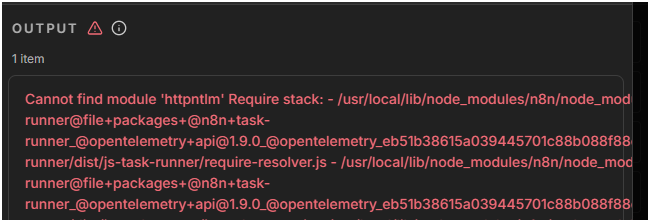
DockerFile
FROM n8nio/n8n

USER root

RUN apk add --no-cache curl

RUN npm install -g httpntlm

USER node
Docker-compose.yml
version: '3.8'

volumes:
  n8n_storage:

services:
  n8n:
    build: .
    restart: always
    ports:
      - "127.0.0.1:5678:5678"
    environment:
      - TZ=Asia/Taipei
      - NODE_FUNCTION_ALLOW_EXTERNAL=*
      - N8N_BROWSERLESS_URL=http://browserless:3000
    volumes:
      - n8n_storage:/home/node/.n8n
    depends_on:
      - browserless

  browserless:
    image: browserless/chrome:latest
    restart: always
    ports:
      - "3000:3000"
    environment:
      - MAX_CONCURRENT_SESSIONS=5
      - ENABLE_DEBUGGER=false
I have try few change but still not working
I fix dockerfile to below , but not work
FROM n8nio/n8n

USER root

# Reinstall apk-tools first
RUN wget -q https://dl-cdn.alpinelinux.org/alpine/v3.22/main/x86_64/apk-tools-2.14.9-r3.apk && \
    tar -xzf apk-tools-2.14.9-r3.apk -C / && \
    rm apk-tools-2.14.9-r3.apk
# 安裝 curl
RUN apk add --no-cache curl

RUN npm install -g /usr/local/lib/node_modules/n8n httpntlm

USER node
Information on your n8n setup
- n8n version: 2.3.6
- Database (default: SQLite): not use
- n8n EXECUTIONS_PROCESS setting (default: own, main):
- Running n8n via (Docker, npm, n8n cloud, desktop app): docker desktop
- Operating system: Windows