Connection aborted - error reading from instance, CloudRun vs CloudSQL

Describe the problem/error/question

We have hosted N8N using GCP CloudRun and Connection through CloudSQL. At some point the connection between those two got aborted resulting in “Database not ready” message.
Fortunately I enabled alerting with checking readiness, thus I got the message. It happened already second time. Redeploying CloudRun helped. But surely, it’s not a solution.
CloudRun runs with:

cpu_idle: false
Execution environment: Second Generation
Startup CPU Boost: true
2 CPUS, 4GiB memory

What is the error message (if any)?

“Database not ready”

DEBUG logs when it started happening:

DEFAULT 2026-02-12T09:47:17.368026Z 2026-02-12T09:47:17.367Z | debug | Querying database for waiting executions {“scopes”:[“waiting-executions”],“file”:“wait-tracker.js”,“function”:“getWaitingExecutions”}

INFO 2026-02-12T09:47:29.229227Z [httpRequest.requestMethod: GET] [httpRequest.status: 200] [httpRequest.responseSize: 193 B] [httpRequest.latency: 1 ms] [httpRequest.userAgent: GoogleStackdriverMonitoring-UptimeChecks(``https://cloud.google.com/monitoring``)] ``https://<n8n-url>/healthz/readiness

DEFAULT 2026-02-12T09:47:39.879757Z 2026/02/12 09:47:39 [db-name] connection aborted - error reading from instance: read tcp IP->DB_IP: read: connection reset by peer

DEFAULT 2026-02-12T09:47:39.880998Z 2026-02-12T09:47:39.880Z | error | Connection terminated unexpectedly {“file”:“error-reporter.js”,“function”:“defaultReport”}

DEFAULT 2026-02-12T09:47:39.881175Z 2026-02-12T09:47:39.880Z | error | Connection terminated unexpectedly {“file”:“error-reporter.js”,“function”:“defaultReport”}

DEFAULT 2026-02-12T09:47:46.882458Z 2026-02-12T09:47:46.881Z | warn | Database connection timed out {“file”:“db-connection.js”,“function”:“ping”}

ERROR 2026-02-12T09:47:46.947087Z [httpRequest.requestMethod: GET] [httpRequest.status: 503] [httpRequest.responseSize: 197 B] [httpRequest.latency: 1 ms] [httpRequest.userAgent: GoogleStackdriverMonitoring-UptimeChecks(``https://cloud.google.com/monitoring``)] ``https://<n8n-url>/healthz/readiness

DEFAULT 2026-02-12T09:47:53.883948Z 2026-02-12T09:47:53.883Z | warn | Database connection timed out {“file”:“db-connection.js”,“function”:“ping”}

Share the output returned by the last node

Information on your n8n setup

  • n8n version: 2.7.3
  • Database (default: SQLite): CloudSQL
  • n8n EXECUTIONS_PROCESS setting (default: own, main): default
  • Running n8n via (Docker, npm, n8n cloud, desktop app): CloudRun
  • Operating system: GCP

Hello @rgrzesk ,

Cloud SQL kills the connection because it was idle, but n8n’s connection pool didn’t realize it.When n8n tried to use that “dead” connection from its pool to check for waiting executions, it crashed.
If you are currently connecting via Private IP (TCP), you will constantly fight network timeouts. The recommended way to connect Cloud Run to Cloud SQL is via the built-in Unix Domain Socket.

This offloads the connection management to a Google-managed sidecar that handles keep-alives and reconnects automatically.
How to switch:

  1. Cloud Run Config: Go to “Edit & Deploy New Revision” → Container, Networking, SecurityIntegrations (or “Cloud SQL” tab in older UIs).
  2. Add Connection: Select your Cloud SQL instance. This mounts it at /cloudsql/INSTANCE_CONNECTION_NAME.
  3. Update n8n Env Vars:
  • DB_TYPE: postgresdb (assuming Postgres)
  • DB_POSTGRESDB_HOST: /cloudsql/YOUR_PROJECT:REGION:INSTANCE_NAME (Do not use the IP address).
  • DB_POSTGRESDB_USER / PASSWORD: (Keep as is).

This usually eliminates “connection reset” errors entirely because the socket file doesn’t suffer from TCP network timeouts.

Let me know if you must use TCP/IP to work around this issue as well
I am here to help

Thank you for the reply.

I am already using Cloud SQL Connection:

Terraform:
image

I have never used TCP connection when connecting to CloudRun N8N. So I think that’s not the issue.

As mentioned it’s not the first time it happened, thus I enabled DEBUG logs, but I don’t see anything specific than aborted connection.

Since Cloud Run instances often handle lower traffic or single concurrency, the default n8n connection pool is likely too large, leaving multiple connections sitting idle until Cloud SQL silently kills them. To fix this “rotting connection” issue, you should set the environment variable DB_POOL_SIZE=2 (or a maximum of 5). This forces n8n to recycle a smaller number of connections much more actively, ensuring they stay “fresh” and preventing the server from trying to reuse a dead connection that causes the crash.

I guess you are referring to Database environment variables | n8n Docs and DB_POSTGRESDB_POOL_SIZE variable. I keep it default, so it’s already set to 2.
Enforcing explicitly setting to 2 won’t bring any effect I guess.

OK then try creating a “Heartbeat” workflow that forces the database connection to stay alive.
Simply set up a Schedule Trigger to run every minute and connect it to a Postgres node executing a lightweight SELECT 1 query; this constant activity keeps the connection pool busy, preventing Cloud SQL from ever seeing it as “idle”.

would this work for you?

Unfortunately it’s very tricky solution for me. I am having a setup of a few N8N instances with different isolated users (different projects). To most of them I don’t have access (from the user perspective).

To achieve that I would need something like predefined workflow that is going to be setup while deploying n8n cloudrun instance using Terraform. Is that somehow possible?

you can configure a Liveness Probe directly in the Terraform configuration.
By adding a liveness_probe that points to n8n’s /healthz/readiness endpoint, Google Cloud will automatically ping your instance every few seconds. This endpoint runs a database query effectively acting as the ‘heartbeat’ to keep the connection pool active without any extra setup.

Isn’t the same effect we currently have using UpTime Check while calling /heathz/readiness endpoint every 5 minutes? As you can see from the logs we were calling it, but the error occurred anyway. How would that be different? And why every few seconds it has to be called? What does happen under the hood if we miss the hit within 5 minutes window?

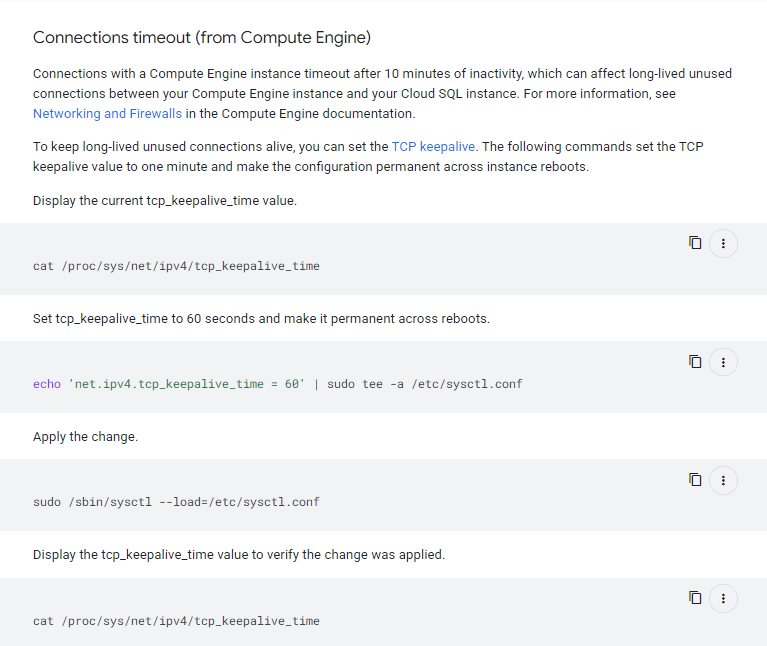
in the screenshot Google explicitly states that their infrastructure kills idle connections to save resources and recommends a 60-second keepalive to prevent it.so by hitting the DB every 15 seconds, we are doing exactly what they suggest: forcing traffic through the pipe to reset that idle timer before it cuts us off.

maybe this is your issue, anything form 2.7.x onwards

Interesting: we also see GET /healthz/readiness -> 200 just a couple milliseconds before the DB socket is reset, then n8n logs connection reset by peer and readiness flips to 503.
That suggests readiness polling isn’t a reliable DB keepalive: it may reflect cached/background status and/or it may not touch the same pooled connection that later gets reused and fails.

Also it is mentioned here:

Additionally I found an information that DB checks are done in the background every 2 seconds:

I already had that issue with 2.6.x some time ago. But will keep an eye on the issue. Thanks!

It happened again, without any reason. Even though the day before there was a fresh instance with new version 2.9.0 deployed. Based on the logs the /readiness endpoint is checked every few seconds. I think it’s enough. Additionally we do the uptime check every 5 minutes, so we have lots of mechanisms that keeps the machine alive.