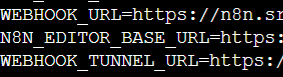
I am using n8n for 5 days and every day I got “connection lost”. Sometimes I am getting “ERR_SSL_PROTOCOL_ERROR” while trying to open url sometimes I am getting “connection lost” error on workflow screen. I tried some changes with Gemini like adding this lines but it didnt work.
What is the error message (if any)?
Please share your workflow
(Select the nodes on your canvas and use the keyboard shortcuts CMD+C/CTRL+C and CMD+V/CTRL+V to copy and paste the workflow.)
SSL protocol errors with connection drops usually mean your reverse proxy or HTTPS setup is misconfigured. Check your Docker setup—make sure SSL certificates are valid and not expired, and that your proxy (Nginx, Caddy, Traefik) is correctly forwarding requests.
Also verify your WEBHOOK_URL and N8N_HOST environment variables match your actual domain with correct protocol. Connection lost errors can also be websocket issues—ensure your proxy passes websocket connections properly with upgrade headers.
Check Docker logs for n8n container and proxy for specific errors during disconnects.
Thanks for respondings but it didn’t works. Actually I’m very beginner at server things like docker. I tried your solution with Gemini but its same. It asked me to add this lines: