‘Connection Lost’ every single time without the program completing the execution. I have 1 GBps internet connection so that shouldn’t be the issue.
Please share your workflow
Here is the basic program flow.
Get all the files from google drive -> loop through files one by one -> check if file is already in database -> if (true) -> memory clean up -> loop to next file, if (false) -> download file -> parse data -> chunk data -> insert into supabase table -> memory clean up -> loop to next file
For reference my memory clean up function. I am not sure if its really doing anything.
memory clean up
{
  "nodes": [
    {
      "parameters": {
        "jsCode": "// Memory cleanup between files\n// Force garbage collection if available\nif (typeof global !== 'undefined' && global.gc) { \n    try { global.gc(); } catch(e) {} \n}\n\n// Get data from current input only - don't reference upstream nodes\nconst currentItem = $input.first().json;\n\n// Return minimal continuation signal - only what's needed for the loop\nreturn [{ json: { \n  _loopContinue: true,\n  timestamp: Date.now()\n}}];"
      },
      "id": "73ddc24e-9e8f-4475-aae8-74ed577f2143",
      "name": "File Memory Cleanup",
      "type": "n8n-nodes-base.code",
      "typeVersion": 2,
      "position": [
        4608,
        1200
      ]
    }
  ],
  "connections": {
    "File Memory Cleanup": {
      "main": [
        []
      ]
    }
  },
  "pinData": {},
  "meta": {
    "templateCredsSetupCompleted": true,
    "instanceId": "74b36a4e82f73a31951d86894759a2e3d51a240887fe4dfaf21ddbe89385f683"
  }
}
Your n8n instance is crashing because your main workflow is retaining the execution data for every single file in the loop, causing RAM usage to grow indefinitely until it hits the limit.
and because n8n is designed to keep the input and output data of every node in memory as long as the main workflow is running.
the fix i see is to use a Sub-Workflow.
you need to move the heavy lifting out of the main loop:
Main Workflow: Get Google Drive files → Loop → Execute Workflow Node (pass just the File ID).
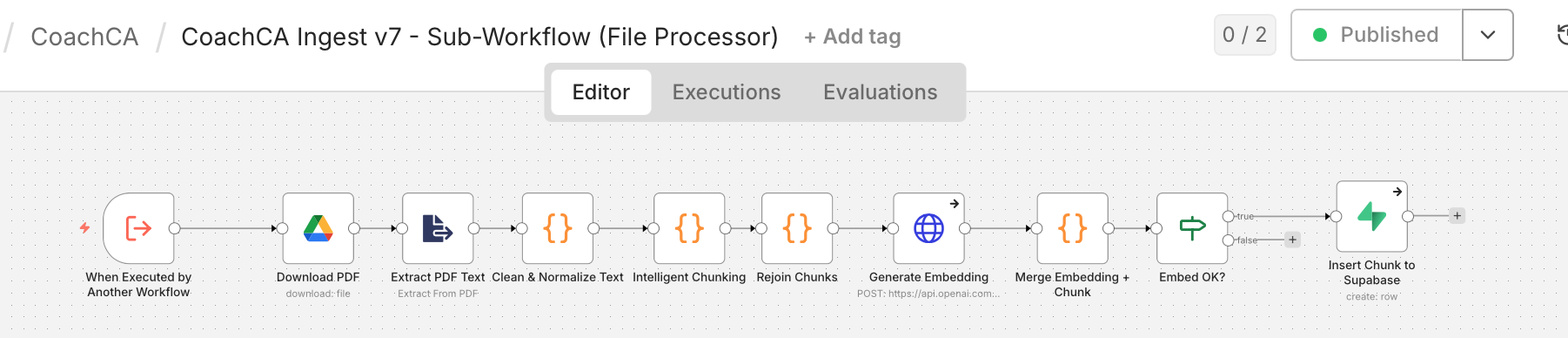
Thank you, that was very helpful. I divided the workflow just as you recommended, but the behaviour is not as expected. In the intended workflow, the main workflow identifies all the files in a google drive folder and then should loop through them 1 at a time. The ‘File Ingested?’ node then checks if the file is already in the database. if true → go to next file. if false, go to the ingestion workflow (which has ‘wait for sub-workflow completion’ enabled). Instead of going through one file at time in the false branch, it continues to iterate and ‘collects’ all the files in the false branch in ‘File Ingested?’ node, after which it tries to execute ‘Prepare sub-workflow input’ node and through the sub workflow with a big list of files one at a time . since there are large number of files, it again runs into the memory problem. I do not understand why the loop continues to run without fully executing the false branch ? ie. once ‘In ingested?’ node identifies a particular file that is not ingested, it should execute the ‘prepare sub-workflow input’ node, then call sub workflow node, then wait for it complete, then execute ‘file memory clean up’ node and then go back to the ‘Loop files’ node and pick up the next file. instead it goes through 70-80 files (it changes) and then creates a back log of all the un-ingested files and then tries to process them. I have attached screenshots of the main workflow and sub workflow.
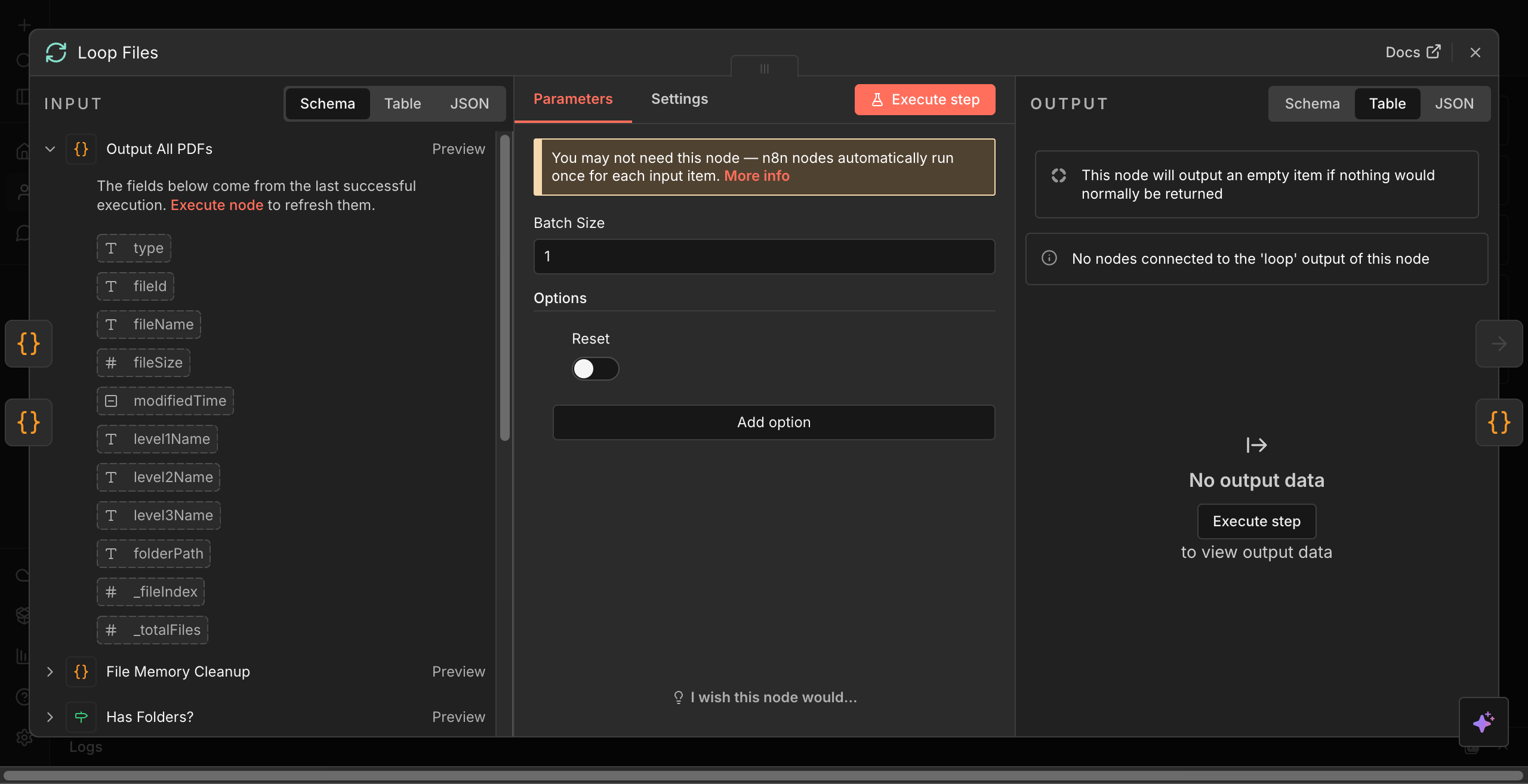
The behavior of the Loop node does look unusual. How many items per batch do you currently have it configured to process? Could you share a screenshot of the Loop node configuration?
its configured for batch size of 1. screenshots of the loop files configuration attached. I also did a screen recording ( Workflow Automation - n8n ) . you can see in the 11-12th second, the false branch is activated but instead of proceeding to execute ‘Prepare sub-workflow input’ node the loop iteration count continues to increase.
I found a work around the loop problem. I moved the ‘is ingested’ function out of the loop and and create a list of files not ingested and then loop through that list with subworkflow. This removes the problematic ‘if’ node out of the loop. It works as intended. but I still get the ‘connection lost’ , typically after 3-4 files. the loop has a list of about 90-100 files that it should loop through 1 at a time.
@aandhi
that bulk check before the loop was a really smart move. it definitely speeds things up, but you’re still hitting a second memory trap: accumulated loop results.
even though the sub-workflow frees its internal memory, your main Loop Files node still collects the final output from every single run. if your sub-workflow finishes by returning heavy vector rows from the Insert Chunk to Supabase node, the main workflow holds all of that data in RAM until the websocket snaps.
here are a couple of things you could try to fix it:
1. you could try adding an Edit Fields (Set) node at the very end of your sub-workflow, right after the Supabase insert. configure it to drop all incoming data and only return a tiny payload, like { "status": "success" }. this prevents the main loop from hoarding gigabytes of vector arrays.
2. how are you running this workflow? which might be the second half of the problem.i noticed in your screen recording you were clicking the manual “Execute Workflow” button.
if this is the case then, n8n attempts to stream the execution data for every single node directly to your browser tab. the frontend almost always crashes on bulk processing like this. you could try activating the workflow and triggering it via a Webhook or Schedule node so it processes silently.
Hi - quick update. I implemented both your suggestion. The sub-workflow still crashes when processing the 3/4/5th file (depending on size I am guessing). The ‘failed execution logs’ don’t show anything (I can see the data for the successful executions). I even tried updating the settings to ‘not save’ any execution data but it still crashes. I am working with pdf files (1-2 mb) that have mostly text. Any other ideas ? Thank you for your help. Are there other platforms you recommend ?
Just to update everyone, it looks like n8n assigns extremely limited resources per workflow, so it crashes. I ran virtually the same code on my local machine (m2 MacBook Air) and it worked perfectly.