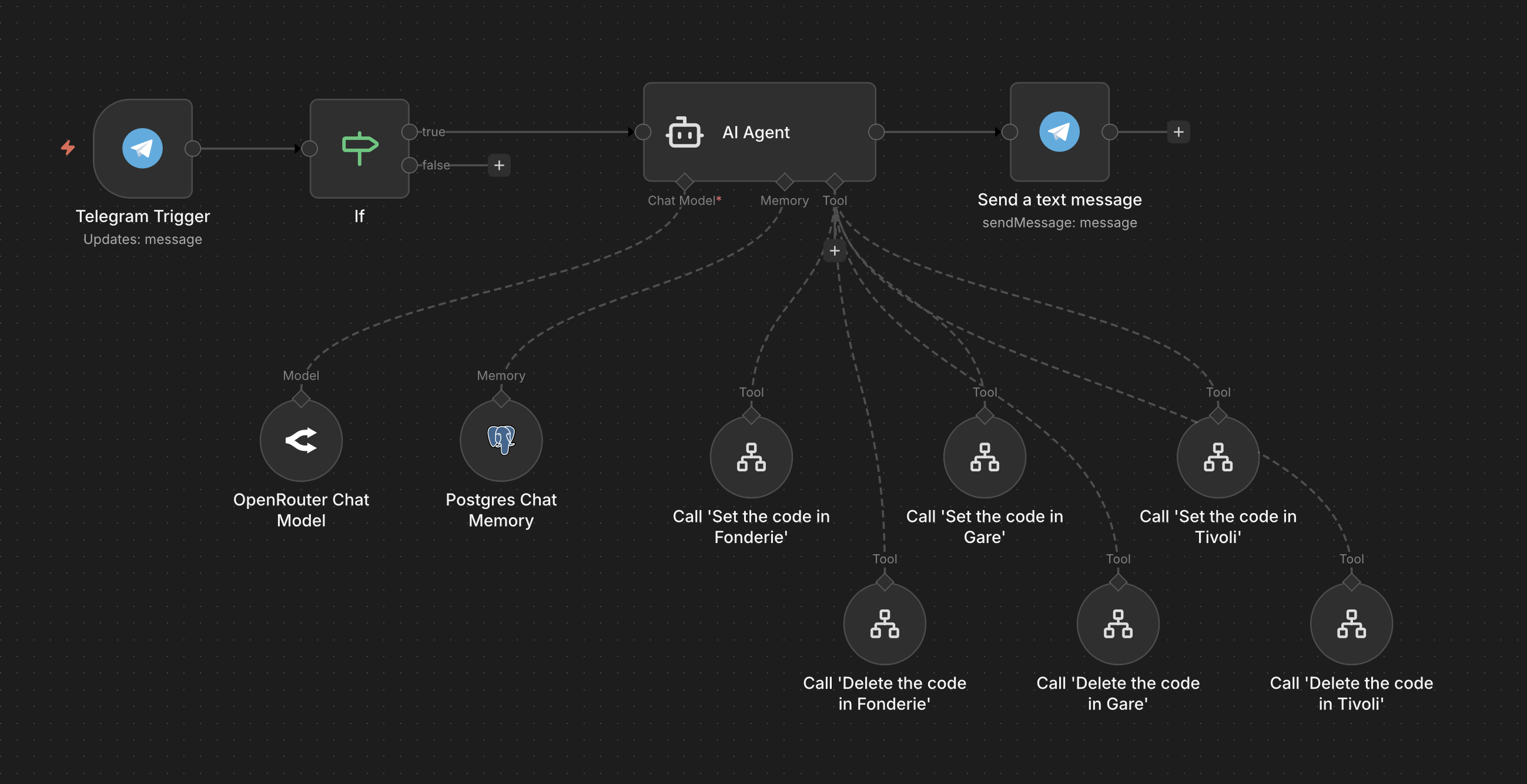
Hi,
I have a workflow that allows me to set/delete door codes in our coworking spaces, with Telegram.
I’d like to add the ability to set a code, but for a specific duration. This requires setting the code, and after a few minutes / hours, deleting it of course.
What is the most elegant / secure way to do this in n8n? I’d like to keep the instant feedback when I chat with n8n through Telegram, and if possible have code deletion survive a server reboot.
How would you do this, the n8n way?
Hi @philippelang,
I am not too sure how you are currently setting and deleting your door codes, but the simple way I would do this is to add the door code to a data table when setting the code with it’s desired expiry date calculated. So for example if you created a code for 10 minutes, calculate 10 minutes from the current time and store that record. Then simply have a scheduler run every minute and check for expired codes. If any found, delete them.
I am happy to help with an example if I can get a better understanding of your current implementation of creating and storing your door codes.
Hi, thanks for your answer!
I was thinking at a solution like this, but I was wondering if there wasn’t a more elegant, less programmatic way of doing things. If anyone of the n8n team reads us: a programmable “scheduler” node would be fantastic…
Hi @philippelang, yes I hear you. But, I think this is more an architectural design issue than a product feature limitation since the use cases for this type of thing can be very broad.
Let me know if you need help with this type of thing, but maybe you could build a central workflow dealing with these kind of scenarios for any future workflow you have this need for, so you essentially build it once generically and re-use it for everything else.
Oh I’m not talking about any sort of “limitation” at all! Building a scheduler with a table is perfectly fine, but I could imagine - one day - a scheduler node in n8n, let’s say in version 3! I have the feeling it would make sense.
I’ll try building something soon, and if possible reusable, as you propose!
Can you explain a bit more on how you envision the scheduler node you’re referring to? Perhaps Im not understanding 100%.
Currently there is a basic scheduler node you can use to then execute any specific logic you need.
I’m using this “Scheduler” node, and my idea would be a bit different: when a node calls another one, we could specify when it is run in the future. Just like a wait, but a node that does not block at all.
In my case, from my AI node, that would allow me to run “set code” straight away, and “delete code” in the future, giving me a “temporary code”.
Works great, thanks!
I struggled a bit with the text of my agent, in order to have my “temporary codes” work properly and message sent back correctly to the user. but it seems to work fine.
I’m sure it can be refined and that other AI models can be used. I have been using Claude Opus 4.5 for now…
For those interested:
You are a door assistant. Be helpful and polite when you talk with the users. You have a Telegram tool available, in order to send a text message to the user. Please use it.

The user may want you to perform these different tasks:

--


Task a: set the code in one of the available locations (Fonderie, Gare, Tivoli)
You can use the tools you have in order to set the code in the proper location.

After performing this task a, send a text message to the user, explaining him what has happened.

-

Task b: delete the code in one of the available locations (Fonderie, Gare, Tivoli), or maybe in all locations at once
You can use the tools you have in order to delete the code. Use a delay of 0.

After performing this task b, send a text message to the user, explaining him what has happened.

-

Task c: set the code in one of the available locations (Fonderie, Gare, Tivoli), but for a certain duration
This task requires two steps, performed in this exact specific order:

Step 1: set the code in one of the available locations, as explained in task a
Step 2: delete the code in one of the available locations, as explained in task b, but with a delay equal to the duration specified by the user

Before performing this task c, send a text message to the user, explaining him what will happen.
After performing this task c, send a text message to the user, explaining him exclusively about step 2, telling him it has already happened in the past. Don't mention step 1.


--

Don't use a location by default: the user has to specify it.
This is great news @philippelang. PS, you can use Claude.ai and ask it to enhance your system prompt and adding any rules you want it to add to make it more robust.
1 Like