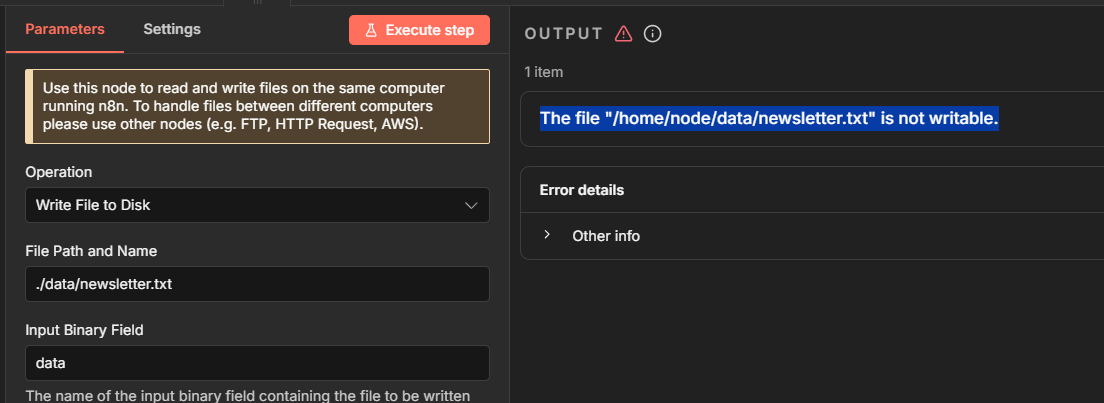
DOCKER Write permission issue : The file "/home/node/data/newsletter.txt" is not writable

Hello all. I think there is a real topic here. So many similar topic but still the same problem. After trying almost everything I saw on the other topics, I have no choice but to pos here because the issue is not resomve on my end

Describe the problem/error/question

I’m trying to write a file to disk but it fails, supposedly because of permissions

To create the container, I run this command :

docker run -it --rm --name n8n -p 5678:5678 -e GENERIC_TIMEZONE=Europe/Paris -e TZ=Europe/Paris -e N8N_ENFORCE_SETTINGS_FILE_PERMISSIONS=true -e N8N_RUNNERS_ENABLED=true -v n8n_data:/home/node/.n8n --mount type=bind,source=C:\Users\Teo\Documents\output_volume,target=/output docker.n8n.io/n8nio/n8n

When that command is executed, I get the following directory structure inside the container :

What is the error message (if any)?

The error message I get in n8n is : (notice I use ./data/newsletter.txt which makes it go as expected to /home/node/data)

Please share your workflow

Share the output returned by the last node

The file “/home/node/data/newsletter.txt” is not writable.

Information on your n8n setup

  • n8n version: 2.1.5
  • Database (default: SQLite): default
  • n8n EXECUTIONS_PROCESS setting (default: own, main): default
  • Running n8n via (Docker, npm, n8n cloud, desktop app): Docker
  • Operating system: Windows

Hi @Teo25,

Did you following documentation for this section adding the path to your env vars?

This is a new requirement since version 2

1 Like

Hi @Wouter_Nigrini

Thanks for your reply

I tried to set N8N_RESTRICT_FILE_ACCESS_TO and this gave me the following error

The docker run command is

docker run -it --rm --name n8n -p 5678:5678 -e GENERIC_TIMEZONE=Europe/Paris -e TZ=Europe/Paris -e N8N_ENFORCE_SETTINGS_FILE_PERMISSIONS=true -e N8N_RUNNERS_ENABLED=true -e N8N_RESTRICT_FILE_ACCESS_TO=/output -v n8n_data:/home/node/.n8n --mount type=bind,source=C:\Users\Teo\Documents\output_volume,target=/output docker.n8n.io/n8nio/n8n

As you can see, I only added the following option to the command

-e N8N_RESTRICT_FILE_ACCESS_TO=/output

The filesystem permissions are the same as in my original post

Ok so I was able to replicate the exact error. I then deleted the write node and add it again and the error went away. Not sure why the node was broken but try recreating the node. The docker settings looks good

Glad it worked for you. But for me, it’s still the same issue. I deleted the node. Stopped the container. Restarted the container and recreated the node. But still, the same error persists. I don’t even know if its n8n bug or a docker quirky configuration thats bogging me