Hey n8n fam!
Just wanted to share a new community node I’ve been testing—n8n-nodes-picedit (aka the Easy Custom Image Creator)—and it’s perfect for anyone who needs to make custom images without complex tools. Let’s break down what this handy node does:
1. Core Goal: Beginner-Friendly Image Customization
No steep learning curve here! The n8n-nodes-picedit node is built for folks new to n8n (or image editing) who want to quickly add text, overlay images, or tweak existing visuals—no design skills required. It’s straightforward, intuitive, and gets the job done fast.
2. Key Features of n8n-nodes-picedit
 Start Fresh or Use Existing Images
-
New Image: Set width/height + background color to create a blank canvas (great for posters, simple graphics, or custom templates).
-
Import Existing: Upload or link to an existing image (product shots, certificates, templates, etc.) to edit—no need to rebuild from scratch.
Add & Tweak Text
Overlay text with full control, all within the node:
-
Adjust size, position (X/Y coordinates or quick align options like “center” or “left”), and font (supports standard system fonts + custom font uploads).
-
Tweak color (via RGB values or hex codes), transparency (0-100% to avoid 遮挡 ing image details), and rotation (0-360°—perfect for angled labels or creative text).
Overlay Images
Stack logos, icons, watermarks, or other visuals on your base image:
- Control position (pinpoint with X/Y coordinates), scale (shrink to fit a corner or enlarge for a decorative element), and rotation—ideal for branding or adding context to images.
Bulk Text Overlay (Game-Changer!)
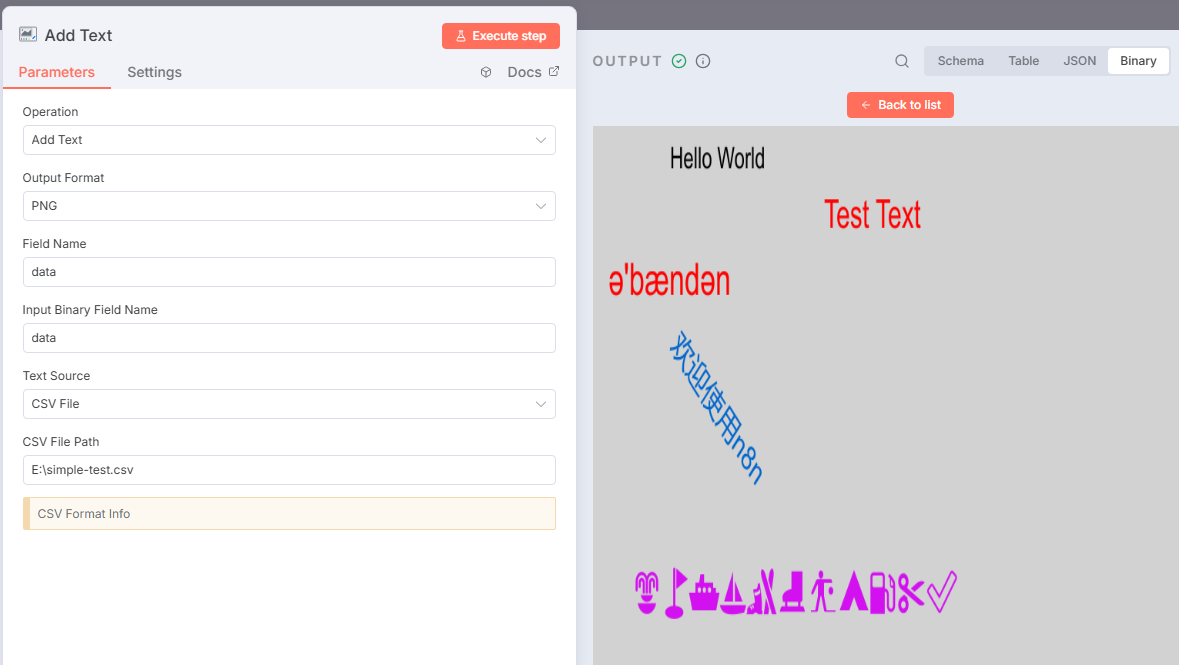
Save hours of repetitive work with CSV-powered bulk text:
-
Drop a CSV file with columns for text content + parameters (font, color, position, rotation—all the settings above).
-
The n8n-nodes-picedit node auto-applies every text entry to your image(s) in one run.
-
Use case example: Batch-add names to 50+ certificates, or product SKUs to a folder of product photos—no manual edits needed!
3. Where to Get n8n-nodes-picedit
Finding and installing the node is easy:
-
Head to the n8n Community Nodes library (via the n8n UI or your preferred access point).
-
Search for “n8n-nodes-picedit” in the search bar—you’ll spot it right away.
-
Install it like any other community node, then drag it into your workflow to start customizing images.
4. Feedback Welcome for n8n-nodes-picedit!
I’ve used n8n-nodes-picedit for small-batch social media graphics and bulk product label updates, and it’s been a huge time-saver. But I’d love to hear how you might use it—whether for branding, admin tasks, or creative projects.
If you spot bugs, have feature requests (e.g., filter support, bulk image overlays), or want to share a workflow you built with the node—drop a comment below! Let’s make n8n-nodes-picedit even better together.
Happy automating, hundred98