Arusha
February 6, 2026, 7:15pm
1
The Struggles:
The Crash: I keep getting Cannot read properties of undefined (reading ‘toLowerCase’). It happens in the Code Node when an email has no attachments or a different structure.
The Logic: I need the Body as a text message and each PDF as a separate file.
Missing Data: Sometimes the Telegram node is triggered but doesn’t send the actual file.
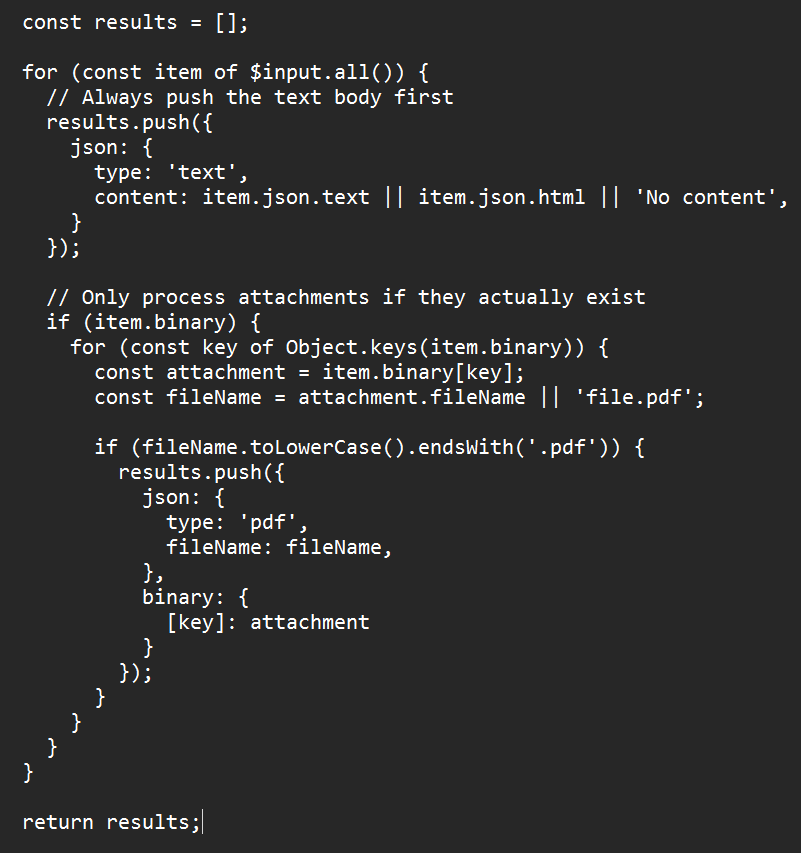
My Code Node logic (causing the crash):
Any idea how to make the PDF extraction bulletproof without crashing the whole flow?
Thanks!
Arusha
February 6, 2026, 8:24pm
3
Unfortunately, I’m getting the following error here too:
Cannot read properties of undefined (reading ‘toLowerCase’) [item 0]
Try changing the type of comparison. Alternatively, you can enable ‘Convert types where required’.
At least that’s what the switch type node says.
Input
[
{
“type”: “text”,
“content”: “(Empty)”,
“subject”: “Test”
},
{
“type”: “pdf”,
“fileName”: “Allgemein - Einstellungen - Jellyseerr.pdf”
}
]
Arusha
February 6, 2026, 10:45pm
4
Unfortunately, I really don’t understand what I’m doing wrong… because no matter how, unfortunately, it doesn’t work. Everything is sent reasonably, but the attachments just don’t.
achamm
February 6, 2026, 10:46pm
5
Did you turn on Convert types where required? @Arusha
Arusha
February 6, 2026, 11:07pm
6
Yes, I did that, but unfortunately it didn’t help
still get
Cannot read properties of undefined (reading ‘toLowerCase’) [item 0]
Brighto
February 6, 2026, 11:56pm
7
Hey @Arusha found the issues, Replace your Code Node logic with this:
let results = [];
const items = $input.all();

if (items.length > 0) {
    const firstItem = items[0].json;

    // Always add the email body as text
    results.push({
        json: {
            type: "text",
            content: firstItem.text || firstItem.textPlain || firstItem.html || "(Empty)",
            subject: firstItem.subject || "No Subject"
        }
    });

    // Process all items for PDF attachments
    for (const item of items) {
        if (item.binary && typeof item.binary === 'object') {
            for (let key of Object.keys(item.binary)) {
                const binaryData = item.binary[key];

                // Bulletproof checks
                if (binaryData && binaryData.data) {
                    const fileExtension = binaryData.fileExtension || '';
                    const fileName = binaryData.fileName || 'unknown';
                    const mimeType = binaryData.mimeType || '';

                    // Check if it's a PDF by extension OR mime type
                    const isPdf = fileExtension.toLowerCase() === 'pdf' ||
                                  mimeType.toLowerCase().includes('pdf');

                    if (isPdf) {
                        results.push({
                            json: {
                                type: "pdf",
                                fileName: fileName
                            },
                            binary: {
                                data: binaryData
                            }
                        });
                    }
                }
            }
        }
    }
}

return results;
Hope this helps!
1 Like
Arusha
February 7, 2026, 11:37am
8
Cannot read properties of undefined (reading ‘toLowerCase’) [item 0]
Unfortunately, I’m getting this error here too.
I honestly don’t understand what the problem is with n8n.
Error Details:
{[email protected] _@[email protected] _ec37920eb95917b28efaa783206b20f3/node_modules/n8n-core/src/execution-engine/node-execution-context/utils/extract-value.ts:211:9)“,getNodeParameter (/usr/local/lib/node_modules/n8n/node_modules/.pnpm/n8n-core@file+packages+core @[email protected] _@[email protected] _ec37920eb95917b28efaa783206b20f3/node_modules/n8n-core/src/execution-engine/node-execution-context/node-execution-context.ts:490:29)”,[email protected] _@[email protected] _ec37920eb95917b28efaa783206b20f3/node_modules/n8n-core/src/execution-engine/node-execution-context/execute-context.ts:128:9)“,[email protected] _asn1.js@5_8da18263ca0574b0db58d4fefd8173ce/node_modules/n8n-nodes-base/nodes/Switch/V3/SwitchV3.node.ts:372:29)”,[email protected] _@[email protected] _ec37920eb95917b28efaa783206b20f3/node_modules/n8n-core/src/execution-engine/workflow-execute.ts:1045:31)“,[email protected] _@[email protected] _ec37920eb95917b28efaa783206b20f3/node_modules/n8n-core/src/execution-engine/workflow-execute.ts:1226:22)”,[email protected] _@[email protected] _ec37920eb95917b28efaa783206b20f3/node_modules/n8n-core/src/execution-engine/workflow-execute.ts:1662:38",[email protected] _@[email protected] _ec37920eb95917b28efaa783206b20f3/node_modules/n8n-core/src/execution-engine/workflow-execute.ts:2297:11”
achamm
February 7, 2026, 8:55pm
9
Hey @Arusha Try this! - Also ensure your telegram node can receive binary like it is set to be able too.
// Get items from the previous nodeconst items = $input.all();const results = ;for (const item of items) {// Safely get the body textconst bodyText = item.json.textPlain || item.json.textHtml || item.json.text || ‘’;// Send body as a text messageresults.push({json: {type: ‘text’,content: bodyText,},});// Safely handle attachmentsconst attachments = item.json.attachments || item.binary || {};for (const [key, attachment] of Object.entries(attachments)) {// Guard against undefined propertiesconst mimeType = (attachment?.mimeType || attachment?.contentType || ‘’).toLowerCase();const fileName = (attachment?.fileName || attachment?.name || ‘’).toLowerCase();if (mimeType === ‘application/pdf’ || fileName.endsWith(‘.pdf’)) {results.push({json: {type: ‘pdf’,fileName: attachment.fileName || attachment.name || ‘document.pdf’,},binary: {data: item.binary?.[key] || attachment,},});}}}return results;
Hi @Arusha , welcome to the n8n community
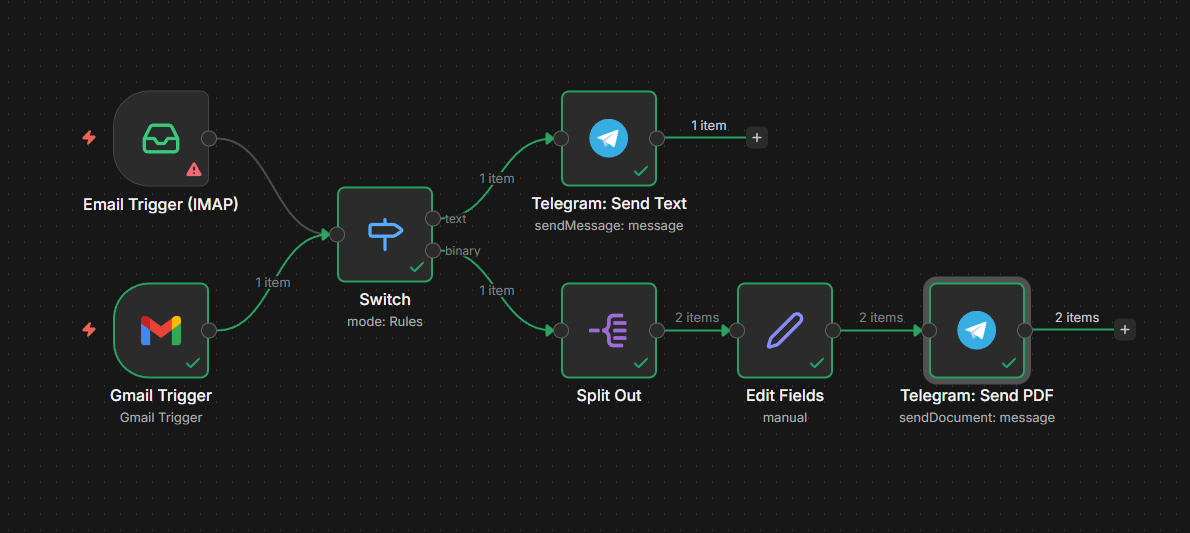
After that, I would use a Switch node to route text items to Telegram Send Text and PDF items to Telegram Send PDF using the binary property data. This avoids the crash and handles emails with or without attachments reliably.
Hi @Arusha ,
I think this is simpler than using a Code node,
However, if you ask me for the simplest no-code way to do this, I would do it like this:
Note that I tested it with Gmail; it should work with IMAP as well:
Feel free to edit this workflow as needed.
Arusha
February 8, 2026, 6:53pm
12
Hello, unfortunately I can’t test your tips today because I don’t have access to my N8N on the go. As soon as I have access again, I’ll report. But thanks for your effort in advance.
1 Like
Arusha
February 11, 2026, 10:24am
13
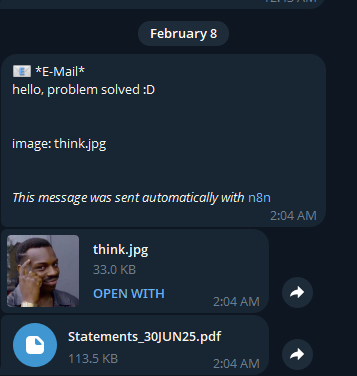
Okay, so he sends me the PDF, but not the content of the email
Sent from gmx to mailcow.
So not Gmail.
 ! From what I can see, the crash happens because the Code node is calling toLowerCase on items that do not have a fileName, such as the email body. To fix this and make sure both text and PDF attachments are sent correctly, I would replace the current Code node with the setup below