Describe the problem/error/question
We are setting up a self-hosted instance. The instance worked well until this weekend.
Last changes were the add of a certificate for HTTPS and the activation of SSO using saml.
From now on, any user accessing the instance of N8N are automatically conected as a particular user (the same for every one) and all requests from the frontend are returned as 401 error by the backend. The user does exist in the database. The login screen is skipped.
It’s like the frontend is working but cannot communicate with the backend.
The only working display seems to be the workflow tab but i can’t load any of them in editor.
The signout button is “Unauthorized” too so cannot go to login screen.
What is the error message (if any)?
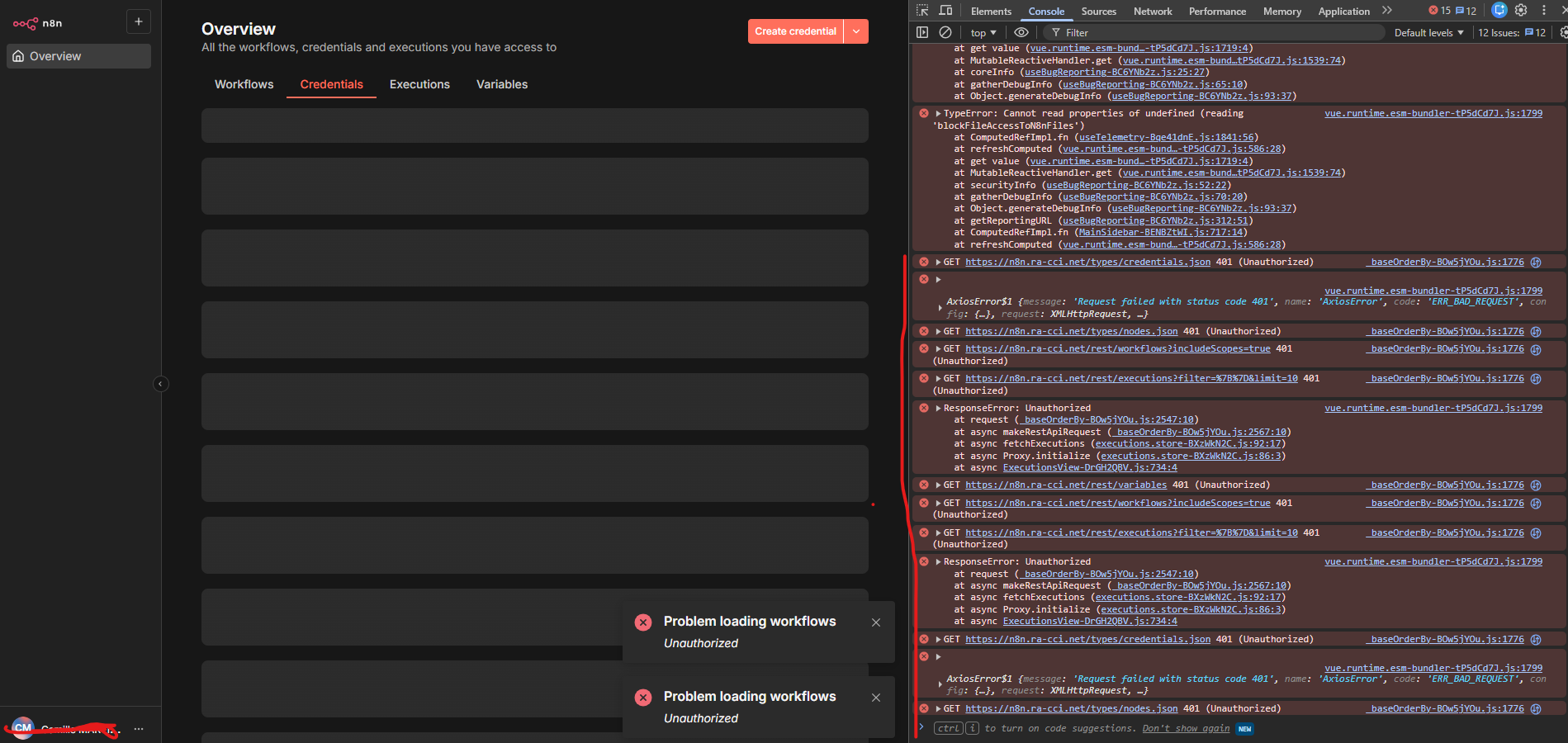
The server logs doesn’t return any errors :
root@69rciv-n8n:/opt/container/n8n-compose# sudo docker compose logs -f
n8n-1 | Initializing n8n process
n8n-1 | n8n ready on ::, port 5678
n8n-1 | n8n Task Broker ready on 127.0.0.1, port 5679
n8n-1 | [license SDK] Skipping renewal on init: license cert is not due for renewal
n8n-1 | Registered runner “JS Task Runner” (…)
n8n-1 | Version: 1.123.4
n8n-1 | Start Active Workflows:
n8n-1 | Activated workflow “API XXXX” (ID: [ID])
n8n-1 |
n8n-1 | Editor is now accessible via:
n8n-1 | ``https://n8n.our-url.net
Action tried :
- Shutdown and restart - compose down then compose up -d
- Restarting the whole machine and not only the docker
- Upgrading N8N to latest version
- Checking if our HTTPS certificates is valid and it seems valid.
- Tried to disable SSO with environnement variables :
N8N_SSO_SAML_ENABLED=false - N8N_SSO_OIDC_ENABLED=false - N8N_SSO_LDAP_ENABLED=false
But didn’t change anything - Tried to disable SSO by changing the authentication method in database to email instead of saml, but didn’t change a thing.
- Tried the variable N8N_SECURE_COOKIE as seen in other post who have 401 errors, but doesn’t look right because we are using HTTPS and didn’t correct the problem.
- Checked the firewall but didn’t notice any problems.
- Some other small things that i don’t remember right now.
Information on your n8n setup
- n8n version: 1.123.4
- Database (default: SQLite): SQLite
- n8n EXECUTIONS_PROCESS setting (default: own, main):
- Running n8n via (Docker, npm, n8n cloud, desktop app): Docker
- Operating system: Ubuntu 24.04
Our compose.yaml extract for n8n image :
n8n:
image: ``docker.n8n.io/n8nio/n8n
restart: always
ports:
- “127.0.0.1:5678:5678”
labels:
- traefik.enable=true
- traefik.http.routers.n8n.rule=Host(${SUBDOMAIN}.${DOMAIN_NAME})
- traefik.http.routers.n8n.tls=true
- traefik.http.routers.n8n.entrypoints=web,websecure
- traefik.http.routers.n8n.tls.certresolver=mytlschallenge
- traefik.http.middlewares.n8n.headers.SSLRedirect=true
- traefik.http.middlewares.n8n.headers.STSSeconds=315360000
- traefik.http.middlewares.n8n.headers.browserXSSFilter=true
- traefik.http.middlewares.n8n.headers.contentTypeNosniff=true
- traefik.http.middlewares.n8n.headers.forceSTSHeader=true
- traefik.http.middlewares.n8n.headers.SSLHost=${DOMAIN_NAME}
- traefik.http.middlewares.n8n.headers.STSIncludeSubdomains=true
- traefik.http.middlewares.n8n.headers.STSPreload=true
- traefik.http.routers.n8n.middlewares=n8n@docker
environment:
- N8N_TRUST_PROXY=true
- N8N_PROXY_HOPS=1
- N8N_GIT_NODE_DISABLE_BARE_REPOS=true
- N8N_BLOCK_ENV_ACCESS_IN_NODE=false
- N8N_ENFORCE_SETTINGS_FILE_PERMISSIONS=true
- N8N_HOST=${SUBDOMAIN}.${DOMAIN_NAME}
- N8N_PORT=5678
- N8N_PROTOCOL=https
- N8N_RUNNERS_ENABLED=true
- NODE_ENV=production
- N8N_NODE_ENV=production
- WEBHOOK_URL=``https://$``{SUBDOMAIN}.${DOMAIN_NAME}/
- GENERIC_TIMEZONE=${GENERIC_TIMEZONE}
- TZ=${GENERIC_TIMEZONE}
- DB_SQLITE_POOL_SIZE=2
- NODES_EXCLUDE=[“n8n-nodes-base.executeCommand”,“n8n-nodes-base.readWriteFile”]
- N8N_EMAIL_MODE=smtp
- N8N_SMTP_HOST=[our-host]
- N8N_SMTP_PORT=465
- N8N_SMTP_SSL=true
- N8N_EMAIL_FROM="[our-email]"
- N8N_SMTP_SENDER=“n8n Automation”
- CREDENTIALS_OVERWRITE_ENDPOINT=send-credentials
- CREDENTIALS_OVERWRITE_ENDPOINT_AUTH_TOKEN=secure-token
- CREDENTIALS_OVERWRITE_DATA={“microsoftOAuth2Api”:{[datas]}
volumes:
- n8n_data:/home/node/.n8n
- ./local-files:/files
Any ideas are welcome, thanks a lot for your help ! 
I’ve been searching for hours and have no more ideas. 