Hello community,
I am attempting to configure the Google Analytics (GA4) node within n8n, but I am unable to complete the authentication process.
Symptom: After clicking “Sign in with Google” and logging in with the account that has access to GA4, I receive the following error from Google:
500. That’s an error.
There was an error. Please try again later. That’s all we know.
What I have already tried:
Created the OAuth consent screen (External) and added my account as a Test User.
Created an OAuth Client ID (Web application) with the Authorised redirect URI copied directly from n8n.
Verified that the Analytics Data API is enabled in Google Cloud.
Tested across different browsers, including Incognito/Private mode.
Re-created the Client ID and Client Secret.
Confirmed that the account being used has the necessary permissions for the GA4 property.
Redirect URI in use: https://oauth.n8n.cloud/oauth2/callback
Despite all of the above steps, I still encounter the 500 error.
Has anyone experienced this issue, or could you suggest further steps to resolve it?
Thank you in advance for your assistance. 
500 errors during Google auth usually mean a mismatch in setup. A few things to check:
-
Ensure your OAuth consent screen is published, not just in testing.
-
Confirm the redirect URI in Google Cloud matches exactly what n8n shows.
-
Recreate the Client ID/Secret and update them in n8n.
-
Clear existing credentials in n8n and try again.
-
Make sure the Analytics Data API is enabled in your Google Cloud project.
Many users fixed it by publishing the consent screen or correcting the redirect URI.
Today, I´m obtaining this error. I think it could be a N8N Permission Problem to integrate with Google Analytics. In the GA4 & Google Cloud I have all the permissions granted. May you help me with this topic? Thank you very much!
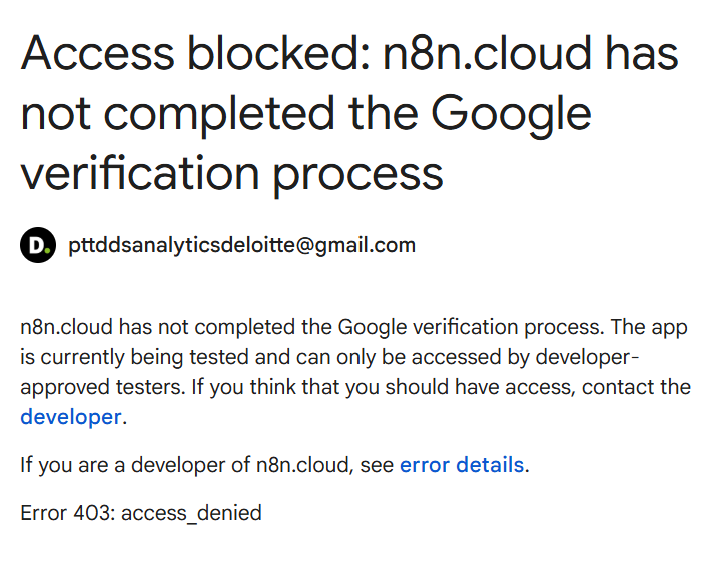
The 500 error happens because n8n Cloud hasn’t completed Google’s OAuth verification for GA4. Even with correct GA4 permissions, Google blocks access.
Workarounds:
-
Use a service account for GA4 in n8n instead of OAuth.
-
Self-host n8n and use your own OAuth credentials.
-
Wait for n8n Cloud verification to complete.
This is not a GA4 permission issue; it’s Google blocking unverified apps.
n8n cloud is verified and we don’t offer a one click option for Analytics so I suspect in this case the app in the Google API console has been called n8n.cloud
The options here would be to change the app from testing to production or adding the email address to the list of allowed accounts.
This topic was automatically closed 90 days after the last reply. New replies are no longer allowed.