I am using self hosting, using docker and postgres. Everytime I launch the n8n server I have to setup all of my credentials again. How do I get the credentials to persist through server restarts?
N/A
N/A
N/A
n8n version: 2.2.4 Database (default: SQLite): Postgres n8n EXECUTIONS_PROCESS setting (default: own, main): Running n8n via (Docker, npm, n8n cloud, desktop app): Docker Operating system: Ubuntu 24.04 LTS
Hi @Matt_Marchio ,
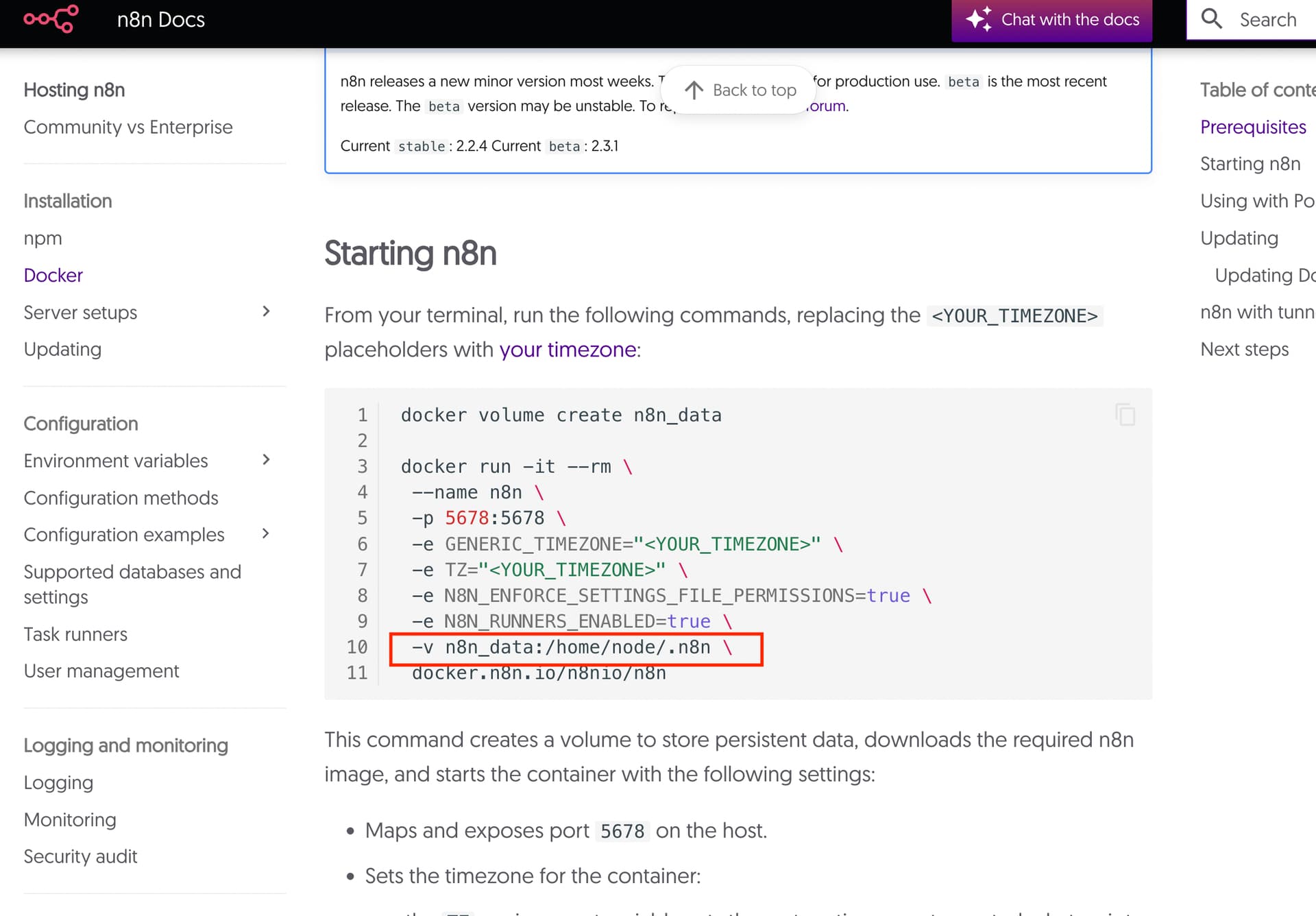
You need to set a volume to the n8n data directory so that data is retained across reboots
Here’s an example docker compose file:
services:
  n8n:
    image: n8nio/n8n:latest
    container_name: n8n-main
    volumes:
      - n8n_data:/home/node/.n8n
    ports:
      - "5678:5678"
    environment:
      # Task runner configuration for v2 (external mode)
      - N8N_RUNNERS_ENABLED=true
      - N8N_RUNNERS_MODE=external
      - N8N_RUNNERS_BROKER_LISTEN_ADDRESS=0.0.0.0
      - N8N_RUNNERS_AUTH_TOKEN=your-secret-here

  task-runners:
    image: n8nio/runners:latest
    container_name: n8n-runners
    environment:
      # Task runner configuration
      - N8N_RUNNERS_MODE=external
      - N8N_RUNNERS_TASK_BROKER_URI=http://n8n-main:5679
      - N8N_RUNNERS_AUTH_TOKEN=your-secret-here
      # Enable Python and JavaScript support
      - N8N_RUNNERS_ENABLED_TASK_TYPES=javascript,python
      # Auto shutdown after 15 seconds of inactivity
      - N8N_RUNNERS_AUTO_SHUTDOWN_TIMEOUT=15
    depends_on:
      - n8n

volumes:
  n8n_data:
To run this, create a folder on your local machine somwhere and call it “docker-compose.yml”.
Then in a terminal / command prompt run the command:
docker compose up
Also check the official documentation for an example using docker run:
1 Like
I had to disable that a while ago because it was breaking my install (wouldn’t authenticate), I guess I’ll just have to live with it.
1 Like
Hi @Matt_Marchio ,
Can you please elaborate what you mean by breaking your install?
If my answer helped, please can you mark it as the solution
When I enabled the n8n_data volume, my login credentials no longer worked. And I couldn’t reset the state of the volume back to the first install state.
You can delete the volume if you didnt have anything sensitive.
Shutdown your instance, then:
docker volume ls

docker volume rm -f <volume_name>
OR
you can reset your password using the below technique.
docker exec -u node -it <n8n-container-name> n8n user-management:reset
system
January 16, 2026, 7:42am
7
This topic was automatically closed 7 days after the last reply. New replies are no longer allowed.