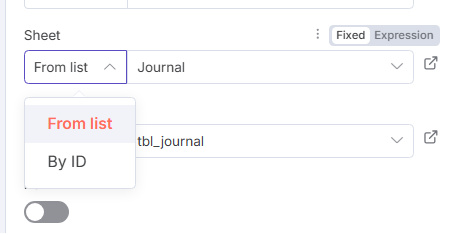
The UI of the Microsoft Excel 365 node was updated recently to align it with the way other file‑based nodes work. In the old node you could select a workbook, worksheet and table “by name”. In the new node you have two options for each of these fields:
From list – n8n will fetch a list of your workbooks/sheets/tables via Microsoft Graph and you can pick the desired one from a dropdown. This is the easiest way to choose by name: the entry in the list uses the workbook or worksheet title, so it’s effectively “by name.”
By ID – you can manually provide the identifier of the workbook, sheet or table. This is useful for dynamic workflows. If you don’t have the ID handy you can click the Expression (fx) button next to the field and simply enter the name (e.g. "Sheet1" or "tbl_journal"), since the ID for a worksheet or table is usually its internal name. You can also use a prior node to fetch the workbook/sheet metadata and then reference the .id or .name property in your expression.
If your workflow relies on the previous behaviour and you can’t get what you need from the dropdown, there are two work‑arounds:
Use the HTTP Request node to call the Microsoft Graph API directly. The documentation notes that whenever a node doesn’t support an operation you require, you can call the service’s API using the HTTP Request node with your existing credential. The Graph API’s /workbook/worksheets and /tables endpoints let you look up sheet and table names and IDs.
Reuse an old version of the node from a previous workflow. You can copy a working Excel node from a workflow created before the update and paste it into your new workflow. n8n will keep using that node’s version until you explicitly upgrade it.
So the functionality isn’t gone, it’s just been refactored: use From list to select by name, or switch the field to Expression and supply the name/ID directly.