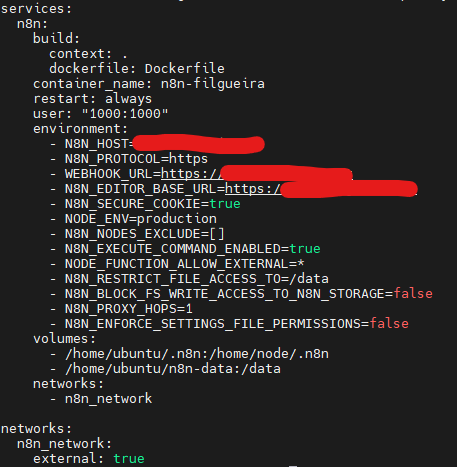
I’m using version 2.4.8. The node execute command doesn’t appear and isn’t available, even though it’s configured in my docker-compose.yml. Any tips? I’m using a VPS with Ubuntu 24.04, Docker, and Nginx.
Add this to your docker compose environment section and create the container:
N8N_ENABLE_UNSAFE_CORE_NODES=TRUE
Then run docker compose down && docker compose up -d to fully restart.
After that, the execute node will apper in the node list.
ps: in newer n8n versions the execute node is hidden by default for security reason, even if N8N_EXECUTE_COMMAND_ENABLED=TURE is set.
Im realy sorry about that impression.
My motivation is to help the community. My english isn’t very good, and use AI to support my answers, but sometimes it brings back some info not completely sure.
The correct documented method is to adjust Nodes_Exclude:
Solved. I misspelled the environment variable. I wrote N8N_NODES_EXCLUDE instead just NODES_EXCLUDE. Sorry!! I guess it’s just old age catching up with me.. hahaha
The best thing IMO (and yes seriously not joking now) is that “Find open questions” is now only a few questions away instead of hundreds, and it actually resets.
Honestly, it’s going to be very satisfying to see it hit zero soon