I have a workflow that runs without error for 100+ iterations then it errors because an expression that evaluates successfully for all the iterations suddenly turns into undefined. I have encountered this problem twice, both times errored in exactly the same node. The 1st attempt errored on 119th iteration while the 2nd attempt on 110th iteration. The expression that failed and became undefined is on a static node outside of the loop so it’s strange why it turns into undefined at around the same time.
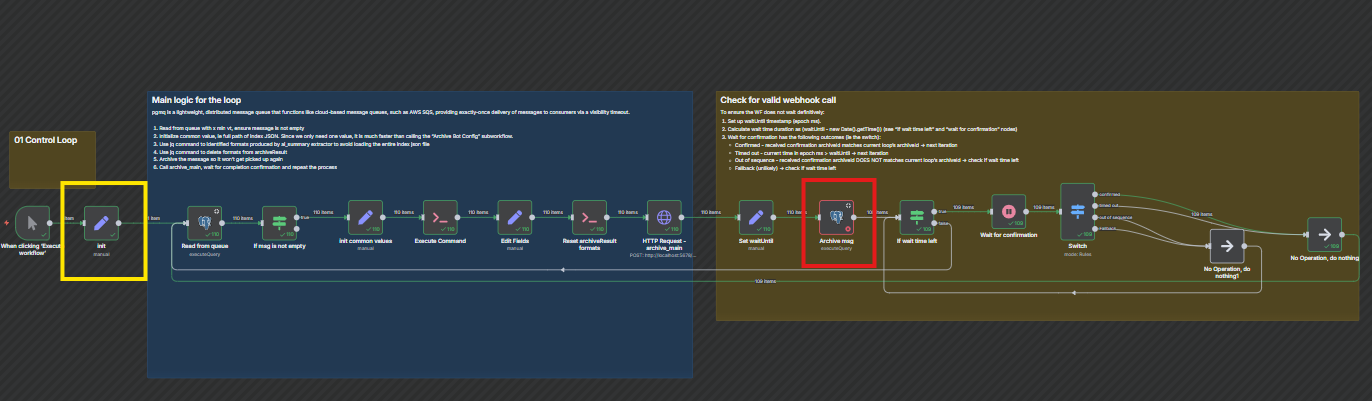
At a high level, the workflow reads a message from a pgmq queue, performs some actions, archives the message and wait for subprocess to complete then repeats the process in a loop. Due the complexity of the workflows and dependencies on databases, I think the most practical is to share some screen shots:
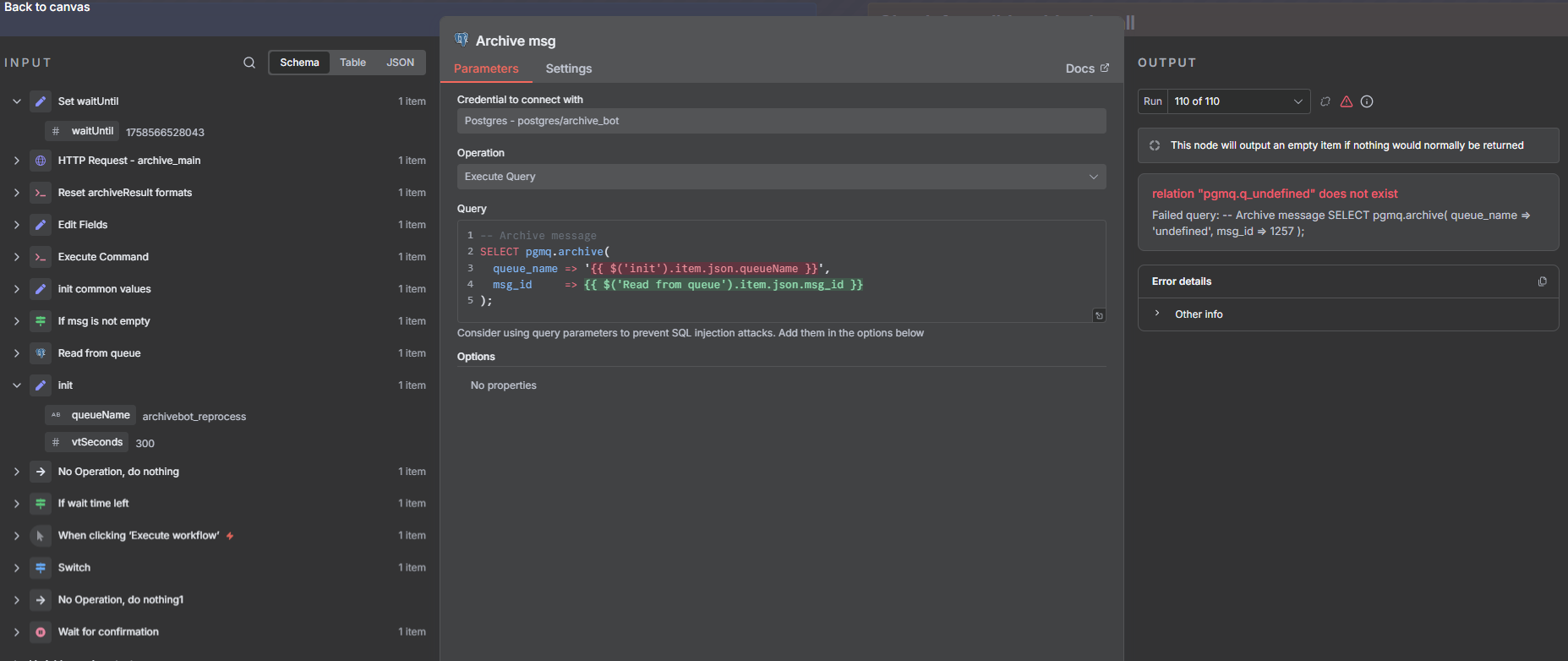
Detail view of the failure point, ie “Archive msg” node highlighted by the read box. The expression {{ $(‘init’).item.json.queueName }} worked without any problem until 110th run it evaluates to undefined.
Detail of the “Read from queue” node, the 1st node of each iteration. As shown, it uses the same expression as the “Archive msg” node to grab the queue name from “init” node.
As shown above, the expression that failed is to grab the queue name from the “init” node (yellow box) which is static/constant and resides outside of the loop. The loop reads this value in 2 places, first when it tries to read the message from the pgmq (ie beginning of the loop) and when it tries to archive the message (ie failure point after 100+ attempts). The workflow does not load much data and the message from pgmq is also very small.
What steps can I take to investigate the root cause, is there a hard limit on how many iterations a workflow can handle?
What is the error message (if any)?
See above.
Please share your workflow
(Select the nodes on your canvas and use the keyboard shortcuts CMD+C/CTRL+C and CMD+V/CTRL+V to copy and paste the workflow.)
This definitely looks like a memory issue. Even if you don’t throw around much data, the heap increases with each loop as execution data piles up. There’s no way to fix this, but you can dance around it.
1) Definitely consider abstracting into sub-workflows. This will free up so much memory load from the loops. Especially if you can abstract processes that take something, process it, and never need to know about it again, until the next item comes (next sub-workflow activation).
2) You can save small important data in the workflow static memory and test if it still disappears
3) As a last resort, in workflow static memory you could also track the number of loops and restart the workflow via start/stop n8n nodes. If possible with your setup/trigger, this can prevent it running OOM.
Hope this helps, feel free to mark this as Solution if it did
Thank you @krisn0x for the advise! I have already offloaded bulk of the heavy lifting to other workflows triggered via webhook (the Http Request node in the middle) to keep this “loop control” workflow light weight. Nonetheless, I will definitely give workflow static memory a try and see if there’s any improvements.
WRT #3, could you please provide a simple example? I have been looking all over for this pattern but did not manage to find it. In Temporal, there’s a concept of Continue-As-New which in essence saves the workflow’s current state and stops > starts a new instance with the saved state as the starting point for long running workflows. I already kept all the important states in the DB so I don’t need the ability to “snapshot and transfer state to new instance” but I would like to implement the ability to automatically stop and restart long running workflows indefinitely or until I manually stop it. The only reliable way I can think of is to have a daemon / monitor process outside of N8N pulling the REST API to check on the status of the workflow and restarts it as needed; however, I would prefer to handle this in N8N if there’s a way to do it.
const workflowStaticData = $getWorkflowStaticData('global');
// Add iteration counter and restart logic
const iteration = (workflowStaticData.iteration || 0) + 1;
workflowStaticData.iteration = iteration;

// Restart workflow every 100 iterations
if (iteration % 100 === 0) {
  console.log(`Completed ${iteration} iterations, restarting workflow...`);

  // Use an IF node after this to check for this return value and pipe to an n8n node that starts/stops the workflow
  return null;
}
Thank you. I am familiar with how to make a workflow self stop using static variables. Correct me if I am wrong, the only ways to start a workflow is via triggers (schedule, webhook, app event, manual, and execute sub-workflow) and if a workflow needs to start anew, the logic to restart the workflow needs to reside outside of the workflow itself but this turns into an infinite stack as the workflow that restarts “this” workflow eventually needs to be restarted by yet another one, did I get that wrong?
In Temporal, the Continue-As-New feature is enforced by the workflow engine like Docker’s restart policy. So if N8N does not have this built in and to prevent infinite stacking, one will need to create a workflow that runs on a schedule that pulls the REST API to check on target workflow’s status and restarts it no?
I don’t think you can check the loops on a workflow mid-execution from the outside, so the approach I think would work is this:
Main workflow uses code node to keep track of loops
Once triggered it executes a sub-workflow
Sub-workflow uses 2 nodes:
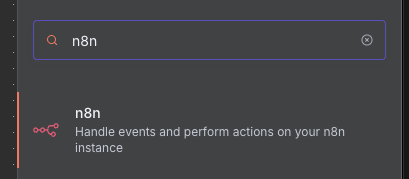
n8n node to deactivate the main flow
wait a bit
n8n node to activate it back again
No infinite loop required here, as once the sub-workflow runs, it’s independent and will restart the main flow successfully. Of course you need to ensure the main flow won’t lose data that is not yet saved anywhere.
Also, forgot to say, but ALWAYS delete the static data at the end, because it can crash your instance and remain there. Maybe do that before triggering the sub-workflow.