Hello
I need to fetch client ip address in webhook node but I cant find the ip(like 192.168.x.x).
what should I do?
Hi there, you can find it in the webhook header response
it’s on the headers.x-real-ip, tht variable holds the ip address of your client
Hello @hossein_sharifi
In n8n, the Webhook node doesn’t expose the client IP directly in the default JSON body. By default, you only see the headers, params, query and body.
Firstly, if you’re using a production/behind proxy environment, you may use headers in the Webhook node:
- Create a Set or Function node after your Webhook node:
- You can access them with an expression:
{{$json[“headers”][“x-forwarded-for”] || $json[“headers”][“x-real-ip”]}}
Or in a Function node:
return [
{
ip: $json.headers[‘x-forwarded-for’] || $json.headers[‘x-real-ip’]
}
]
 If your reverse proxy is not configured, you’ll just see the proxy/container IP (like 172.x.x.x or 127.0.0.1).
Secondly, if you’re testing locally (for devs), all requests look like they’re coming from 127.0.0.1, so you won’t see the real client IP in the webhook data. Browsers also don’t send the LAN IP (like 192.168.x.x) for security reasons.
I have created and tested an example to fetch the client’s public IP in your frontend (e.g., Vue app) and include it in the payload that you may send to n8n. For example:
//function to get client id
async function getClientIp() {
const res = await fetch(‘https://api.ipify.org?format=json’) //example client IP
const data = await res.json()
return data.ip
}
Then send it along with your form data:
//calling the function
const ip = await getClientIp()
await fetch(‘http://localhost:5678/webhook-test/your-webhook-id’, {
method: ‘POST’,
headers: { ‘Content-Type’: ‘application/json’ },
body: JSON.stringify({
amount: 20,
term: 5,
purpose: ‘House’,
clientIp: ip,
}),
})
Now n8n will receive:
//payload for Webhook node in n8n
“body”: {
“amount”: 20,
“term”: 5,
“purpose”: “House”,
“clientIp”: “37.201.153.64”
}
Here’s the preview:
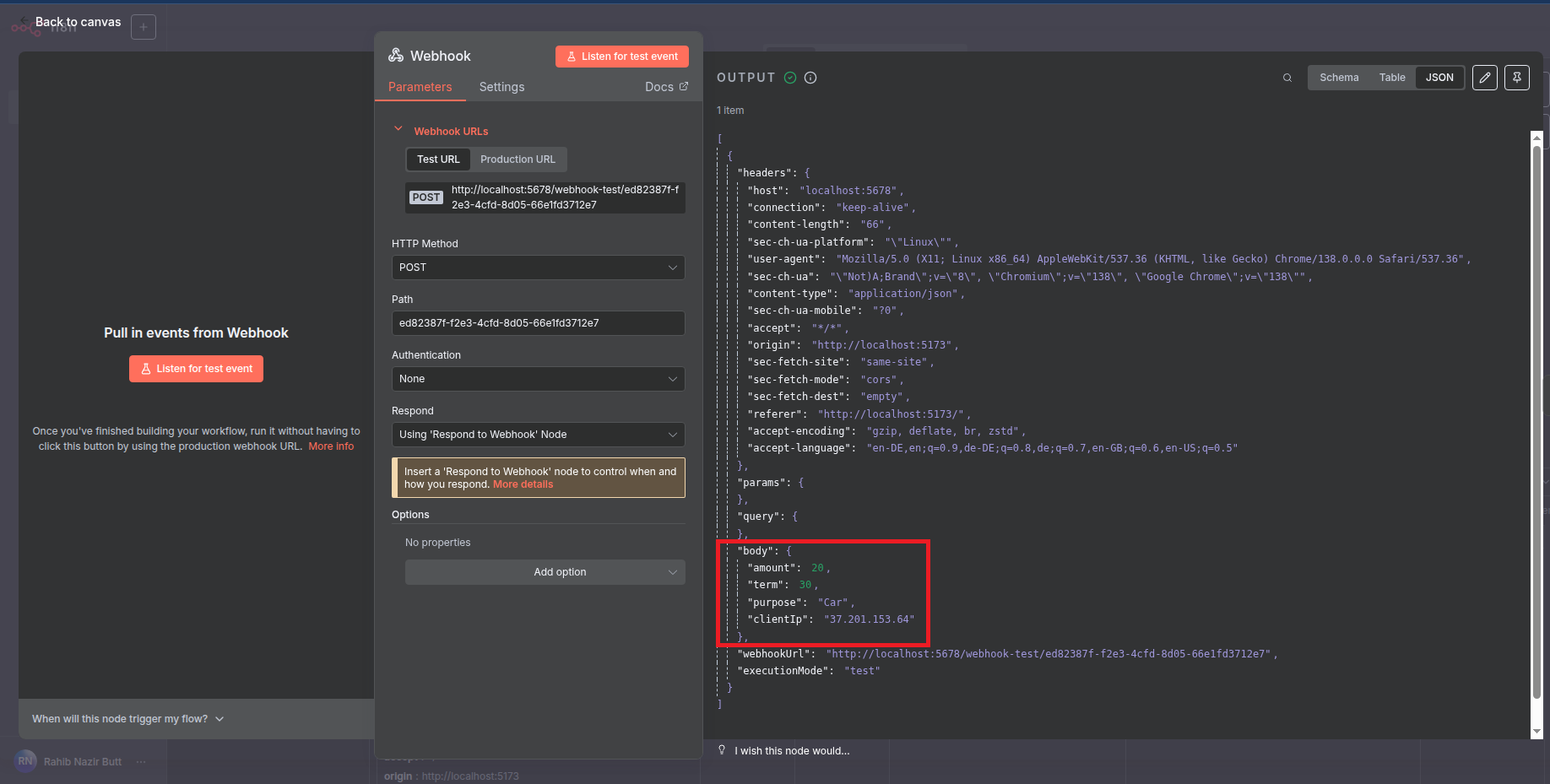
Sending the IP in the body is just for used logging, analytics, or demonstration, not for trust/security. Always rely on headers (x-forwarded-for / x-real-ip), not the body as mentioned above.
Hope this answers your question. 
1 Like
Thanks 
1 Like
This topic was automatically closed 7 days after the last reply. New replies are no longer allowed.