Hello n8n Community,
I am encountering a persistent and frustrating bug with the Execute Command node on a self-hosted n8n instance (Elestio deployment on Alpine Linux/Docker). The issue is that dynamic expressions for binary file paths are resolving to empty strings, despite the data being correctly input and the syntax being verified.
I have exhausted all known troubleshooting steps. I am hoping a community expert who has seen this specific environment failure can offer a solution.
The Goal: Burn styled subtitles onto a video using FFmpeg in the Execute Command node.
The Setup:
-
Host Environment: Elestio (Alpine Linux/Docker).
-
FFmpeg Status: Confirmed installed and executable (ffmpeg -version runs successfully).
The Problem (Expression Fails):
**I tried both of these but they didn’t work, and expressions are always red/undefined:
**
INPUT_VIDEO=“{{$binary.video_file.filePath}}”; SUBTITLES_SRT=“{{$binary[‘subtitles.srt’].filePath}}”; ffmpeg -i “$INPUT_VIDEO” -vf “subtitles=‘$SUBTITLES_SRT’:force_style=‘fontname=Arial,fontsize=28,outline=1,borderstyle=3,backcolor=&H80000000,primary_color=&H00FFFF’” -c:v libx264 -crf 23 -y /tmp/output_final.mp4
INPUT_VIDEO=“{{$binary.video_file.filePath}}”; SUBTITLES_SRT=“{{$binary.subtitles.srt.filePath}}”; ffmpeg -i “$INPUT_VIDEO” -vf “subtitles=‘$SUBTITLES_SRT’:force_style=‘fontname=Arial,fontsize=28,outline=1,borderstyle=3,backcolor=&H80000000,primary_color=&H00FFFF’” -c:v libx264 -crf 23 -y /tmp/output_final.mp4
Irrefutable Evidence of the Failure:
-
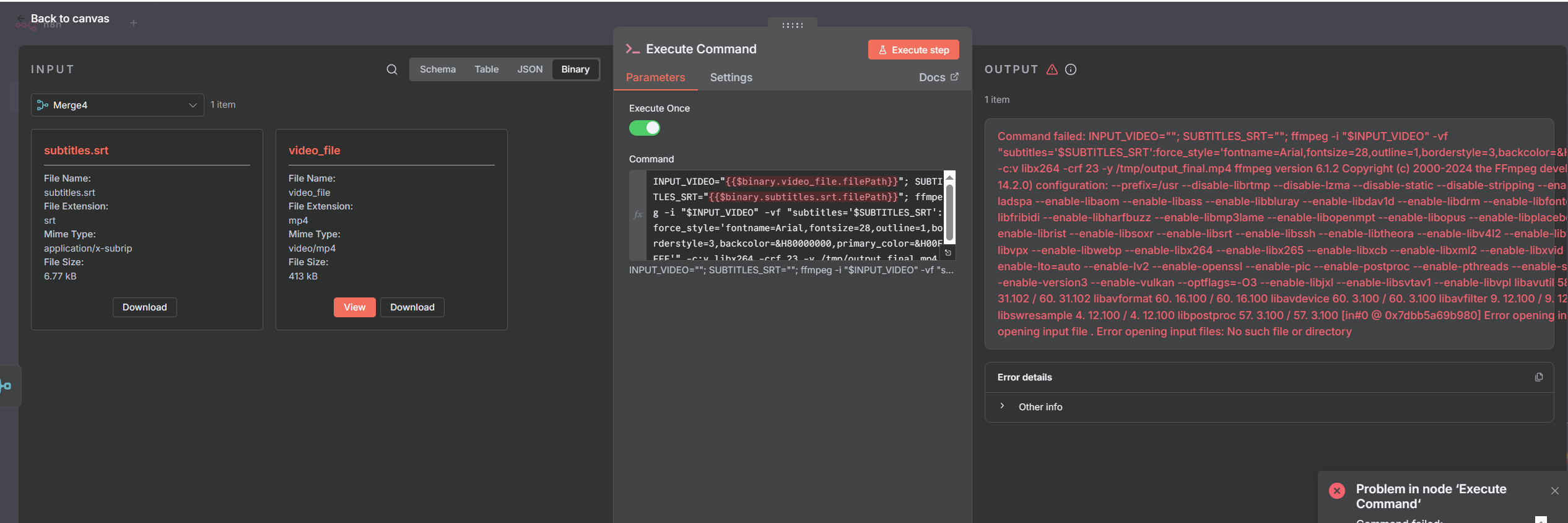
Input Data: The screenshot shows the Binary input to the Execute Command node is correct. Both properties (video_file and subtitles.srt) are present and valid.
-
Syntax Check: The syntax used has been validated as 100% correct (using .filePath and mandatory bracket notation for [‘subtitles.srt’] due to the dot).
-
Output Result: The output confirms the expressions resolve to empty strings:
INPUT_VIDEO=“” ; SUBTITLES_SRT=“” ; ffmpeg -i “”
Has anyone running n8n on an Elestio/Alpine environment experienced this issue? If so, what was the server-side fix (e.g., a specific environment variable like N8N_TEMPORARY_DIR or a permissions change) required to get the {{$binary…filePath}} expression to correctly resolve a string?
Thank you for any insight you can provide into this deep environmental configuration bug.