Hi!
I was trying to download a video from a website… But apparently its giving this error
Any idea on how to fix it?
I tried setting up enviornment variables etc but it wouldn’t work.
Gemini has kinda given up on me
And I dont know what to do, please help.
Thanks
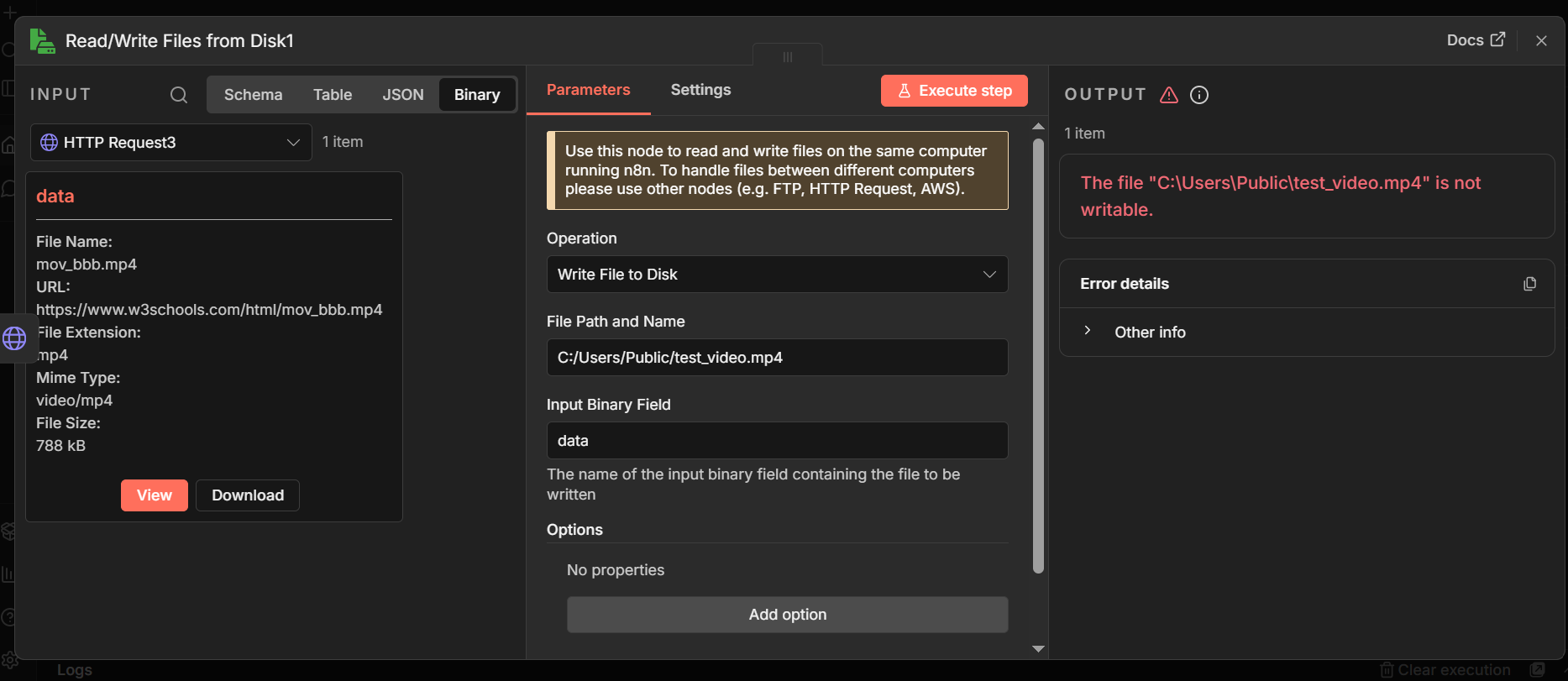
{
“nodes”: [
{
“parameters”: {
“url”: “https://www.w3schools.com/html/mov_bbb.mp4”,
“options”: {
“response”: {
“response”: {
“responseFormat”: “file”
}
}
}
},
“type”: “n8n-nodes-base.httpRequest”,
“typeVersion”: 4.3,
“position”: [
0,
-224
],
“id”: “43e0aabd-e333-4ea5-9b94-3d0ebb4e83b1”,
“name”: “HTTP Request3”
},
{
“parameters”: {
“operation”: “write”,
“fileName”: “C:/Users/Public/test_video.mp4”,
“options”: {}
},
“type”: “n8n-nodes-base.readWriteFile”,
“typeVersion”: 1.1,
“position”: [
208,
-224
],
“id”: “cbc70de5-1e17-4088-9040-3af4c3d84295”,
“name”: “Read/Write Files from Disk1”
}
],
“connections”: {
“HTTP Request3”: {
“main”: [
[
{
“node”: “Read/Write Files from Disk1”,
“type”: “main”,
“index”: 0
}
]
]
}
},
“pinData”: {},
“meta”: {
“templateCredsSetupCompleted”: true,
“instanceId”: “0561070a28d6405b96b375aa7d6bc72460d04eb02d6b2d5fbc900d7fa6e47541”
}
}
Describe the problem/error/question
What is the error message (if any)?
Please share your workflow
(Select the nodes on your canvas and use the keyboard shortcuts CMD+C/CTRL+C and CMD+V/CTRL+V to copy and paste the workflow.)
Share the output returned by the last node
Information on your n8n setup
- n8n version:
- Database (default: SQLite):
- n8n EXECUTIONS_PROCESS setting (default: own, main):
- Running n8n via (Docker, npm, n8n cloud, desktop app):
- Operating system:

 . n8n does not save files automatically, and using responseFormat file alone is not enough. Without defining a Binary Property Name, the downloaded file is not exposed as binary data and becomes invisible to the next node. As a result, the write node tries to save a file that does not exist.