Hi
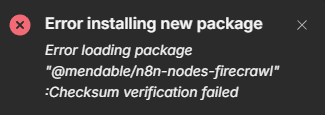
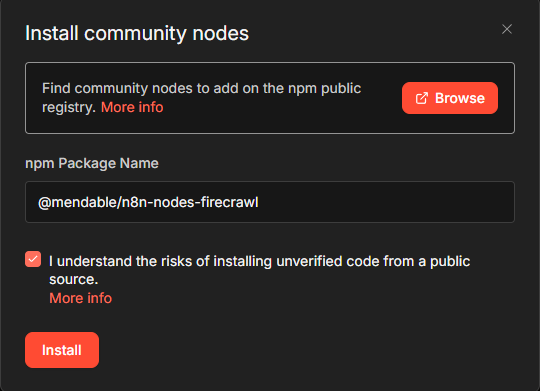
I am trying to install firecrawl and I this error message “Error loading package “@mendable/n8n-nodes-firecrawl” :Checksum verification failed.”
Using perplexity to resolve this issue it provides me with this root cause
Root Cause
n8n Cloud uses an internal Verdaccio registry (verdaccio.n8n-verdaccio.svc.cluster.local) to host/verify community nodes like @mendable/n8n-nodes-firecrawl. The checksum verification fails due to an internal DNS resolution problem (getaddrinfo ENOTFOUND) or metadata sync issue, preventing the package download even if it’s valid on npm.
Describe the problem/error/question
I am unable to install FIrecrawl
What is the error message (if any)?
“Error loading package “@mendable/n8n-nodes-firecrawl” :Checksum verification failed. Please check your network connection and try again.”
Please share your workflow
{
  "nodes": [
    {
      "parameters": {
        "options": {}
      },
      "type": "@n8n/n8n-nodes-langchain.chatTrigger",
      "typeVersion": 1.4,
      "position": [
        0,
        0
      ],
      "id": "4545b078-f5a7-408c-b159-e135721af6be",
      "name": "When chat message received",
      "webhookId": "1af47bbb-9775-4c17-9467-afd4e5729900"
    },
    {
      "parameters": {
        "options": {}
      },
      "type": "@n8n/n8n-nodes-langchain.agent",
      "typeVersion": 3.1,
      "position": [
        208,
        0
      ],
      "id": "a0a00701-be0b-4005-a062-c38b10adb925",
      "name": "AI Agent"
    },
    {
      "parameters": {
        "model": "deepseek/deepseek-v3.2",
        "options": {}
      },
      "type": "@n8n/n8n-nodes-langchain.lmChatOpenRouter",
      "typeVersion": 1,
      "position": [
        208,
        208
      ],
      "id": "193a52ac-d0c5-4c0a-ad5c-2745c3547779",
      "name": "OpenRouter Chat Model",
      "credentials": {
        "openRouterApi": {
          "id": "jpCkmicldTpnJMgr",
          "name": "OpenRouter account 2"
        }
      }
    },
    {
      "parameters": {},
      "type": "@n8n/n8n-nodes-langchain.memoryBufferWindow",
      "typeVersion": 1.3,
      "position": [
        368,
        208
      ],
      "id": "4f9e954e-f37a-4738-be09-2f7f17ffeed7",
      "name": "Simple Memory"
    },
    {
      "parameters": {
        "content": "## INPUTS\n\nData flowing in",
        "height": 240
      },
      "type": "n8n-nodes-base.stickyNote",
      "position": [
        -80,
        -64
      ],
      "typeVersion": 1,
      "id": "d82f5a52-a5c5-43b9-b47d-a7bd896979ab",
      "name": "Sticky Note"
    },
    {
      "parameters": {
        "content": "## Processing\n\nThis is the business",
        "height": 448,
        "width": 336
      },
      "type": "n8n-nodes-base.stickyNote",
      "position": [
        176,
        -64
      ],
      "typeVersion": 1,
      "id": "1f32806e-e5c4-4f00-8567-3ca9c97c4f20",
      "name": "Sticky Note1"
    }
  ],
  "connections": {
    "When chat message received": {
      "main": [
        [
          {
            "node": "AI Agent",
            "type": "main",
            "index": 0
          }
        ]
      ]
    },
    "OpenRouter Chat Model": {
      "ai_languageModel": [
        [
          {
            "node": "AI Agent",
            "type": "ai_languageModel",
            "index": 0
          }
        ]
      ]
    },
    "Simple Memory": {
      "ai_memory": [
        [
          {
            "node": "AI Agent",
            "type": "ai_memory",
            "index": 0
          }
        ]
      ]
    }
  },
  "pinData": {},
  "meta": {
    "templateCredsSetupCompleted": true,
    "instanceId": "18c390b068cfd039e1601fd09e10cea634aa23d507e8ca2440c09421b7dc572a"
  }
}(Select the nodes on your canvas and use the keyboard shortcuts CMD+C/CTRL+C and CMD+V/CTRL+V to copy and paste the workflow.)
Share the output returned by the last node
Information on your n8n setup
- n8n version:2.7.4
- Database (default: SQLite): default
- n8n EXECUTIONS_PROCESS setting (default: own, main): default
- Running n8n via (Docker, npm, n8n cloud, desktop app): Cloud
- Operating system: Windows 11