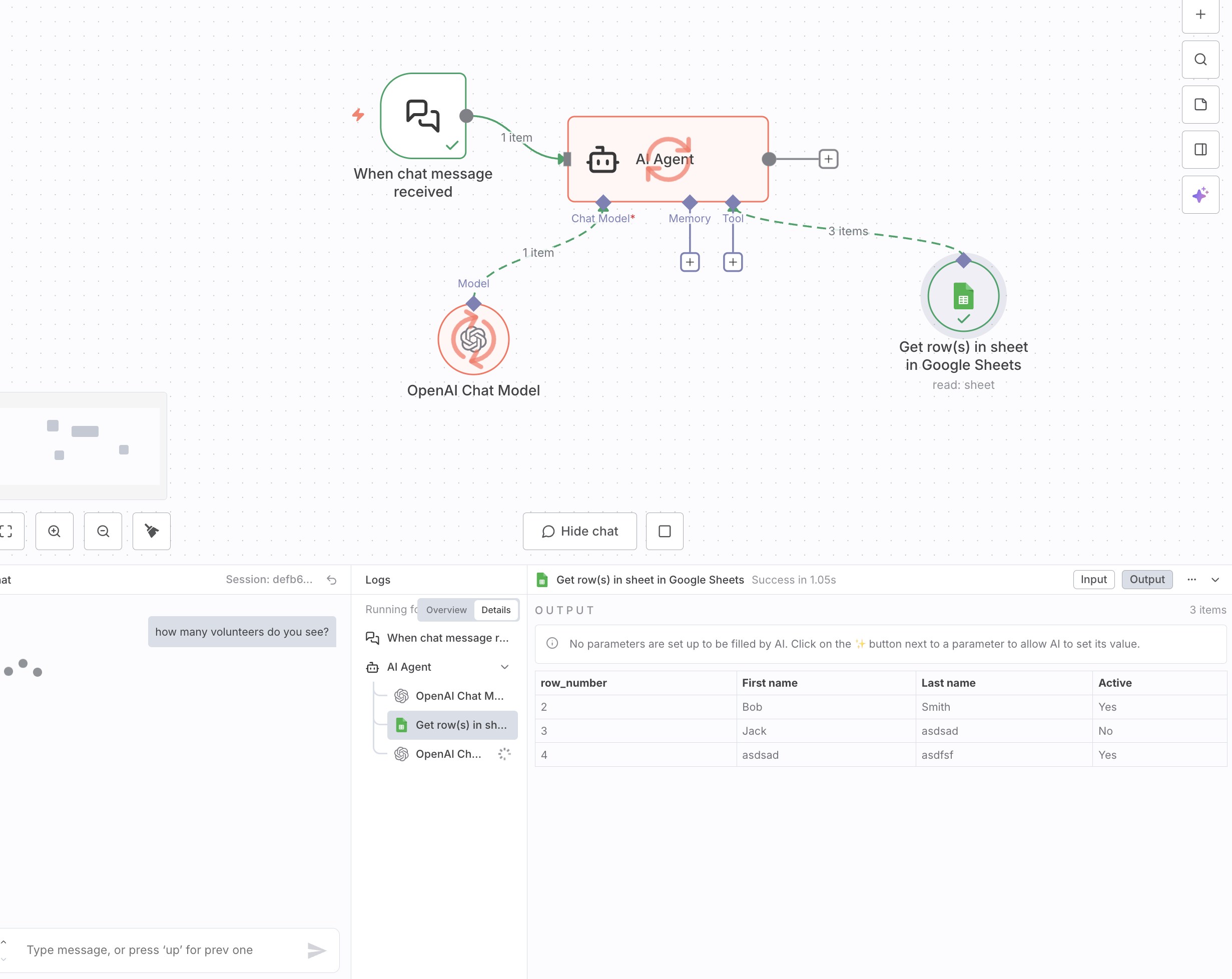
I am trying to read the number of rows from this sheet in “Google Drive”. The tools call does get “3 rows” from google sheet, but I have absolutely no clue why the LLM call only passes in the 1st row, which only gives me the value of 1.
The LLM request to OpenAI should have the 3 rows in the “REQUEST”.
Any help is much appreciated. Thanks.
System: You are a helpful assistant.\nHuman: REQUEST: how many volunteers do you see?\nAI: Calling Get row(s) in sheet in Google Sheets with input: {"id":"call_...."}\nTool: {"row_number":2,"First name":"Bob","Last name":"Smith","Active":"Yes"}
The solution is to ensure that the entire array of 3 rows is passed to the final OpenAI model as a single input. You need to configure your workflow to “aggregate” or “combine” the items into one piece of data.
Here are the likely solutions, depending on your specific platform (which appears to be a tool like n8n or a similar visual workflow builder):
Check the Node’s Output Settings: Look at the Get row(s) in sheet node. There might be a setting under “Options,” “Settings,” or “Output” that controls how it passes data. Look for an option to “aggregate,” “combine,” or output as a “single item” or “array.”
Use a “Merge” or “Aggregate” Node: Many workflow tools have specific nodes designed for this purpose. You would place a node like “Merge,” “Item Lists,” or “Aggregate” after the Get row(s) node and before the final OpenAI node. This node’s job is to take multiple items and combine them back into a single array/JSON object.
Adjust the Input Mapping in the Final LLM Node: In the final OpenAI node, check how it is receiving the data. Instead of just referencing the input, you may need to use an expression to grab the entire output from the previous step. For example, instead of referencing {{ $item.json }}, you might need to reference {{ $items() }} or a similar expression that tells the platform to use the data from all items from the previous node.
By making one of these changes, the final LLM call will receive the full context:
Hi CY1234, I made the same workflow and by giving relevant system prompt to agent, It start working as per expectation, I recored the video as well, You can clearly see the implementation.