Github: paginating on response header

Describe the problem/error/question

I need to retrieve multiple pages of Github Issues (e.g. https://api.github.com/repositories/226368338/issues). Github sends the next page url as HTML-formatted response header:

link: <https://api.github.com/repositories/226368338/pulls?per_page=1&page=2>; rel="next", <https://api.github.com/repositories/226368338/pulls?per_page=1&page=48>; rel="last"

I have already enabled including the full response and can access $response.headers.link, but have no idea how to select on the rel=nextand remove the brackets?

Do something like .split(“;”)[0].extractURL

ChatGPT might have a more elegant / resilient version. :smiley:

why reading the next page url from link header?

this is page one https://api.github.com/repositories/226368338/issues?per_page=100&page=1

this is second page https://api.github.com/repositories/226368338/issues?per_page=100&page=2

use the below worklfow for getting all issues using http node

Or simply use Githb node

@ramin1 because I don‘t know how many pages there are.

I‘ve noticed there is an parse-link-header npm module. Could this be included and used somehow?

it does not matter. http node do handle that and returns all results

You can use github node too

@ramin1 the Github node- when selecting to return “all” issues returns 128 (at least that’s what the UI shows- should be a few thousands). Also, browser console shows there’s only a single request, so that doesn’t work either.

Same problem with your HTTP suggestion- it only does a single request.

It’s very unfortunate that request (an especially response) are not logged…

@andig

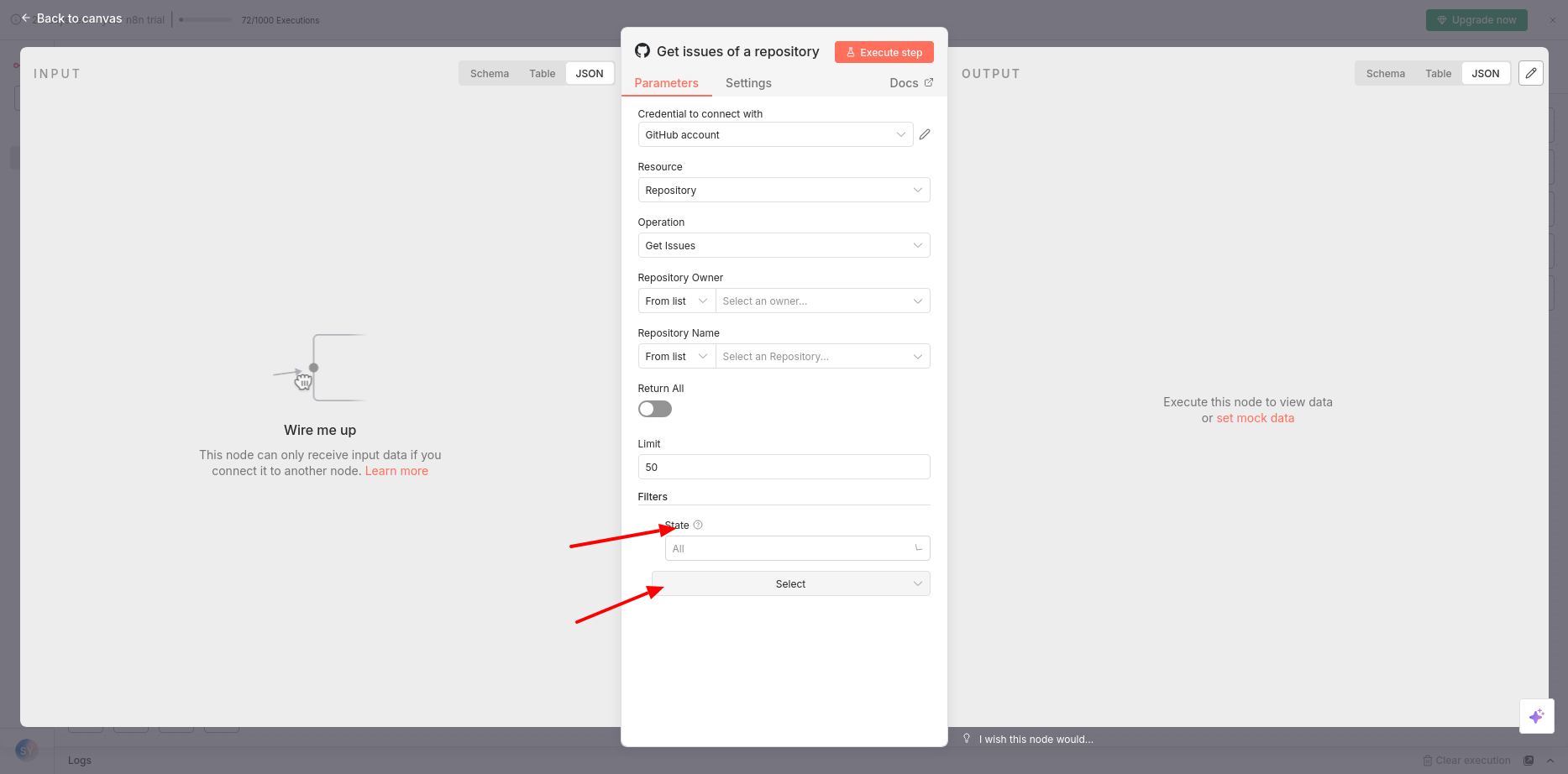
for getting all issues. you must add a filter

add filter and then select state and then choose all

Ouch, indeed. Thank you, much appreciated!

You’re welcome and mark the answer as a solution please.

Still not working.

Seems the Github node doesn’t do it like Github wants to for larger data sets:
{ "message": "Pagination with the page parameter is not supported for large datasets, please use cursor based pagination (after/before)", "documentation_url": " REST API endpoints for issues - GitHub Docs ", "status": "422" }

The cursor based pagination is exactly what’s contained in the link headers.

The other limitation is that- when selecting “return all” and status “all”- I cannot limit that to 500.

Created Github node: support curser-based pagination and allow limiting number of results

you can below http node setup for your use case

i limited above node to 10 pages and it is resulted in 1.5mb output. getting all of those issues in a single run is not a good idea

you can also achieve this using loops. if you want it let me know

1 Like