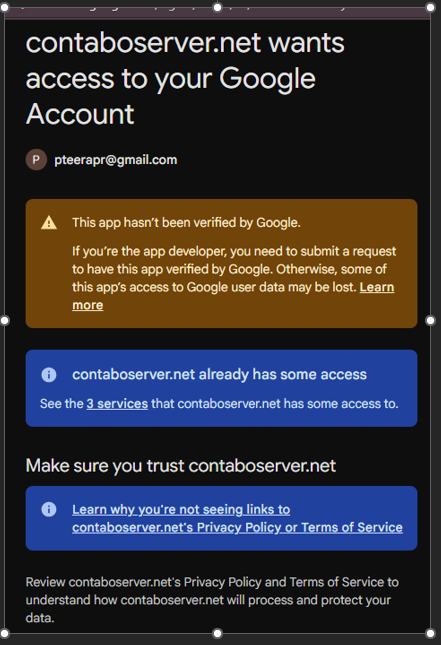
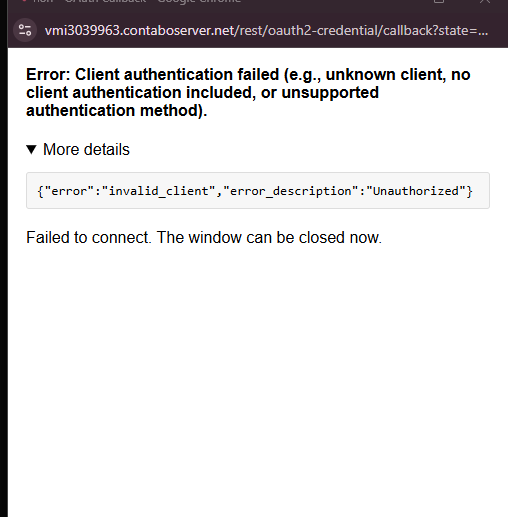
I host my n8n on contabo. I try to connect to Google Drive but the system keep rejection my connection (it connect for a few second, then kick the connection out). I have enable both google drive and google sheet API in Google Cloud Platform. Please see below my screen shot. the callback url, client id and secret key are all correct. I have publish the app in google cloud.
1 Like
Hey @PeterTee Welcome to the n8n community!
This error is not an n8n or Contabo issue. It is a Google OAuth setup problem.invalid_client / Unauthorized usually means Google is rejecting the OAuth client itself, not the callback.
Things to see and validate:
-
OAuth client type
Make sure the credential is OAuth 2.0 Client ID → Web application. Not Desktop, not Other. -
Redirect URI must be exact
Copy the exact redirect URL from n8n Google Drive credentials and paste it into Google Cloud.
No extra slash, no http vs https mismatch, no IP vs domain mismatch. -
OAuth consent screen
Set it to External and add your Gmail as a Test user, even if the app is published. -
Recreate credentials
If it still fails, delete the OAuth client and create a new one. Google is very picky and old clients often break. -
Use your own credentials
Do not use n8n’s built-in Google credentials. Always use your own Client ID and Secret.
As these are the most common Oath problems people face, even i face the some problems recently as it was rejecting my request just for no reason but when i refreshed my credentials it all came back on the track, let me know if this helps
this help. Thank you very much
Hello @PeterTee
This isn’t an n8n or Contabo issue. invalid_client / Unauthorized means Google OAuth is misconfigured.
Quick checks:
-
OAuth client type = Web Application
-
Redirect URI must match n8n exactly
-
Consent screen = External, add yourself as Test User
-
Recreate the OAuth client if needed
-
Use your own Google Client ID & Secret
Recreating the credentials usually fixes it.
Glad it helped you kindly mark that as a solution to help others know what is the actual solution, thanks!