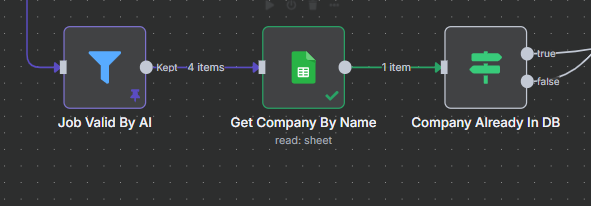
When using a Google Sheet get row node, I am giving it 4 items at input, and it’s only spitting out a single output.
I don’t understand why it wouldn’t just work on all 4 and output 4 results.
Please share your workflow
PARTIAL workflow:
See how 4 items in and 1 item out
Information on your n8n setup
- n8n version: Version 1.91.3
- Database (default: SQLite): NA
- n8n EXECUTIONS_PROCESS setting (default: own, main): NA
- Running n8n via (Docker, npm, n8n cloud, desktop app): docker
- Operating system: ubuntu
Ehy,
the Google Sheets node does not run once per input item by default.
Instead, it runs only once, based on the first input, unless you explicitly tell it to run per item.
- Open the Google Sheets node
- Click on the “Settings” tab
- Enable this option: “Execute Once Per Item”
This will make the node run once for each of the 4 input items, giving you 4 outputs as expected.
it is NOT running once per item. The toggle is set correctly.
Also notice that toggle means to stop at the first ROW FROM THE SHEET that is found.
What I want is for it to run FOR EACH N8N ITEM. these are different concepts.
Ehy @Noam_Salomonski,
Don’t be upset  i’m here to try to understand and to help, I’m sorry I didn’t catch the problem right away.
If I understand correctly, I solve this problem by inserting a loop node within the process.
Tell me if this solution can work.
Cheers
1 Like
Hi thanks, I am not angry, just used caps instead of bold because it’s faster
I am so used to stackoverflow style Q&A (just commenting and not a full reply) and that’s really absent here, sorry 
about the loop solution - maybe. Can you please explain what you mean and how to orchestrate it?
What I later noticed was every item comes out of the sheets node, but it only shows one of them for some reason.
I don’t understand what’s going on and not 100% understand the tooling so I can’t debug this myself.
1 Like
don’t worry
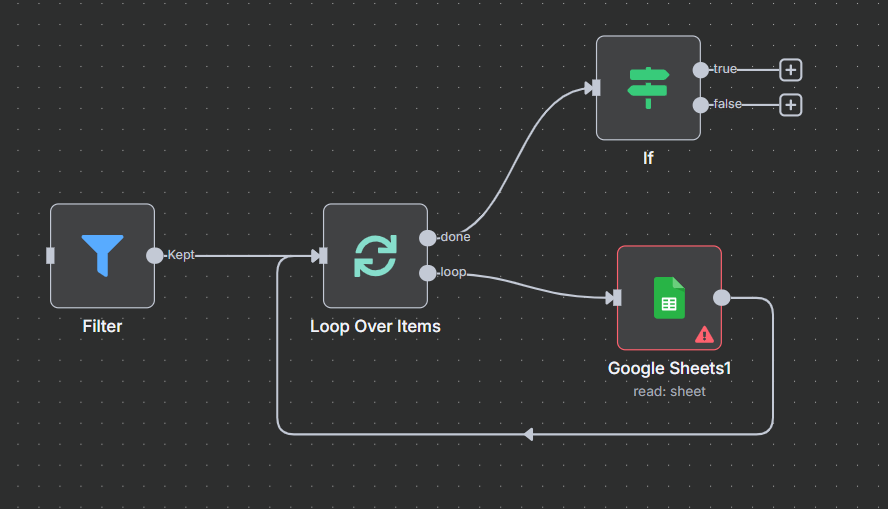
My idea was to put a Loop node inside the flow immediately after the Google Sheet node.
In this way you should have the possibility to take all the rows you want from the google sheet and, once collected, proceed.
The image is just an example because not knowing the whole workflow could be wrong. Give it a try.
→ Here n8n document about loop
Let me know