Its sad how often I come across needed features that are missing in n8n, where I expected n8n to be capable of.
1 Like
Would love to see this as well. Becoming a standard requirement for production chatbots
It’s definitely possible in a node-based graph workflow. 
Looks promising. Hopefully n8n team pick up on this.
Totally agree, it’s a very important feature!
It is important that we have not only streaming output but also input - that how we can have LLM or token-based guardrails for example.
Looks like a different architecture/approach, not API-bsed but token-based. Which for the most use cases is useless and overcomplicated, so I suggest having either a separate type of workflow or some kind of dedicated group inside the exiting one.
I have found this that has the streaming flag on the Agent. I managed to set it up to true. But with the chat widgets dosen’t work. Maybe someone here is using a custom front end where the stream could work. n8n/packages/frontend/@n8n/chat/resources/workflow-streaming.json at master · n8n-io/n8n · GitHub
It seems like this was quietly (?) added to 1.105 feat: Update Chat SDK to support streaming responses (#17006) · n8n-io/n8n@3edadb5 · GitHub
I just did some initial tests, and it looks like its working fine 
Webhook → Respond → Streaming
AI Agent → Options → Enable Streaming
{"type":"begin","metadata":{"nodeId":"ece3abb6-c645-4276-a63b-932b09fd1504","nodeName":"AI Agent","itemIndex":0,"runIndex":0,"timestamp":1754055962495}}
{"type":"item","content":"Hello","metadata":{"nodeId":"ece3abb6-c645-4276-a63b-932b09fd1504","nodeName":"AI Agent","itemIndex":0,"runIndex":0,"timestamp":1754055963347}}
{"type":"item","content":"!","metadata":{"nodeId":"ece3abb6-c645-4276-a63b-932b09fd1504","nodeName":"AI Agent","itemIndex":0,"runIndex":0,"timestamp":1754055963348}}
{"type":"item","content":" I'm","metadata":{"nodeId":"ece3abb6-c645-4276-a63b-932b09fd1504","nodeName":"AI Agent","itemIndex":0,"runIndex":0,"timestamp":1754055963382}}
If you use nginx or similar as a reverse proxy, don’t forget to add
proxy_buffering off;
proxy_cache off;
to the webhook endpoint for smoother responses
1 Like
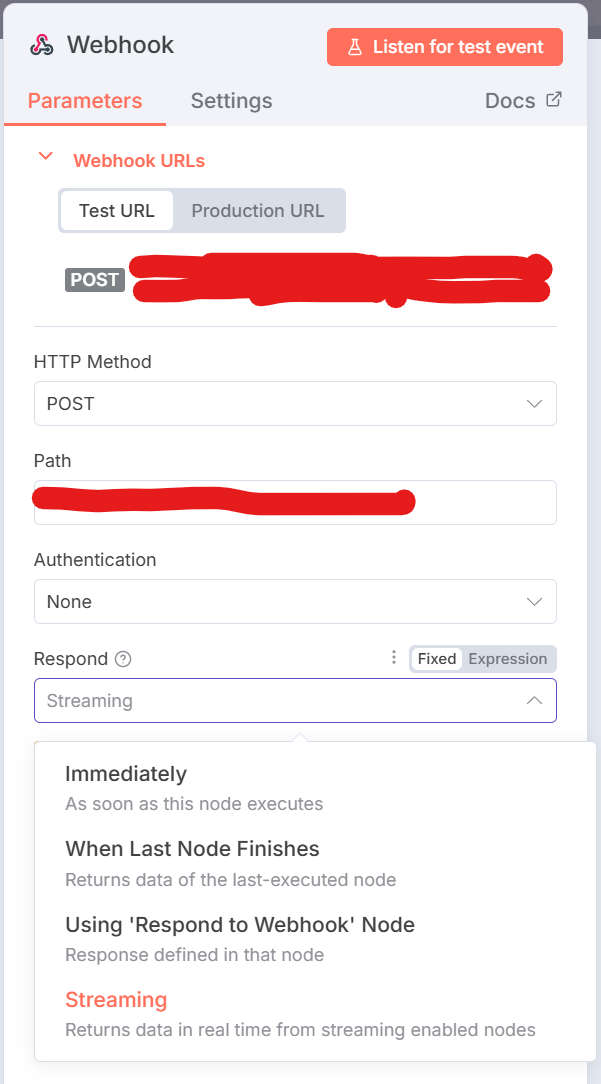
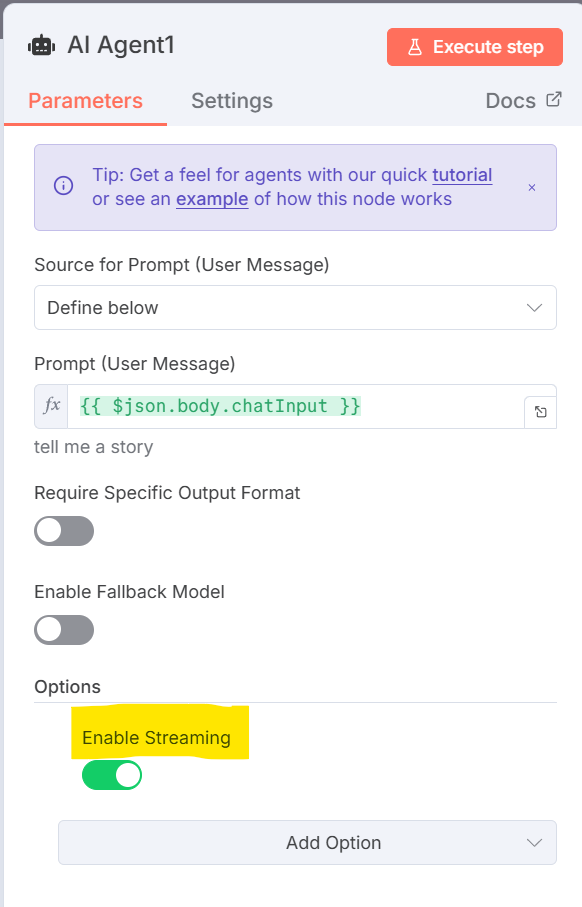
The new 1.105.2 version is now live and stable and enables streaming AI Agent responses to the webhook! I’ve just got it working 
Could you pls help me how to do that? Could you pls. share are basic workflow?
oh nice! just created a duplicated request
The idea is:
Getting the chat UX to support streaming messages or agent “thoughts/actions”.
My use case:
I am currently using the chat interface at work (vibe working - kinda  ) as a Product Manager.
However, I feel like the UX is getting a bit behind the current state of the market - mostly regarding the latest Agent Interaction Guidelines published by Linear, and this line specifically " An agent should be clear and transparent about its internal state ".
I think it would be beneficial to add this because:
I want to be able to follow the Agent’s work plan and be able to challenge and tweak it if needed
Any resources to support this?
An agent should be clear and transparent about its internal state
3 Likes
Here’s an example workflow where the response from the AI is streamed back to the webhook immediately. As in the images above, notice that the webhook has Streaming enabled as does the AI Agent node.
2 Likes
Is there a way to customize this json format of the streaming output?
1 Like
I need the same thing for one of my use cases, but unfortunately, I believe it’s not currently possible.
1 Like
Its working nice from a single agent but it seems that sub-agents as tools are not streaming although that is enabled in their setting.
Made a separate request based on the streaming of live tool calls and action, let’s try push this!
Its killing me to keep the user waiting for 15 minutes. It isnt supposed to be this way. just idea, can we create websocket connection for each execution? please help
I noticed that when I have an agent set up as an orchestrator, with several sub-agents, those sub-agents don’t stream. It’s only the main (orchestrator) agent even though I have enabled streaming on those subagents as well. Or am I doing something wrong?
1 Like
What is the use case where an agent needs a stream from a sub-agent?
Could the sub-agent be set up to stream directly to the source system that called the parent agent?