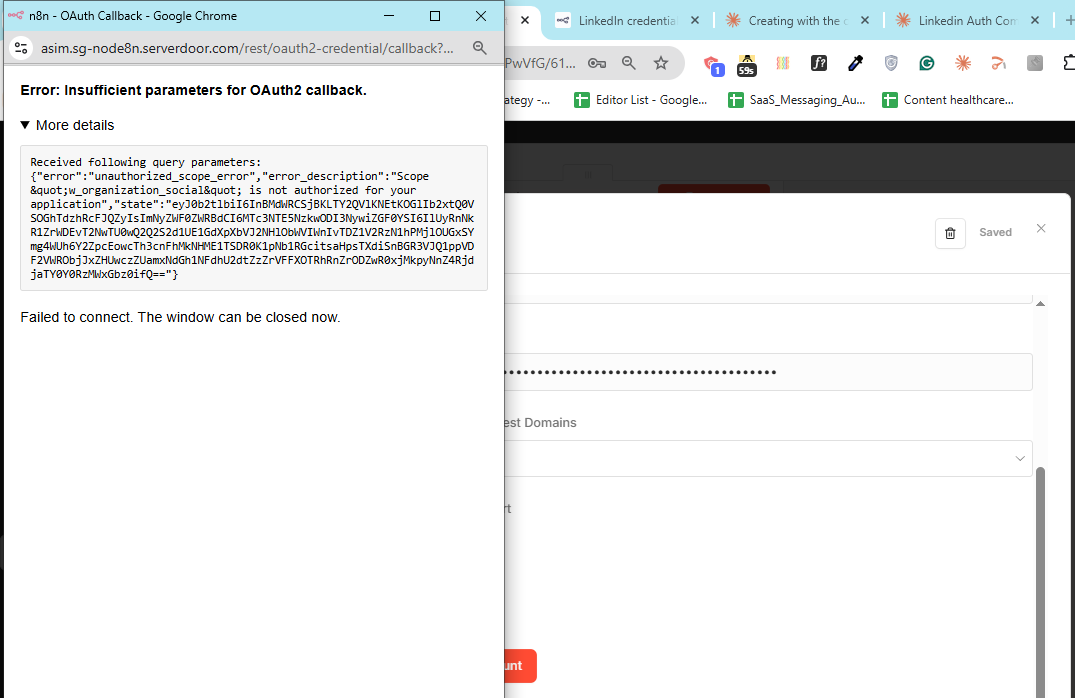
When trying to connect LinkedIn to n8n using the LinkedIn OAuth2 API credential, I get this error after clicking “Connect my account”:
Error message:
Error: Insufficient parameters for OAuth2 callback.

Received following query parameters: {
  "error":"unauthorized_scope_error",
  "error_description":"Scope \"w_organization_social\" is not authorized for your application"
}

Failed to connect. The window can be closed now.
What’s happening:
I click “Connect my account” in n8n
LinkedIn’s login page loads (I can see it)
I authenticate with my LinkedIn credentials
LinkedIn asks for permission to access my account
Instead of completing the connection, I get the error above
Created a LinkedIn Developer app Added Client ID and Client Secret to n8n credential Set “Connect using” to “Standard” (not Community Management) Filled in the OAuth Redirect URL in n8n: https://asim.sg-node8n.serverdoor.com/rest/oauth2-credential/callback My n8n instance is self-hosted on a VPS and accessible via HTTPS
My Setup Details
n8n instance: Self-hosted on VPS at asim.sg-node8n.serverdoor.com (HTTPS)
LinkedIn app type: Sign in with LinkedIn (Standard)
Thanks for breaking that down! That makes total sense now.
Just to clarify: I’m just trying to post to my personal LinkedIn profile, not a company page. And looking at my app settings, I already have the w_member_social scope approved, which is what I need for personal posts.
But the testing with minimum scope is a great idea; I didn’t think to try it out like that.
I’ll report back with results. Thanks for the guidance!
Thanks for getting back! I haven’t tried that yet. I was trying to use the native Lk node first since I thought that would be simpler , also in linkedin node I can also update with a media, but going to try the http request ! thanks a lot
hi @Asim_Arman
One thing that hasn’t really been called out yet is that this does not look like a redirect URI problem. The callback is reaching n8n, but LinkedIn is rejecting the authorization because w_organization_social is being requested and your app is not allowed to use it. So if your goal is to post to your personal profile, I’d check whether the credential is still requesting organization access at all. In n8n, the Organization Support option is what adds w_organization_social , so I’d make sure that is off and then recreate the credential from scratch before reconnecting.
I’d also verify that your LinkedIn app has the Share on LinkedIn product enabled, since that is what grants w_member_social for personal posting. Once the credential connects cleanly with only the member scope, then the LinkedIn node or HTTP Request path should both be viable.
I set it up to only ask for personal posting permissions (w_member_social), but n8n’s LinkedIn integration kept automatically requesting w_organization_social (which is for company pages). That is why Linkedin kept rejecting it. So I am trying the token system
Thanks for breaking that down! I’ve been testing exactly what you suggested - toggling Organization Support and recreating the credential fresh. But I’m hitting a catch-22:
With Organization Support ON: w_organization_social is rejected (not approved for my app) With Organization Support OFF: r_emailaddress is rejected (legacy scope, not in my app)
So it seems n8n’s LinkedIn credential is requesting scopes beyond what I can control with the UI toggles.
Since my goal is just personal profile posting, I’m going to build the OAuth flow manually using HTTP Request nodes - that way I can request only w_member_social and avoid both of these scope conflicts entirely.
I’ll report back once I have it working. Thanks for the guidance!
Ok so it worked! Thanks for helping so much. I basically had to turn off the Organization Support and than the legacy scope aswell, and bascially create another new client secret and it has worked!
The error w_organization_social scope is not authorized usually means your LinkedIn app does not have that product enabled. Go to your LinkedIn Developer App > Products tab and check if you have “Share on LinkedIn” or “Marketing Developer Platform” added. The w_organization_social scope specifically requires the Marketing Developer Platform product which needs to be requested and approved by LinkedIn separately.
Also double check that the OAuth 2.0 Authorized Redirect URLs in your LinkedIn app settings exactly matches what n8n is using. Even a trailing slash difference will cause issues.
Nice, glad you got it working @Asim_Arman !
Please consider leaving a like or marking the reply that helped you as the solution
It makes it easier for others to find answers and supports community contributors.
So we got the HTTP Request node set up and working, but we’re stuck on finding the numeric LinkedIn member ID that the API requires. Still troubleshooting that part, but the HTTP approach itself is solid once we crack the ID issue.
For the LinkedIn numeric member ID - you can get it by calling the /v2/userinfo endpoint (OpenID Connect) with your access token. It will return a sub field which is your member URN. Or use the /v2/me endpoint which returns id directly.
In n8n with HTTP Request node: set URL to https://api.linkedin.com/v2/me, add header Authorization: Bearer {{your_access_token}}, and the response will include the numeric id field you need.
Alternatively, if you’re using the LinkedIn node in n8n (not HTTP Request), some older operations still expose the member ID in the response from /v2/me automatically. Depends on which API version you’re targeting.
This isn’t an n8n issue it’s a LinkedIn permissions (scope) issue
The error: Scope "organization social" is not authorized for your application
means your LinkedIn app is requesting a permission it hasn’t been approved for.
What’s happening
Your OAuth flow is working correctly (the callback is reaching n8n)
LinkedIn is rejecting the request because your app doesn’t have access to that scope
w organization_social is part of LinkedIn’s Marketing / Community Management APIs, which require approval
How to fix it
Option 1 (quick fix):
Remove the w_organization_social scope from your n8n credential and use only basic scopes like:
r_liteprofile
r_emailaddress
This will allow the connection to work, but with limited functionality.
Option 2 (proper solution):
Apply for access to LinkedIn’s Marketing / Community Management API:
Go to your LinkedIn Developer app
Request access to the Marketing Developer Platform (or relevant product)
Wait for LinkedIn approval
Once approved, the scope will work.
Important
LinkedIn is strict with permissions you cannot use advanced scopes unless your app is approved, and it will block the OAuth connection if they’re included.
 Created a LinkedIn Developer app
