I’m using n8n with the Outlook integration, and I want to isolate just the latest reply in an email thread. Right now, the body includes the full thread (previous messages quoted below), but I only want the most recent message content. Is there a clean way to do this? Should I use regex to strip out the older messages, or is there a better built-in method or node setup in n8n to handle this? If anyone has an idea or something to help that would be great.
Hi,
Would you mind sharing how you’re currently fetching the emails into n8n? Are you using the built-in Outlook Trigger node or pulling via Microsoft Graph API? I’m asking to better understand the setup and find a clean way to isolate just the latest reply in the email body.
Hi - thank you for the reply. I am currently using Outlook trigger node but could explore Microsoft Graph API if it makes this process easier. My friend mentioned using regex but unsure how many variations there are since the emails come from different email addresses. Was hoping for a simpler solution
Hi,
Not sure how you’ve configured your Outlook Trigger, but in my setup, it only triggers when a new message comes in — meaning it only includes the latest incoming email, not the full thread from the mailbox.
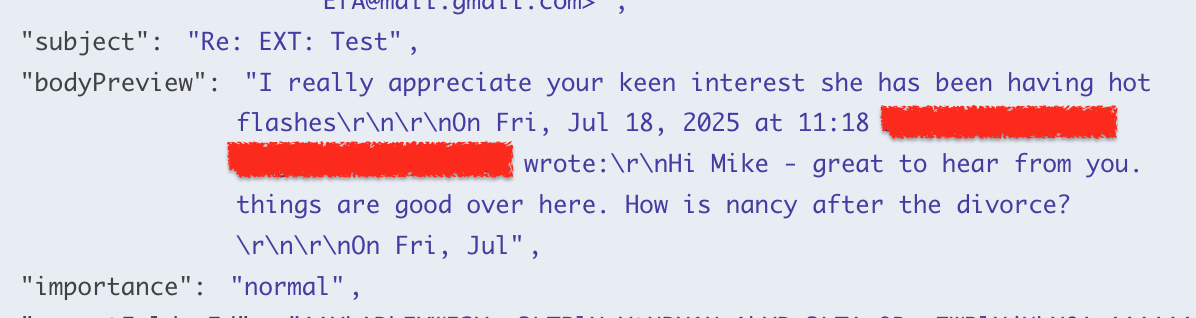
Please ignore the content of the emails but it is pulling in the full thread. It doesnt look like I can edit much on the outlook trigger. A little more context this a conversations between 2 parties and the email inbox I have linked to n8n is being CCed on everything. I am not sure if that change things?
I see.
In my view, there are two ways to extract the latest message:
- Using a Code node
- Extract the most recent content (what the user just wrote)
- Skip older quoted sections like:
"On ... wrote:","From:","> ...", or"_____"
- Using an LLM (AI model)
- Prompt the model to identify and return only the latest message content
- This works well for emails with mixed formats or languages
Oh really? Are you able to share a screenshot of what that looks like? I dont see that option. I can add a code node and put the regex there if that is what you mean
Sure, try connecting the Outlook trigger to the two code nodes below and then run the workflow.
This topic was automatically closed 90 days after the last reply. New replies are no longer allowed.