How do I get my n8n flow to reach my foundry agent via API access

I am trying to pass the email body and subject to a published MS Foundry agent to have it make a decision on whether the email is an order or not, but am unable to get to the agent via API and have no clue whether there is another method that would be more suited to my needs

Describe the problem/error/question

Consistently getting a 401 error which I have narrowed down to either the API key or the endpoint

What is the error message (if any)?

Please share your workflow

Share the output returned by the last node

[

{

“body”:
{

“error”:
{

“code”:
“401”,

“message”:
“Access denied due to invalid subscription key or wrong API endpoint. Make sure to provide a valid key for an active subscription and use a correct regional API endpoint for your resource.”

}

},

“headers”:
{

“content-length”:
“224”,

“connection”:
“close”,

“content-type”:
“application/json”,

“date”:
“Wed, 11 Mar 2026 01:30:24 GMT”,

“apim-request-id”:
“98025f0b-c5c4-4d23-ad4d-48f375db4ceb”

},

“statusCode”:
401,

“statusMessage”:
“PermissionDenied”

}
]

Information on your n8n setup

  • n8n version: 1.123.22
  • Database (default: SQLite):
  • n8n EXECUTIONS_PROCESS setting (default: own, main):
  • Running n8n via (Docker, npm, n8n cloud, desktop app): Cloud
  • Operating system: Win 11

Hi @JamesCMS Welcome!
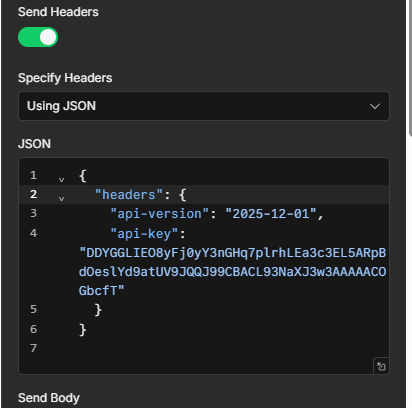
I recommend moving your api-key from query parameters to the send headers section of the HTTP request node, so that it fulfills the azure requiring a API key as a header not that URL you are currently sending.

I have done so but I still have the same error.

Output

1 item

[

{

“body”: {

“error”: {

“code”: “401”,

“message”: “Access denied due to invalid subscription key or wrong API endpoint. Make sure to provide a valid key for an active subscription and use a correct regional API endpoint for your resource.”

}

},

“headers”: {

“content-length”: “224”,

“connection”: “close”,

“content-type”: “application/json”,

“date”: “Wed, 11 Mar 2026 21:08:14 GMT”,

“apim-request-id”: “d3df57b8-e799-4431-801d-420e2f6eef16”

},

“statusCode”: 401,

“statusMessage”: “PermissionDenied”

}

]

Curl gives me the below error text, no object ID though, this leads me to believe the API endpoint is correct but the permissions on the resource are incorrect somehow

Identity(object id: ) does not have permissions for Microsoft.MachineLearningServices/workspaces/agents/action actions. Please refer to Manage roles in your workspace - Azure Machine Learning | Microsoft Learn to fix the permissions issue.

hey @JamesCMS — connecting n8n to external ai agents via api is pretty standard. azure ai foundry uses bearer token auth so make sure the api key is in the Authorization header as ‘Bearer ’ not as a query param. for the http request node: post method, content-type application/json, body with a messages array (that’s what foundry expects). if you’re getting timeouts check if the endpoint needs an api-version parameter in the url — that trips people up. what’s the specific error you’re seeing?

Hi @Benjamin_Behrens - I am getting a 401 error which I am currently assuming is an RBAC permissions error on the Azure side, but without the object ID I cannot narow it dow, even using curl I got a blank object ID.

Changing to “bearere” from “api-key” didnt change anything FYI

the blank object id is the key clue — it means azure can’t resolve your caller identity at all, so this isn’t an rbac role assignment issue but the credential itself isn’t valid for that resource. for services.ai.azure.com endpoints, api-key header is actually the right approach (my bearer suggestion earlier was for azure ml workspace endpoints — different auth system, my bad).

try regenerating the api key directly in azure portal under your ai foundry resource and make sure you’re copying it from that specific resource (not a different azure openai deployment — keys are resource-scoped).

also noticed: your body params have Email subject and Email body as separate keys, but the /protocols/openai endpoint expects an openai-format messages array with role and content. worth fixing that once the auth is sorted or you’ll hit a 422 next.

@Benjamin_Behrens That makes a lot of sense, still getting a 401 with the regenerated API key - the previous key was definitely from the correct resource also. I am new at this so it could also be the endpoint isn’t right, but from all the documentation I have read it should be.

I am back to being sus on the endpoint I am trying to hit. I’ll go read some more documentation as from what I have read the published agent should be reachable, the below were the endpoints supplied by Foundry on publishing the agent, 401 errors also

@JamesCMS persistent 401 after key regeneration usually points to one of two things:

API key access might be disabled at the resource level. Azure AI Foundry resources have a setting that can force Entra ID auth only — check Azure Portal → your AI Foundry resource → Settings/Networking and look for something like “Allow API key access” or “Disable local authentication”. If that’s toggled off, no API key will work regardless.

Resource key vs. project key. The endpoints Foundry gave you are project-level paths (/api/projects/...), but there are sometimes separate keys at the project level vs. the top-level resource. In Azure AI Foundry Studio, check under your project settings → there may be a dedicated key there separate from the resource keys.

The endpoints themselves look structurally correct for what Foundry publishes — so if auth is genuinely enabled and you have the right key, that api-version=2025-11-15-preview is worth double-checking too. It was the preview version at publish time, but you could try fetching the current supported versions via the Azure docs or swap to a more recent one if available.

If API key auth is locked down, the alternative is generating an Entra ID bearer token via the Azure CLI (az account get-access-token --resource https://cognitiveservices.azure.com) and using that as Authorization: Bearer <token> — more steps but confirms whether it’s key-specific or a broader auth issue.

@Benjamin_Behrens The API auth option is under properties at the resource level and is already enabled, good idea to check for sure.

I’ll come back to the rest tomorrow and let you know.

good to confirm that’s not the blocker — so auth is enabled, key is from the right resource, header is set correctly.

one thing worth trying when you’re back: look at the two endpoints Foundry gave you — they both have /responses appended (protocols/openai/responses) and api-version=2025-11-15-preview as a query param in the url. your workflow is currently hitting protocols/openai with no api-version, which is a different endpoint. azure might be rejecting the request before it even reaches key validation.

try updating the url to: https://n8n-order-email-to-myob-resource.services.ai.azure.com/api/projects/n8n_order_email_to_myob/applications/IsEmailAnOrder/protocols/openai/responses?api-version=2025-11-15-preview

Hey a colleague has found a solution, needed to create a generic credential with the API key, change the auth type on the HTTP request to generic header auth and direct to the responses endpoint, completed solution pasted in below

{
“nodes”: [
{
“parameters”: {
“pollTimes”: {
“item”: [
{
“mode”: “everyMinute”
}
]
},
“output”: “raw”,
“filters”: {},
“options”: {
“attachmentsPrefix”: “attachment_”,
“downloadAttachments”: true
}
},
“type”: “n8n-nodes-base.microsoftOutlookTrigger”,
“typeVersion”: 1,
“position”: [
-16,
224
],
“id”: “361daf1c-4049-487c-9c6c-872efa463c6c”,
“name”: “Microsoft Outlook Trigger”,
“credentials”: {
“microsoftOutlookOAuth2Api”: {
“id”: “QK6tJproo2mXU4kP”,
“name”: “[email protected]
}
}
},
{
“parameters”: {
“method”: “POST”,
“url”: “https://n8n-order-email-to-myob-resource.services.ai.azure.com/api/projects/n8n_order_email_to_myob/applications/IsEmailAnOrder/protocols/openai/responses?api-version=2025-11-15-preview”,
“authentication”: “genericCredentialType”,
“genericAuthType”: “httpHeaderAuth”,
“sendBody”: true,
“specifyBody”: “json”,
“jsonBody”: "={\n “model”:“gpt-5-nano”,\n “input”: [\n {“role”: “user”, “content”: “Get an answer”}\n ]\n} ",
“options”: {
“response”: {
“response”: {
“fullResponse”: true,
“neverError”: true
}
}
}
},
“type”: “n8n-nodes-base.httpRequest”,
“typeVersion”: 4.3,
“position”: [
304,
224
],
“id”: “fa35b8c7-3af3-4e16-9e22-bb449f5c27f0”,
“name”: “HTTP Request”,
“alwaysOutputData”: false,
“credentials”: {
“httpHeaderAuth”: {
“id”: “sBG16iYZ17SvUH5B”,
“name”: “n8n-order-email-to-myob-resource API key 1”
}
}
}
],
“connections”: {
“Microsoft Outlook Trigger”: {
“main”: [
[
{
“node”: “HTTP Request”,
“type”: “main”,
“index”: 0
}
]
]
},
“HTTP Request”: {
“main”: [

]
}
},
“pinData”: {},
“meta”: {
“templateCredsSetupCompleted”: true,
“instanceId”: “0fc75bd7dd2d50f89302cfdf6389f85b36fccf740504f34cbd68bd897bb95280”
}
}