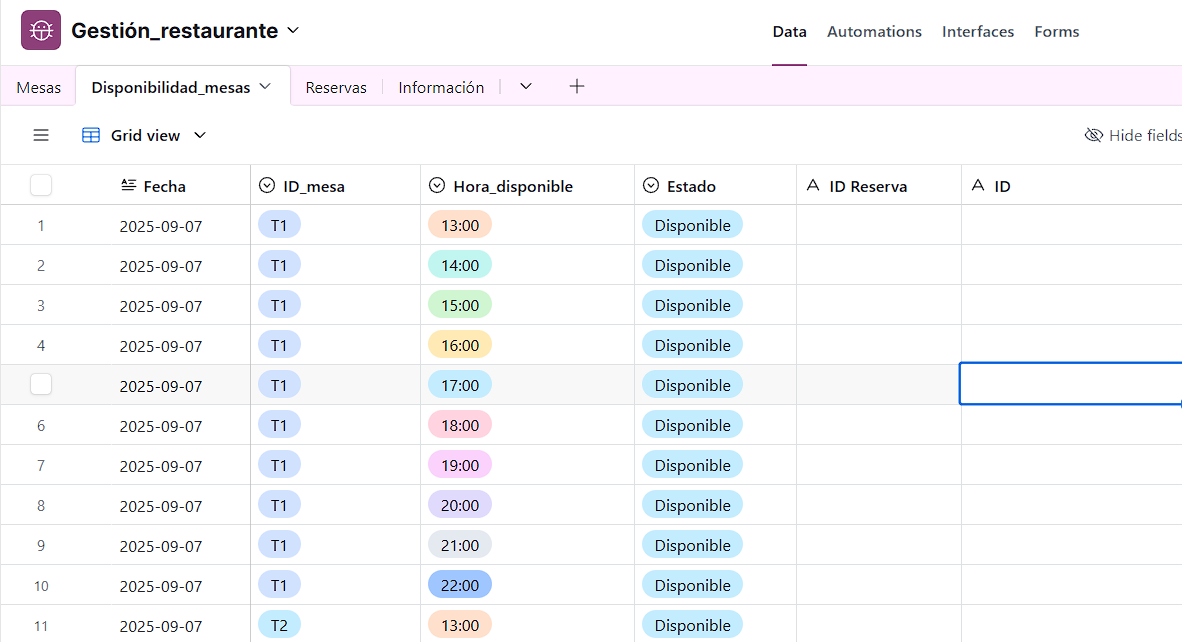
I was wondering how to add new dates and times automatically in an airtable base using a n8n workflow. It would trigger every X amount of time to add future dates and times available as time passes on, it would also delete old fields from that past in the datebase to reduce useless data. So I do not have to manually add and delete the dates and times. I attached an example below of ideally how the workflow should add the information into the sheet, and the data that would be deleted once this date has passed.
Cron Trigger → Get Rows → Loop Over Items → If Date Exists:
→ If Date Exists = True → If Date Has Passed:
→ If Date Has Passed = True → Clear Row → Back To Loop
→ If Date Has Passed = False → Back To Loop
→ If Date Exists = False → Append Date Into Row → Back To Loop
If I am not mistaken this is the logic you want to achieve. Either way I hope you get an idea of how the workflow might look like if not exactly like what I have mapped above. If you do think this might be the workflow you want and still be confused by my map you can contact me and I would help you make the workflow.
Hi, yeah could you please help me make the workflow. Is it also possible to add several dates which have different “ID_mesa”, “Hora_disponible” as seen above?
Thanks.
This topic was automatically closed 90 days after the last reply. New replies are no longer allowed.