How to automatically duplicate the existing workflow using webhook trigger

I’m building a lead generation app where each new user gets their own workflow for processing leads.

Here’s what I want to achieve:

  1. I have a master workflow that contains:

    • A Webhook Trigger

    • Lead processing logic

    • Email sending using SMTP credentials

  2. When a new user signs up and submits an onboarding form in my app:

    • A webhook should fire

    • n8n should automatically duplicate the master workflow for that specific user

    • The workflow should automatically get the SMTP credentials the user entered in the form

    • Those SMTP credentials should then be assigned to the email node inside the duplicated workflow

My questions:

  • Is it possible in n8n to programmatically duplicate an existing workflow using a webhook trigger?

  • Can I dynamically create or assign SMTP credentials from incoming webhook data?

  • If yes, what is the recommended way to implement this? Should I use the n8n API, workflow templates, or another approach?

My goal is to allow every new user to have an isolated workflow automatically generated for them.

Information on n8n setup

n8n version: 1.119.2
Database: Supabase
Running n8n via: Hostinger Cloud VPS
Operating system: Ubuntu 24.04

You can use n8n node. with that node you can create, delete and get workflows

https://docs.n8n.io/integrations/builtin/core-nodes/n8n-nodes-base.n8n/

so how can i add that credential in that?

Yes, with that node you can manage credentials too

https://docs.n8n.io/integrations/builtin/core-nodes/n8n-nodes-base.n8n/#create-credential

1 Like

SO you mean that i have to map that input from the user in my code? and it will automatically create that? correct?

i didn’t do that myself. but i think in your workflow you must create a credential first and the next node create the workflow with created credential.

I am unable to understand how can i get the json for this? i have refer to the documents you provided. if possible can we have a 10 min call? or something like that .

Because mostly i am using http request nodes for booking , can i map that directly inside that json or what it the other way for doing this using create a credential node

To find the type, download your workflow as JSON and examine it. For example, for a Google Drive node the {credentialTypeName} is googleDriveOAuth2Api:

{
    ...,
    "credentials": {
        "googleDriveOAuth2Api": {
        "id": "9",
        "name": "Google Drive"
        }
    }
}

so id will be same or it will be changed?

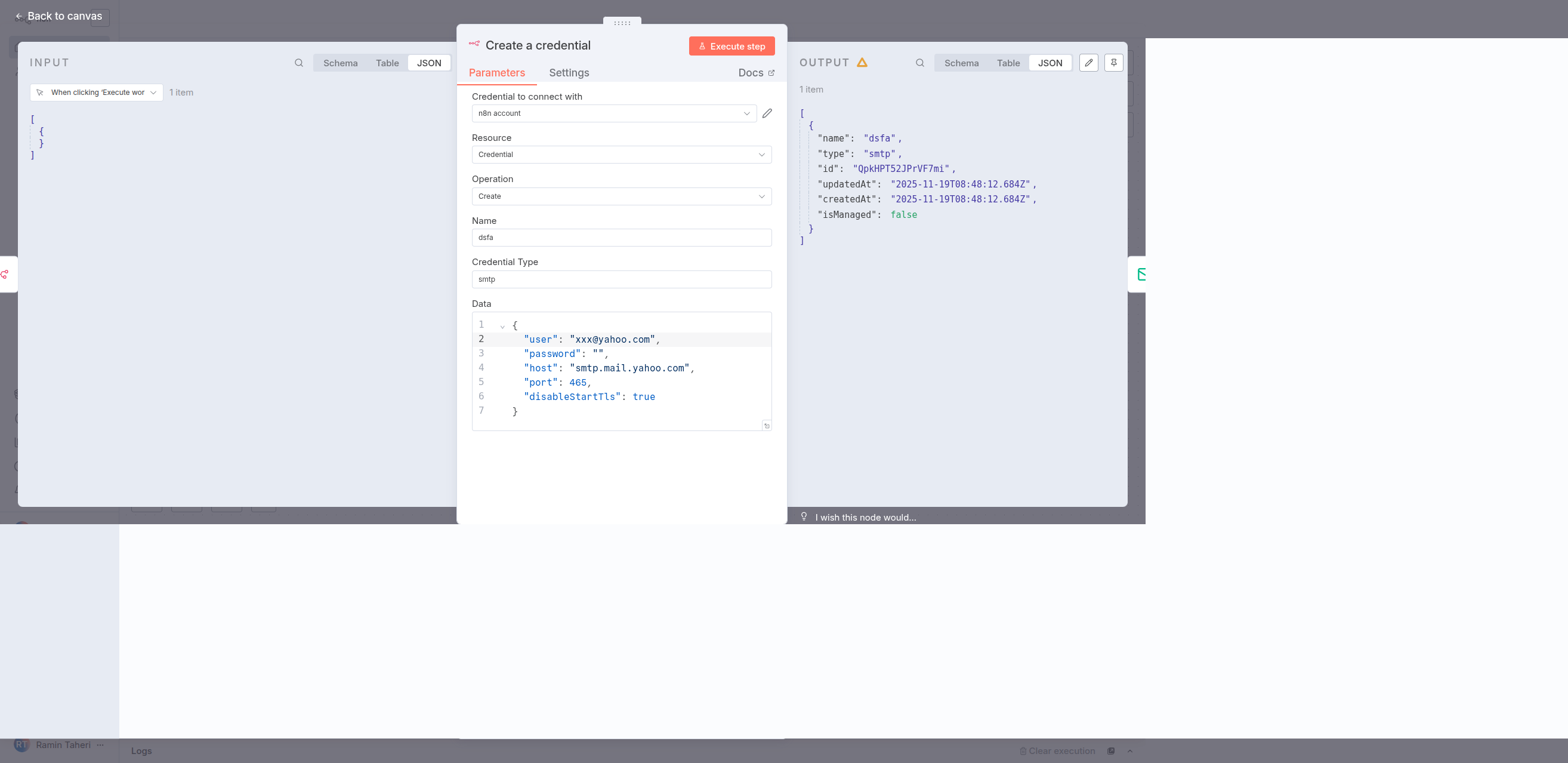
based on the image that you included.

set Credential Type to smtp

set Data to

{
“user”: “[email protected]”,
“password”: “”,
“host”: “smtp.mail.yahoo.com”,
“port”: 465,
“disableStartTls”: true
}

How could i obtain credential type and the schema for Data Field?

first i add a Send Email Node to a dummy workflow and copy node and paste it in a text file and inspect the json. in the json object, there is a credentials key

in the credentials object in above json there is key, that key is the Credential Type, in this example it is smtp

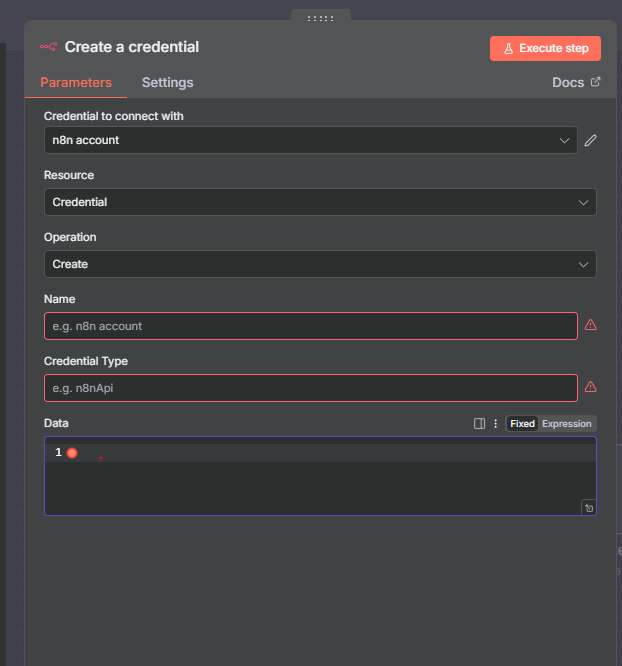
so i found the Credential Type, How can i figure out the schema for Data field for “create credential form”?

i did this

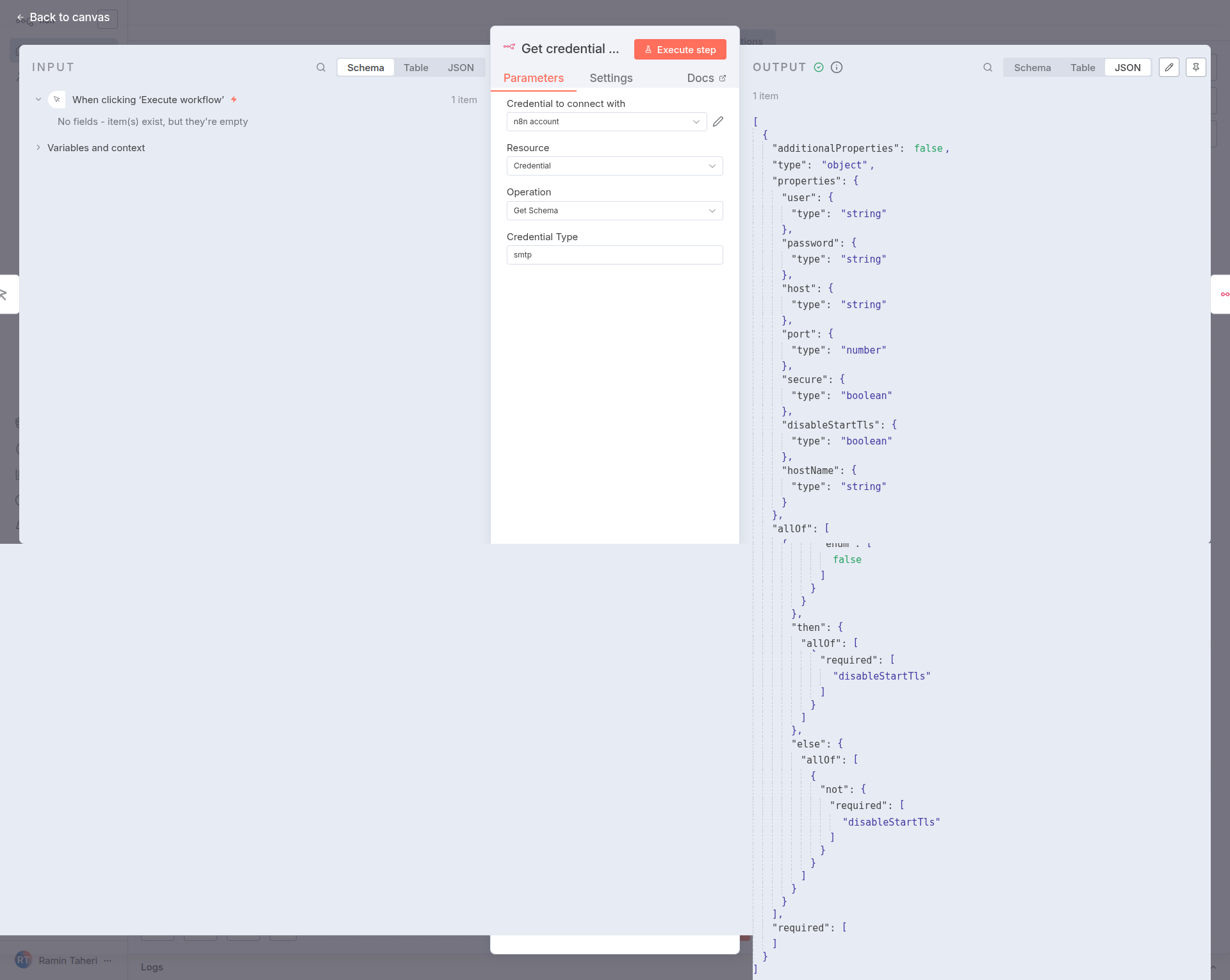
add a n8n node with the below values and run it

the json output of above node describes the schema of Data field

[
  {
    "additionalProperties": false,
    "type": "object",
    "properties": {
      "user": {
        "type": "string"
      },
      "password": {
        "type": "string"
      },
      "host": {
        "type": "string"
      },
      "port": {
        "type": "number"
      },
      "secure": {
        "type": "boolean"
      },
      "disableStartTls": {
        "type": "boolean"
      },
      "hostName": {
        "type": "string"
      }
    },
    "allOf": [
      {
        "if": {
          "properties": {
            "secure": {
              "enum": [
                false
              ]
            }
          }
        },
        "then": {
          "allOf": [
            {
              "required": [
                "disableStartTls"
              ]
            }
          ]
        },
        "else": {
          "allOf": [
            {
              "not": {
                "required": [
                  "disableStartTls"
                ]
              }
            }
          ]
        }
      }
    ],
    "required": []
  }
]

from the above json i created the below json for Data field

{
“user”: “[email protected]”,
“password”: “lnlgfjeqm65456465465454uuldzri”,
“host”: “smtp.mail.yahoo.com”,
“port”: 465,
“disableStartTls”: true
}

now that i have the credential type and data i can create the n8n node


Thanks @ramin1 ,

but see now i am using gmail trigger , so credential will always be same , after adding the credentials we get this button and after signing with the gmail account our workflow starts. So is there any possibility of doing this.

This is what the json for gmail trigger shows, so the id under gmailOAuth2 is the id of the gmail account connected? And if yes how can i do it after adding the sign in with gmail button on my site
“id”: “85435435409-53957836”,
“name”: “Gmail Trigger”,
“credentials”: {
“gmailOAuth2”: {
“id”: “ghdfsgsdfgfk,
“name”: “Gmail account”

i didn’t get what you want to accomplish exactly. in your question you said that you have Webhook trigger and want to create SMTP credentials.

please send your workflow or send a DM, so maybe i can help you