How to configure n8n to run in a subpath?

I cloned the source code (master branch) from GitHub and ran pnpm install and pnpm build. When I run n8n at http://localhost:5678 with pnpm start , it successfully accesses it.
Now, I want to run it locally at the http://localhost:5678/my_n8n subdirectory, but I’m not sure how to change it. I saw the documentation mentioning N8N_PATH: The path n8n deploys to.

I didn’t use docker because my development environment doesn’t allow me to use docker, so I just cloned the source code and then ran it locally using
pnpm install
pnpm build
pnpm start**

But I don’t understand what file I should modify.**
Could someone please tell me which configuration file I should modify?

I’ve tried setting the environment variables like this and then running pnpm start again to start the project:

image

then,show the info :Editor is now accessible via: http://localhost:5678/my_n8n
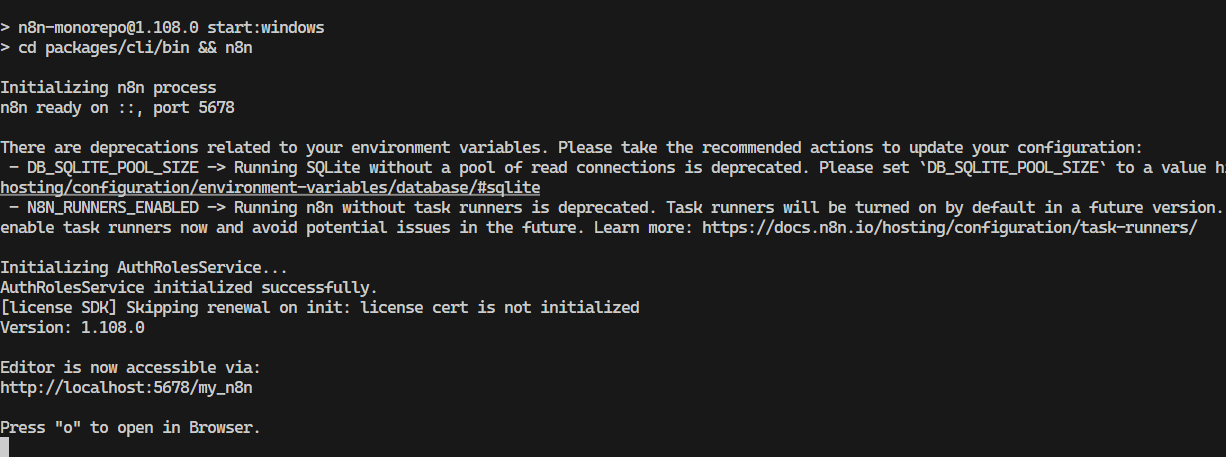
But when I open this address, the page is blank and the console reports an error:

It seems that the static files path cannot be loaded

Information on your n8n setup

  • n8n version: 1.108.0 master branch
  • Database (default: SQLite):
  • n8n EXECUTIONS_PROCESS setting (default: own, main):
  • Running n8n via (Docker, npm, n8n cloud, desktop app):pnpm start
  • Operating system:windows

I think this is a scenario that many people will need to use. Has anyone successfully done this configuration?

hello @hao-z-zheng

Try to set the path with $env:N8N_PATH="/my_n8n"

@Jon Mentioned on Discord that this feature might be removed in v2. So please keep that in mind. :slight_smile:

Also I don’t see how this feature is something “many people will need to use“.

The n8n team really needs to consider organizing someone to answer user questions. No one officially responds to such a basic question, but I figured it out myself through research and am sharing my solution in the hope it helps others.

I’m currently using n8n release/1.109.0.

Also, I saw the n8n team say they’ll consider deprecating the N8N_PATH configuration option in version 2, but it’s essential.

I hope the official n8n team will provide more detailed documentation for version 2.

I’m currently using version 1.109. Steps to Resolve for configuring sub-paths:

  1. Add a .env file to the packages\cli\bin.env directory.
    .env:
    N8N_PATH=/my_n8n/
    N8N_EDITOR_BASE_URL=http:/ /www.xyz.com/my_n8n/
    N8N_DIAGNOSTICS_ENABLED=false

  2. Build the project using pnpm build and then start it using pnpm start

  3. Add the following configuration to the nginx server:

http {

map $http_upgrade $connection_upgrade {
default upgrade;
‘’ close;

}

server {
listen 443;
server_name www.your_server_url;

location = / { return 302 /my_n8n/; }
location = /my_n8n { return 301 /my_n8n/; }

location /my_n8n/rest/push {
proxy_http_version 1.1;
proxy_set_header Upgrade $http_upgrade;
proxy_set_header Connection $connection_upgrade;
proxy_set_header Host $host;
proxy_set_header X-Forwarded-Host $host;
proxy_set_header X-Forwarded-Port $server_port;
proxy_set_header X-Forwarded-Proto $scheme;
proxy_set_header X-Forwarded-For $proxy_add_x_forwarded_for;
proxy_buffering off;
proxy_read_timeout 3600s;
proxy_send_timeout 3600s;
proxy_pass http:// 127.0.0.1:5678/rest/push;
}

location /my_n8n/ {
proxy_pass http:// 127.0.0.1:5678/;
proxy_http_version 1.1;
proxy_set_header Host $host;
proxy_set_header X-Forwarded-Proto $scheme;
proxy_set_header X-Forwarded-For $proxy_add_x_forwarded_for;
proxy_set_header Upgrade $http_upgrade;
proxy_set_header Connection $connection_upgrade;
client_max_body_size 50m;

}

location = /my_n8n/index.html {
proxy_pass http:// 127.0.0.1:5678/;
add_header Cache-Control “no-cache, no-store, must-revalidate”;
}

location /static/ {
proxy_pass http:// 127.0.0.1:5678/static/; proxy_http_version 1.1;
proxy_set_header Host $host;
proxy_set_header X-Forwarded-Proto $scheme;
proxy_set_header X-Forwarded-For $proxy_add_x_forwarded_for;

expires 30d;
add_header Cache-Control “public, max-age=2592000”;
}
}
}

  1. Then visit your www.your_server_url/my_n8n

  2. The nginx proxy will help you access the n8n website running on port 5678

2 Likes

This topic was automatically closed 7 days after the last reply. New replies are no longer allowed.