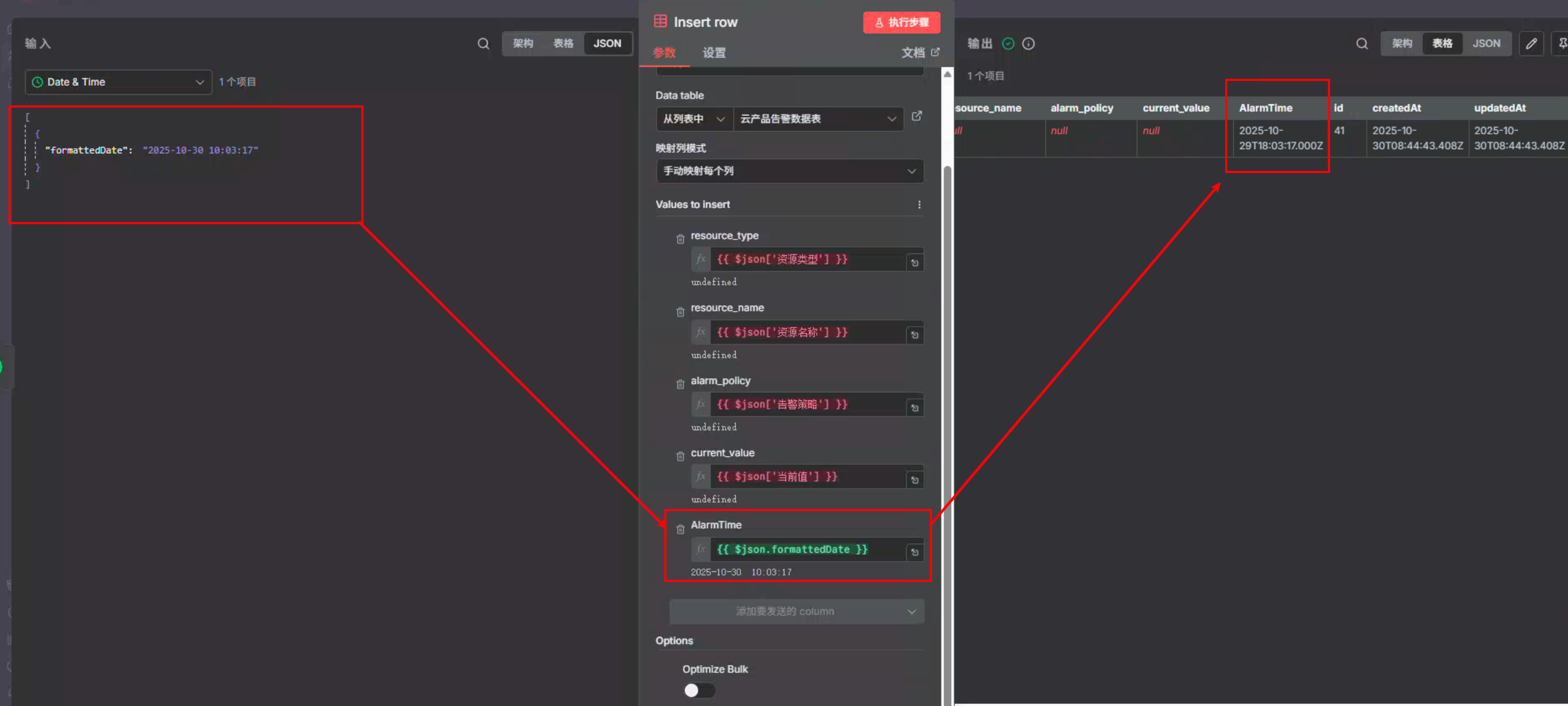
How to control the time zone of the DataTable?

How to control the time zone of the datatable?

Share the output returned by the last node

Information on your n8n setup

  • n8n version: 1.117.3
  • Database (default: SQLite): SQLite
  • n8n EXECUTIONS_PROCESS setting (default: own, main): main
  • Running n8n via (Docker, npm, n8n cloud, desktop app): Docker
  • Operating system: ubuntu

Expressions like {{ $now }} use the timezone of the workflow, which you can change in the settings(refer to image). You can set different timezones for different workflows.

1 Like

Thank you for your reply. It seems that my settings here are reasonable, but the issue is that the time zone will automatically convert when storing data in a database

The reference document datatable is not effective

Try using Date & Time node with the option, ‘Use Workflow Timezone’ toggled on(refer to image).

The effect I want to achieve is to store the alarm time field in the datatable and insert it. Currently, the crearedAT field is UTC+8 (which is the expected time zone), but what UTC time zone does the crearedAT field output to the big model。

I have tested it.:

{{$json.template_variable.AlarmTime.toDateTime().setLocale(‘zh-CN’)}

GENERIC_TIMEZONE=Asia/Shanghai

The time zone output here is not UTC+8 either

Is the time zone ultimately stored in the data table automatically changed。

Considering you already format the date before it reaches the table, have you tried using a string value instead of date in the data table?

You can alternatively use Timestampz as a string too – format it to a date whenever you get a row instead of formatting it when inserting a row.

2 Likes

This topic was automatically closed 7 days after the last reply. New replies are no longer allowed.