Describe the problem/error/question
I am currently exploring the n8n using 14 day free trial. I build one small workflow and divided that workflow into sub work flow. but when i tried to call sub workflow from mail workflow. it is showing error “Sub-workflow must be published before using”.
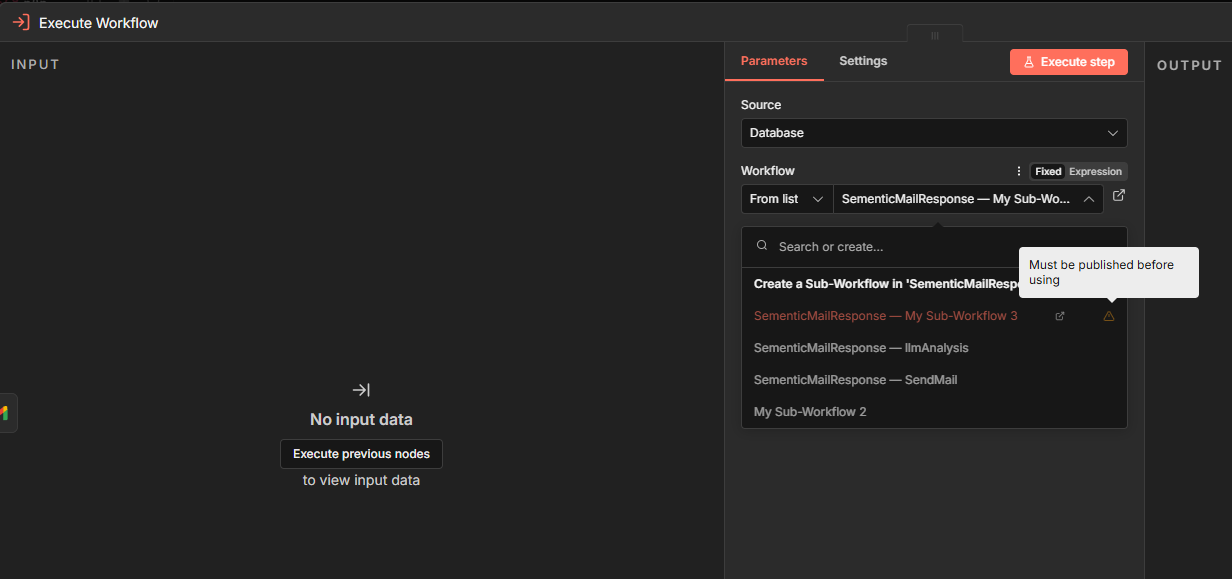
What i understand currently, let say my main workflow is in production and i got the issue in one of the sub workflow. so my next step would be fix the issue, test it and then push it in PROD.
But due to above restriction how i can i test the changes end to end. Because once i publish the changes and prod bot execution is on going my changes would impact that changes as well.
[Not sure if i am able to explain my concern correctly, Please let me know if any one can help me with doubt]
Thanks.
What is the error message (if any)?
Please share your workflow
(Select the nodes on your canvas and use the keyboard shortcuts CMD+C/CTRL+C and CMD+V/CTRL+V to copy and paste the workflow.)
Share the output returned by the last node
Information on your n8n setup
- n8n version:
- Database (default: SQLite):
- n8n EXECUTIONS_PROCESS setting (default: own, main):
- Running n8n via (Docker, npm, n8n cloud, desktop app):
- Operating system: