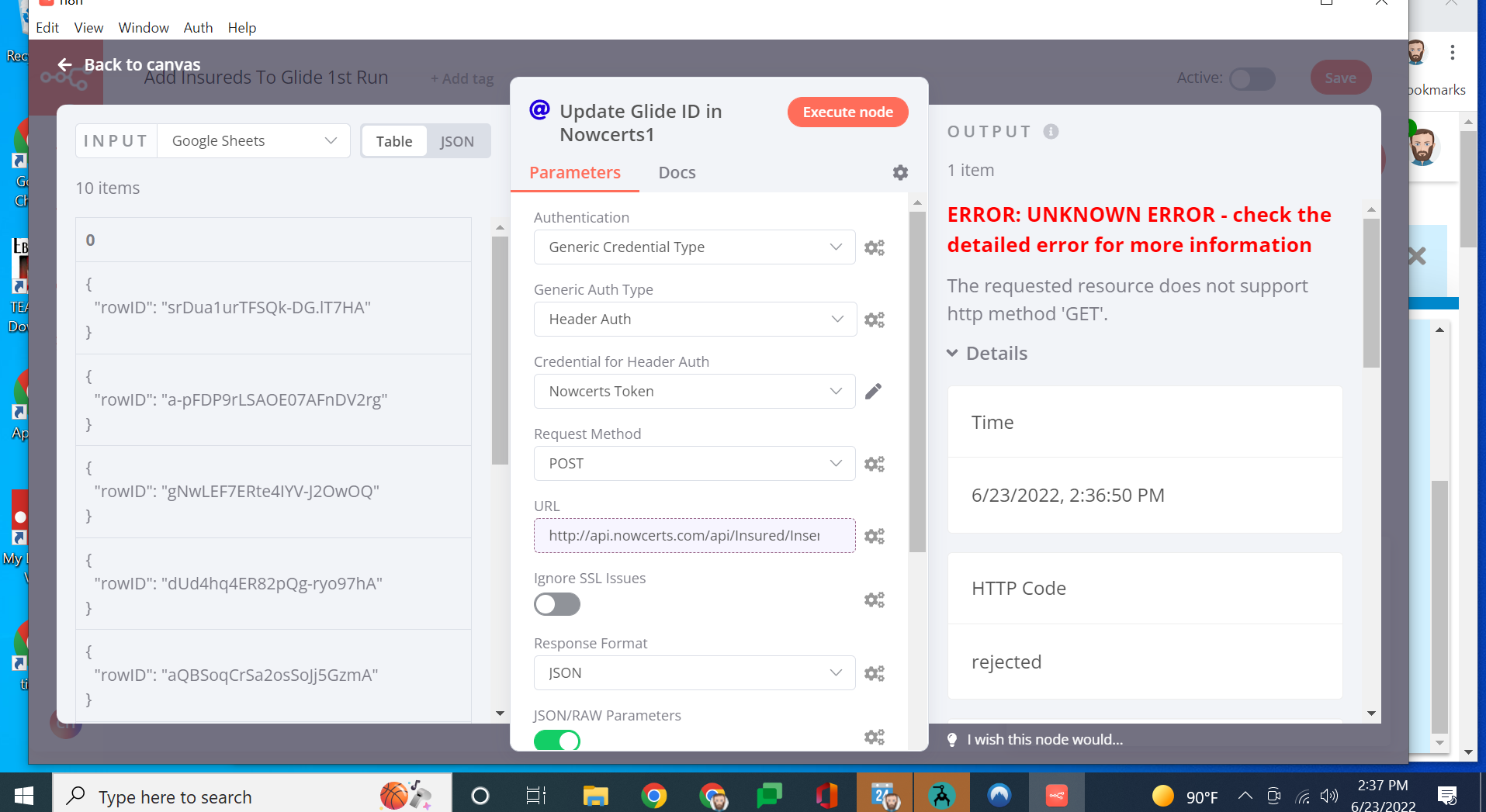
When making an HTTP POST request, with the request method set to POST, I am receiving an error in the response that a GET request is not allowed on this endpoint, but I am not making a GET request. screenshot below. I am using the desktop version for windows.
Welcome to the community @ReduceMyIns!
Can you please post the full output of the error on the right? Maybe there is something in there that sheds some light on what is going on here.
ive tried resetting the “request method” field, deleting the node, and starting with a fresh one. below is the full output.
Cause
{“status”:“rejected”,“reason”:{“message”:“405 - {“message”:“The requested resource does not support http method ‘GET’.”}”,“name”:“Error”,“stack”:“Error: Request failed with status code 405\n at createError (C:\Users\Chase Henderson\AppData\Local\Programs\n8n\resources\app\node_modules\axios\lib\core\createError.js:16:15)\n at settle (C:\Users\Chase Henderson\AppData\Local\Programs\n8n\resources\app\node_modules\axios\lib\core\settle.js:17:12)\n at IncomingMessage.handleStreamEnd (C:\Users\Chase Henderson\AppData\Local\Programs\n8n\resources\app\node_modules\axios\lib\adapters\http.js:269:11)\n at IncomingMessage.emit (node:events:406:35)\n at IncomingMessage.emit (node:domain:470:12)\n at endReadableNT (node:internal/streams/readable:1331:12)\n at processTicksAndRejections (node:internal/process/task_queues:83:21)”}}
Stack
NodeApiError: UNKNOWN ERROR - check the detailed error for more information
    at Object.execute (C:\Users\Chase Henderson\AppData\Local\Programs\n8n\resources\app\node_modules\n8n-nodes-base\dist\nodes\HttpRequest\HttpRequest.node.js:1119:27)
    at processTicksAndRejections (node:internal/process/task_queues:96:5)
    at async Workflow.runNode (C:\Users\Chase Henderson\AppData\Local\Programs\n8n\resources\app\node_modules\n8n-workflow\dist\src\Workflow.js:594:28)
    at async C:\Users\Chase Henderson\AppData\Local\Programs\n8n\resources\app\node_modules\n8n-core\dist\src\WorkflowExecute.js:536:49
1 Like
Same here. I am using the method “POST” and receiving the error message “405 - “{"detail":"Method \"GET\" not allowed.","status_code":405}””
POST X GET
Edit: Sounds like this occurs only “importing cUrl”. Directly insert works here.
Hey @Antonio_Morais,
That is interesting, which version of n8n are you using?
Hey @Jon .I am using version 0.233.1.
Important to say that I recently updated to this version importing all credentials (maybe helps the investigation). This flow was creating from new one.
Hey @Antonio_Morais,
I would be surprised if the credential import caused the issue but I will dig into the curl command import to see if that is the cause.
2 Likes
I also encountered this today I was setting up a simple HTTP Request node to POST some contact form data to my API. Had everything configured - method set to POST, JSON body all filled out, headers good to go. Hit execute and… it worked! Got back a 200 response with data. Perfect, right?
Wrong. Nothing was actually being created.
After way too much time checking my API code, CORS settings, authentication, and questioning my entire existence, I finally found the problem: I had a typo in my URL - //api/contacts instead of /api/contacts (extra slash).
The weird part? n8n didn’t error out or warn me. Instead, it just… silently changed my POST to a GET request. So I was getting data back (which is why it looked like it worked), but obviously not creating anything.
Once I fixed the typo to /api/contacts, everything worked perfectly.
Not sure if this is expected behavior, but it would’ve saved me a ton of debugging time if n8n had either:
-
Thrown an error about the weird URL
-
Actually sent the POST I configured
-
Or at least shown somewhere in the logs that it switched methods on me
Anyway, hope this saves someone else the headache. Check your URLs for extra slashes! - text credits to Replit agent! 