Every time a new vendor contract came in, someone on the team would skim it for 5 minutes, say “looks fine,” and sign it. That’s how you miss a 30-day auto-renewal clause buried on page 8.
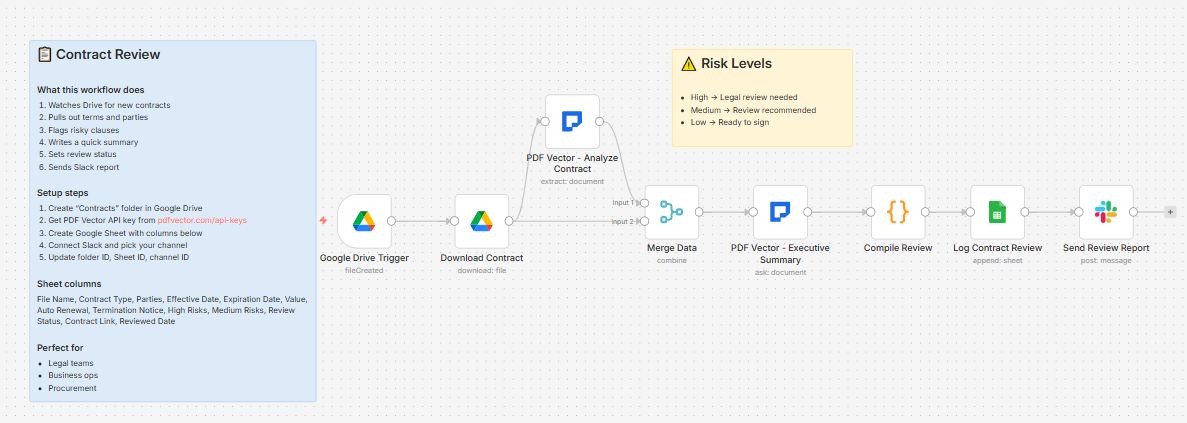
Built a workflow that reads every contract the moment it lands in Drive. Takes about 40 seconds. Here’s what it does:
What it does
New file in your Contracts folder → downloads it → runs two AI passes → logs everything to Sheets → fires a Slack report
Pass 1 - Structured extraction:
Pulls out contract type, all parties, effective and expiration dates, total value, payment terms, termination notice window, whether there’s an auto-renewal clause, non-compete clauses, and every risk flag it can find. Each risk gets tagged High / Medium / Low.
Pass 2 - Executive summary:
Writes a plain-English 2-3 sentence summary, lists the top 3 things to be aware of, and gives an overall risk rating with justification.
The Code node then counts the High and Medium risks and sets a review status automatically:
-
1+ High risks → “Requires Legal Review”
-
2+ Medium risks → “Review Recommended”
-
Everything else → “Ready for Signature”
The Slack message looks like this:
📝 Contract Review Complete

File: vendor-agreement-march.pdf

Type: Service Agreement

Parties: Acme Corp (Vendor), Your Company (Client)

📋 Executive Summary

[2-3 sentence plain-English summary]

⚠️ Risk Assessment

• High Risks: 1

• Medium Risks: 2

[High] Unlimited liability clause — Section 8.2

[Medium] Auto-renewal with 30-day cancellation window

[Medium] Broad IP assignment clause

🏷️ Status: Requires Legal Review

View Contract → [link]
That message fires before anyone opens the file. Your legal team knows immediately which contracts need attention and which are fine to sign.
What gets extracted
-
Contract type (Service Agreement, NDA, Employment, Lease, Sales, Partnership, License)
-
All parties with their roles
-
Effective date, expiration date, auto-renewal (yes/no), renewal terms
-
Total value, payment terms
-
Termination notice days + termination clauses
-
Liability limitations, indemnification clauses, confidentiality terms
-
Non-compete clause (yes/no) + details
-
Risk flags array — each with description, severity, and the specific clause
Setup
You’ll need:
-
Google Drive and Sheets (free)
-
n8n instance (self-hosted — this uses a community node)
-
PDF Vector account (free tier: 100 credits/month, roughly 15-20 contracts)
-
Slack (optional — delete the last node if you don’t use it)
Takes about 15 minutes to configure. Full setup guide in the post below.
Download
Workflow JSON:
github.com/khanhduyvt0101/workflows
Full workflow collection:
Setup Guide
Step 1: Get your PDF Vector API key
Sign up at https://www.pdfvector.com — free plan is enough to test. Go to API Keys and generate a key.
Step 2: Set up Google Drive
Create a folder called “Contracts” in Google Drive. Copy the folder ID from the URL (the string after /folders/).
Step 3: Set up your Google Sheet
Create a new spreadsheet with these headers in Row 1:
File Name | Contract Type | Parties | Effective Date | Expiration Date | Value | Auto Renewal | Termination Notice | High Risks | Medium Risks | Review Status | Contract Link | Reviewed Date
Copy the Sheet ID from the URL (the long string between /d/ and /edit).
Step 4: Import the workflow
Download the JSON from GitHub and import into n8n via Import from File.
Step 5: Configure the nodes
Google Drive Trigger:
-
Connect your Google account
-
Paste your Contracts folder ID
Download Contract:
- Same Google credential
PDF Vector - Analyze Contract:
-
Add new credential (Bearer Token type)
-
Paste your API key
PDF Vector - Executive Summary:
- Same PDF Vector credential
Log Contract Review:
-
Connect Google Sheets
-
Paste your Sheet ID
-
Sheet tab must be named exactly “Contract Review”
Send Review Report (Slack):
-
Connect your Slack workspace
-
Pick your channel ID
-
Or delete this node if you don’t use Slack
Step 6: Test it
Activate the workflow and drop a contract PDF into your Drive folder. Wait about a minute and check your Sheet and Slack. The review status column will tell you how the contract was classified.
Accuracy
Tested on service agreements, NDAs, lease agreements, and employment contracts. Digital PDFs: ~95% accurate on extraction. Scanned contracts: ~88% — OCR is usually fine but messy scans drop accuracy on specific clause detection.
The risk flagging is AI judgment, not legal advice. It catches the obvious stuff (unlimited liability, auto-renewal, broad IP assignment) reliably. Edge cases in heavily customized contracts may need manual review even if it comes back Medium.
Cost
Free tier is 100 credits/month. Each contract uses about 6-8 credits (two AI passes). So you get roughly 12-15 contracts per month for free.
Basic plan is $25/month for 3,000 credits if you’re doing volume.
Customizing it
Change the risk threshold:
In the Code node, the status logic checks highRisks > 0 and mediumRisks >= 2. Adjust the numbers to match how strict you want the filter to be.
Add email instead of Slack:
Swap the Slack node for a Gmail node. Use the same template variables — they’re all available from $('Compile Review').item.json.
Filter by contract type:
Add an IF node before the Slack alert to only send notifications for specific contract types (e.g., only alert on Service Agreements over a certain value).
Store the executive summary:
Add a “Summary” column to your Sheet and map $json.executiveSummary to it. Useful for having plain-English notes without opening each file.
Limitations
-
Requires self-hosted n8n (PDF Vector is a community node)
-
Heavily redacted contracts won’t extract well — the AI needs readable text
-
Doesn’t track contract renewal dates or send reminders (would need a separate scheduled workflow for that)
-
Not a substitute for legal review on high-value contracts
Links
-
PDF Vector n8n integration: n8n Integration - PDF Vector
-
Full workflow collection: GitHub - khanhduyvt0101/workflows: Awesome PDF Automation Workflows - A curated collection of ready-to-use automation workflows for PDF processing and document extraction · GitHub
-
n8n docs: https://docs.n8n.io
Questions? Drop a comment if something’s not working or you want to extend it differently.