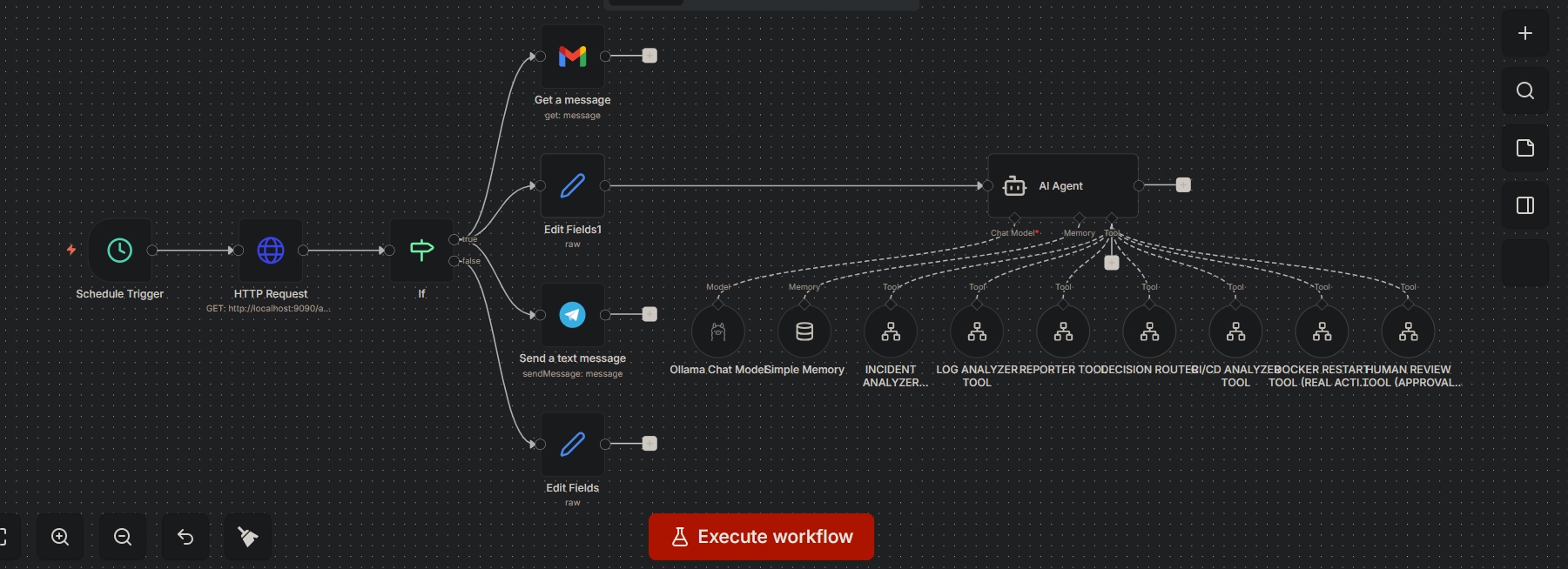
I built a fully automated AI DevOps system using n8n — and turned it into a multi-agent incident response platform

I built a fully automated AI DevOps system using n8n — and turned it into a multi-agent incident response platform.

This project isn’t just automation… it’s a full AI-driven DevOps control plane.

It monitors systems, detects failures, analyzes logs, evaluates CI/CD pipelines, and responds like a real Site Reliability Engineer.

:brain: What it does:

Real-time system monitoring (every minute)

Detects outages, CPU spikes, and service failures

AI-based incident analysis and severity classification

CI/CD pipeline failure detection and debugging

Log analysis for root cause detection

Structured incident reporting

Instant alerts via Telegram

Human approval flow for critical actions

Optional Docker restart for auto-healing (with safety gates)

:robot: Multi-Agent Architecture:

I designed the system using modular AI agents:

Incident Analyzer Agent

Log Intelligence Agent

CI/CD Analyzer Agent

Decision Routing Agent

Reporting Agent

Human Approval Agent

Auto-Healing Action Agent

Each agent runs as an independent workflow and connects like microservices.

:gear: Tech Stack:

N8N (orchestration layer)

Docker, Inc(automation + recovery actions)

AI models (Ollama / LLMs)

Monitoring + alerting logic

Telegram for real-time incident delivery

:fire: Why this matters:

This is the direction DevOps is moving toward:

From manual monitoring → automation → AI-driven self-healing infrastructure.

I didn’t just build workflows — I built a 24/7 AI DevOps engineer system that can observe, reason, and act.

:rocket: Next step: scaling this into a SaaS platform for AI-powered DevOps automation and incident response.

One of my next projects will be an Amazon Web Services (AWS) cost explorer and manager

If you’re building in DevOps, AI, or automation — this is the future.

Let’s connect.

4 Likes

Really cool architecture! The multi-agent pattern with modular workflows is exactly the right approach for this kind of system.

I’m currently building something similar for my clients — AI agents orchestrated via n8n with a governance layer for cost/token tracking per project. Would love to dig deeper into your implementation.

A few questions if you don’t mind:

On the agent architecture:

  1. How do your agents communicate with each other — sub-workflows or webhook calls between them?
  2. Which Ollama model are you using for incident analysis? (llama3, mistral, something else?)
  3. For the human approval flow — are you using Telegram callback queries with a Wait node, or a separate webhook listener?

On observability & data visualization:
4. How are you visualizing incident data and agent activity? Are you using something like Langfuse or n8nDash, or did you build a custom dashboard served on-the-fly via n8n webhooks (HTML + Respond to Webhook)?
5. Do you have any kind of reporting UI where you can see incident history, severity trends, and agent performance over time?
6. How are you handling token/cost tracking as this scales across multiple monitored systems? Are you logging usage per agent somewhere?

This is definitely the direction DevOps is heading.

1 Like

Really appreciate that, and honestly your governance layer idea is super interesting. That’s actually something I’m starting to think about now as things scale.

Happy to walk you through how I built mine :backhand_index_pointing_down:

Agent architecture

For communication, I’m mostly using n8n sub-workflows as modular services. The main orchestrator triggers other agents using Execute Workflow nodes when I need fast, internal communication.

When I want things to be more decoupled or async, I switch to webhooks between workflows. So it’s basically:

  • Execute Workflow for fast internal calls

  • Webhooks when I want flexibility or external triggers

For models, I’m using Ollama with:

  • llama3 for heavier reasoning like incident classification and decision making

  • mistral for lighter stuff like log parsing and extraction

I route between them depending on the task so I can balance speed and accuracy.

For the human approval flow, I’m using Telegram callback queries with a Wait node. The flow is pretty straightforward:

  • Send incident to Telegram with approve/reject buttons

  • Wait node pauses execution

  • Callback resumes the workflow with the user’s decision

For critical cases, I added a webhook fallback in case Telegram fails or times out.

Observability and data

Right now it’s a mix of simple and practical setups. I’m logging structured outputs into Google Sheets for quick visibility, and I built a basic real-time dashboard using n8n with HTML + Respond to Webhook.

I haven’t plugged in Langfuse yet, but I’m definitely considering it for deeper tracing.

For reporting, I’m storing things like incident history, severity, actions taken, and timestamps. At the moment it’s still lightweight, but the plan is to move toward a proper dashboard with React and charts to track trends like incident frequency and resolution time.

For token and cost tracking, I’m logging every LLM call with:

  • agent name

  • task type

  • model used

Then I estimate token usage based on input and output size and store that per agent.

Next step is building a proper centralized cost layer per project with budgets, smarter model routing, and cost-aware decisions, which is why your approach sounds really relevant.

Overall, I’m trying to move it from just automation into something that can actually observe, decide, and improve over time.

Would love to hear how you’re handling the governance side, especially how you enforce limits across agents.

1 Like

I’m also building an AWS cost tracker/optimisor

1 Like

For governance, here’s the short version of our approach:

Token tracking: Same execution ID → webhook → Wait 5s → GET execution → parse tokenUsage pattern, but we persist to Supabase (not Sheets) for multi-client isolation. Each client gets their own view via the auto-generated REST API.

Multi-provider normalization: We wrote a normalizeUsage() Code Node that maps OpenAI/Anthropic/Mistral/Gemini formats to a common { input_tokens, output_tokens, cost_usd } shape.

Curious about your model routing — are you selecting llama3 vs mistral at the orchestrator level or per sub-workflow?

I’m currently using Llama 3.2, but I’m looking to upgrade it in the future

1 Like

Man, this architecture is seriously impressive. Running an AI DevOps layer locally with Ollama and handling the human-in-the-loop via Telegram is a great setup.

I am super curious about one specific edge case in your human approval flow though. You mentioned using the Wait node with a Telegram callback. In my experience, that is exactly where silent failures love to hide. If the Telegram API hiccups, or the callback webhook drops, the Wait node just sits there or expires, and the workflow quietly dies without throwing a hard error.

Since this is an incident response platform, how do you monitor the monitor? Do you have some kind of external watchdog making sure these critical approval workflows don’t just silently hang in production?

1 Like

Yeah honestly you’re right, that’s a weak spot.

Right now since I’m still testing, I just use a timeout so it doesn’t hang forever, and if it expires I resend or escalate. I also log pending approvals to catch anything stuck.

Later I’ll move to a watchdog/event-driven setup instead of relying on the Wait node.

In the future I may even store the logs in a database of Google sheets

1 Like

Very, very good. That’s crazy, man! There’s a lot of room for improvement in the short, medium, and long term. Congratulations!

1 Like

Thank, that mean alot. I’m trying to find a full time job as an automation or an ai engineer and this projects are helping alot with experience

Yeah that’s the classic workaround pattern — timeout + log + hope for the best. Works fine until it doesn’t.

The move to a watchdog/event-driven setup is the right call long-term. Database logging (Google Sheets or Postgres) gives you the audit trail you need, and an external checker that queries those logs on a schedule will catch the stuck ones. The hard part is defining “stuck” — is it 5 min? 1 hour? Depends on the business context of each approval.

One pattern that works: have the watchdog check for any pending approval older than X, and if found, escalate to a different channel (SMS instead of Telegram, or a different human). Layered escalation beats single-channel alerts every time.