Most people sign a lease after skimming it for 10 minutes. The auto-renewal clause on page 6, the early termination penalty buried in section 12, the vague maintenance language that lets a landlord argue anything — you don’t catch those in a skim. Built a workflow that reads the whole thing and tells you what to watch out for.
What it does
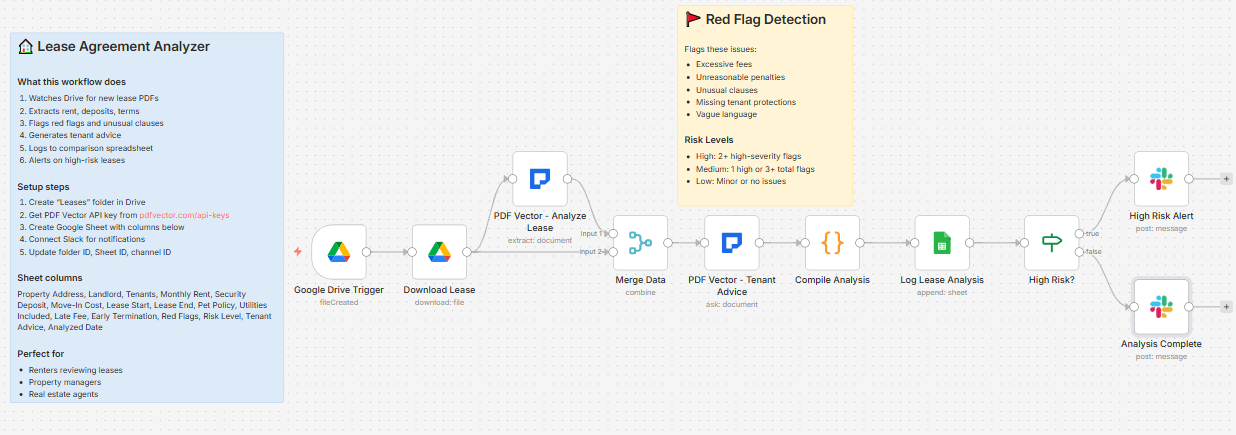
Lease PDF uploaded to Drive → runs two AI passes → calculates move-in cost → logs to comparison spreadsheet → routes to high-risk alert or standard notification on Slack
Takes about 25-30 seconds per lease.
Pass 1 - Structured extraction:
Pulls every financial term, date, policy, and clause out of the lease into structured fields.
Pass 2 - Tenant advice:
Reviews the same lease from a tenant advocate perspective. Writes a 2-3 sentence summary, lists the top 3 things to negotiate before signing, rates the lease as Tenant-Friendly / Neutral / Landlord-Friendly, and flags anything that could cause problems at move-out.
What gets extracted
Financial terms:
-
Monthly rent, security deposit, pet deposit
-
Total move-in cost (rent + security + pet deposit combined)
-
Late payment grace period and fee
-
Returned check fee
-
Early termination penalty
-
Parking fee
Dates and duration:
-
Lease start and end dates, term length
-
Auto-renewal (yes/no) and renewal terms
-
Required notice to vacate (days)
-
Move-out notice required (days)
Policies:
-
Pet policy — allowed or not, deposit amount, monthly pet rent, breed/size restrictions
-
Utilities included — which ones, which are tenant-paid
-
Parking included or fee
Parties:
-
Landlord name, company, phone, email
-
All tenant names listed
Red flags:
Every potentially unfair clause gets flagged with severity (High / Medium / Low) and the actual clause text. Examples the workflow catches:
-
Excessive late fees (over 5-10% of rent)
-
Unreasonable early termination penalties (more than 2 months rent)
-
Vague maintenance language (“tenant responsible for all repairs”)
-
Missing standard protections (no habitability clause)
-
Auto-renewal with inadequate notice requirements
Risk levels
-
High: 2+ high-severity flags → fires a separate urgent Slack alert
-
Medium: 1 high flag or 3+ total flags → standard notification
-
Low: minor or no issues → standard notification
The Slack alerts
High risk lease:
🚨 HIGH RISK LEASE DETECTED

Property: 123 Main St, Apt 4B

Rent: $2,400/month | Move-in: $7,200

Term: 2025-06-01 to 2026-05-31

⚠️ Red Flags (3 found):

[High] Early termination = 4 months rent ($9,600)

[High] Landlord can enter with 12 hours notice (not 24)

[Medium] Tenant responsible for all appliance repairs

📋 File: lease-123-main.pdf
Standard lease:
✅ Lease Analyzed

Property: 456 Oak Ave, Unit 2

Rent: $1,800/month

Term: 2025-07-01 to 2026-06-30

Risk Level: Low

File: oak-ave-lease.pdf
What lands in Google Sheets
Each row: Property Address, Landlord, Tenants, Monthly Rent, Security Deposit, Move-In Cost, Lease Start, Lease End, Pet Policy, Utilities Included, Late Fee, Early Termination, Red Flags, Risk Level, Tenant Advice, Analyzed Date
Useful if you’re comparing multiple apartments — all your leases in one sheet side by side.
Setup
You’ll need:
-
Google Drive and Sheets (free)
-
n8n instance (self-hosted — uses PDF Vector community node)
-
PDF Vector account (free tier: 100 credits/month, roughly 12-15 leases)
-
Slack (optional — delete the last two nodes if not needed)
About 15 minutes to configure.
Download
Workflow JSON:
github.com/khanhduyvt0101/workflows
Full workflow collection:
Setup Guide
Step 1: Get your PDF Vector API key
Sign up at https://www.pdfvector.com — free plan works fine. Go to API Keys and generate a key.
Step 2: Create your Google Drive folder
Create a folder called “Leases” in Google Drive. Copy the folder ID from the URL (string after /folders/).
Step 3: Set up your Google Sheet
Create a new spreadsheet with these exact headers in Row 1:
Property Address | Landlord | Tenants | Monthly Rent | Security Deposit | Move-In Cost | Lease Start | Lease End | Pet Policy | Utilities Included | Late Fee | Early Termination | Red Flags | Risk Level | Tenant Advice | Analyzed Date
Copy the Sheet ID from the URL.
Step 4: Import the workflow
Download the JSON from GitHub and import into n8n via Import from File.
Step 5: Configure the nodes
Google Drive Trigger:
-
Connect your Google account
-
Paste your Leases folder ID
Download Lease:
- Same Google credential
PDF Vector - Analyze Lease:
-
Add new credential (Bearer Token type)
-
Paste your API key
PDF Vector - Tenant Advice:
- Same PDF Vector credential
Log Lease Analysis:
-
Connect Google Sheets
-
Paste your Sheet ID
-
Sheet tab must be named exactly “Sheet1” (or update to match your tab name)
High Risk Alert (Slack):
-
Connect Slack
-
Paste your channel ID for urgent alerts
Analysis Complete (Slack):
-
Same Slack credential
-
Can use the same channel or a different one
Step 6: Test it
Activate and drop a lease PDF into your Drive folder. Check your Sheet and Slack after about 30 seconds.
Accuracy
Tested on residential leases from the US — standard form leases, custom landlord agreements, and multi-page commercial-style residential leases.
-
Financial terms (rent, deposits, fees): ~97% on digital PDFs
-
Dates and duration: ~95%
-
Pet policy and utilities: ~93%
-
Red flag detection: ~85% — catches obvious issues reliably, may miss unusual jurisdiction-specific clauses
-
Tenant advice quality: good for standard leases, less specific on highly customized agreements
Scanned leases: drops to ~85% overall. Works but worth double-checking the financial figures.
Cost
Each lease uses about 6-8 PDF Vector credits (two AI passes). Free tier of 100 credits gets you roughly 12-15 leases per month.
Basic plan is $25/month for 3,000 credits if you’re a property manager running multiple leases regularly.
Customizing it
Adjust risk thresholds:
In the Compile Analysis code node, the risk logic checks highRisks.length >= 2 for High and highRisks.length === 1 || redFlags.length >= 3 for Medium. Change these numbers to be stricter or more lenient.
Add commercial lease support:
Edit the extraction prompt in the PDF Vector - Analyze Lease node to include commercial-specific terms like CAM charges, tenant improvement allowances, and percentage rent clauses.
Skip Slack, use email instead:
Replace both Slack nodes with Gmail nodes. The template variables from $('Compile Analysis').item.json work the same way.
Trigger from email:
If leases come in as email attachments, swap the Drive trigger for a Gmail trigger. Everything downstream stays the same.
Limitations
-
Requires self-hosted n8n (PDF Vector is a community node)
-
Red flag detection is AI judgment — not legal advice, always have an attorney review before signing important leases
-
Jurisdiction-specific tenant protections vary — the AI doesn’t know local law
-
Highly customized or unusual lease formats may extract less cleanly
-
Doesn’t track lease expiration dates or send renewal reminders (would need a separate scheduled workflow)
Links
-
PDF Vector n8n integration: n8n Integration - PDF Vector
-
Full workflow collection: GitHub - khanhduyvt0101/workflows: Awesome PDF Automation Workflows - A curated collection of ready-to-use automation workflows for PDF processing and document extraction · GitHub
-
n8n docs: https://docs.n8n.io
Questions? Drop a comment if something’s not working or you want to adapt it for commercial leases or property management.